Process Management
Process Life Cycle

A process life cycle is the set of stages a process passes through from the moment it is created until it ends. The operating system controls each move between the stages.
The five stages
| Stage | What happens |
|---|---|
| Creation | When you open a program, the operating system creates one or more processes for it. |
| Ready | The operating system moves the process instructions into RAM, so the process is ready to run. |
| Running | The operating system moves the process onto the CPU so that its instructions can be executed. |
| Blocked | The process cannot continue because it is waiting for user input or for another resource, such as a file, to become available. |
| Termination | The process ends when it has finished its job or is closed. |
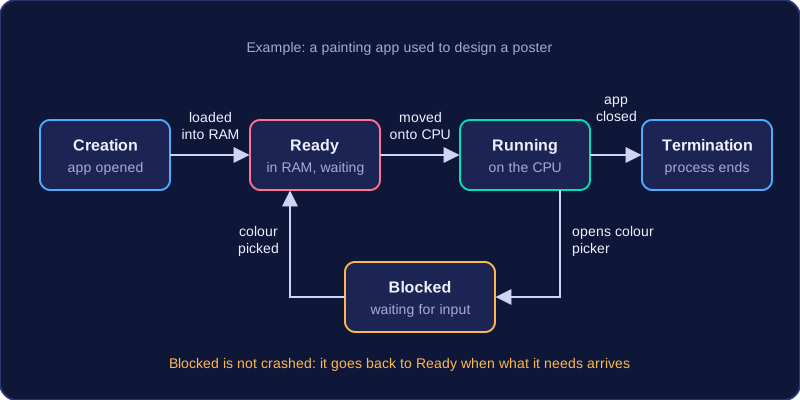
A process in the ready stage is not running yet — it is waiting for its turn. A blocked process has not crashed or finished; it is paused until the thing it needs arrives, and then it goes back to the ready stage.
For example, imagine you open a painting app to design a poster. The operating system creates a process for the app, and its instructions are loaded into RAM, so it is ready. The CPU runs the process while you draw with the brush. When you open the colour picker and the app is waiting for your choice, the process is blocked. Once you pick a colour, it returns to ready and then runs again. When you close the app, the process terminates.
Practise this
Edexcel GCSE Computer Science · Process Management
Edexcel GCSE Computer Science · Purpose & Function of Operating Systems