Software
Memory Management

Memory management is one of the jobs the operating system carries out as part of process management. It decides which parts of main memory (RAM) each running program — called a process — will use, and keeps a record of where each process and its data are stored.
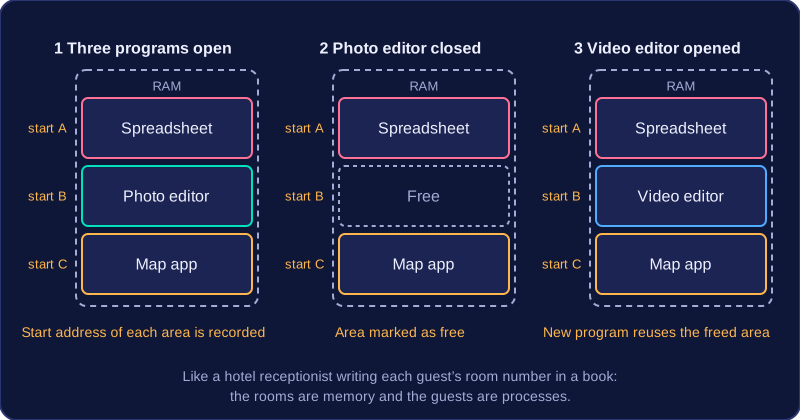
The operating system allocates areas of RAM to each process: a block for the program's instructions and blocks for the data it is working on. It records the location of each block so it can find the program and its data again later. You can picture it like a hotel receptionist giving each guest a room and writing the room number in a book — the rooms are memory, the guests are processes.
Why it matters
Without this management, two programs could be given the same area of RAM. One would overwrite the other's data and both would go wrong. Before placing a program or its data into memory, the operating system checks which areas are free and picks one that is not already in use. It also prevents one process writing into memory that belongs to another.
Freeing memory
When a program closes or finishes running, the operating system frees the memory it was using. Those areas are marked as free so they can be reused by another program or its data. If memory were never freed, RAM would fill up with leftovers from closed programs.
For example, a laptop has a spreadsheet, a photo editor and a map app open. The operating system gives each one its own area of RAM and records the start address of each area. You close the photo editor, so its area is freed. When you then open a video editor, the operating system can reuse that space. This is how several programs and their data can be held in RAM at the same time — the operating system shares out the limited space between them.
Memory management is not the same as file management, which deals with files on a disk. It is about RAM while programs are running.
Virtual memory is a technique the operating system uses when there is not enough free main memory (RAM) for all the processes that need to run. It lets the computer carry on working by treating part of secondary storage as an overflow area for memory.
Swapping processes out
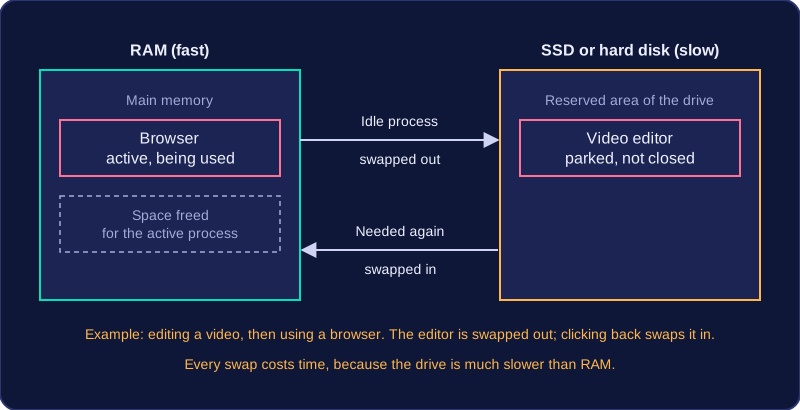
RAM can only hold so much at once. When it runs short, the operating system looks for processes that are sitting in RAM but are not being used by the CPU at that moment, and moves them onto secondary storage such as a solid-state drive or hard disk. Their instructions and data are written to a reserved area of the drive, and the space they were taking in RAM is freed.
That freed space is then given to an active process, so the program you are actually using keeps running. For example, you might be editing a long video while you look something up in a browser. While you are in the browser, the video editor's data is swapped out to the SSD; when you click back on it, it is swapped into RAM again.
Swapping processes back in
When a process stored on the drive is needed again, the operating system copies it back into main memory, moving something else out to make room. Swapping a process out never closes, deletes or uninstalls the program — it is only parked, and it continues from where it stopped.
Why performance drops
Secondary storage is much slower to read and write than RAM, so every swap costs time. A computer relying heavily on virtual memory feels sluggish: programs respond slowly and switching between them causes noticeable pauses.
| Storage | Speed | Job in virtual memory |
|---|---|---|
| RAM | Fast | Holds the programs and data in use, which the CPU reads from and writes to directly |
| Secondary storage | Slow | Temporarily holds processes that have been swapped out |
The gain is that virtual memory extends the usable memory of the computer without anyone buying and fitting extra RAM chips, so programs can still run when RAM is short. It uses the computer's own drive, not an internet service.
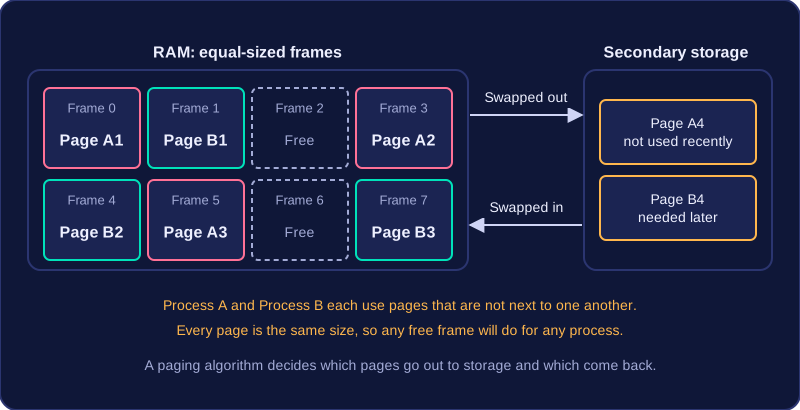
Paging is a way the operating system organises main memory. It divides RAM into equal-sized sections called pages. Because every page is the same size, the operating system can give any free page to a process, rather than searching for one continuous block large enough for a whole program.
When a process is loaded, its instructions and data are split across pages in main memory. The operating system records which pages belong to which process. It can then allocate pages as processes need them and free pages when they are no longer required. This allows several processes to share RAM at the same time.
Swapping pages
When virtual memory is in use, not every page of every process can stay in RAM. A paging algorithm decides which pages are swapped out of main memory into secondary storage, and which pages are swapped back into main memory when they are needed. It might move out pages that have not been used recently to make room for pages that a running process needs now.
For example, a games console running a large open-world game only has room in RAM for the pages covering the area the player is currently in. As the player travels into new territory, the paging algorithm swaps out the pages holding scenery the player has left behind to the console's storage, and swaps in the pages for the new area. If the player later walks back, those pages are swapped in again. The game was never closed or deleted; only some of its pages were moved temporarily.