Memory Management
Managing Memory

Memory management is one of the jobs the operating system carries out as part of process management. It decides which parts of main memory (RAM) each running program — called a process — will use, and keeps a record of where each process and its data are stored.
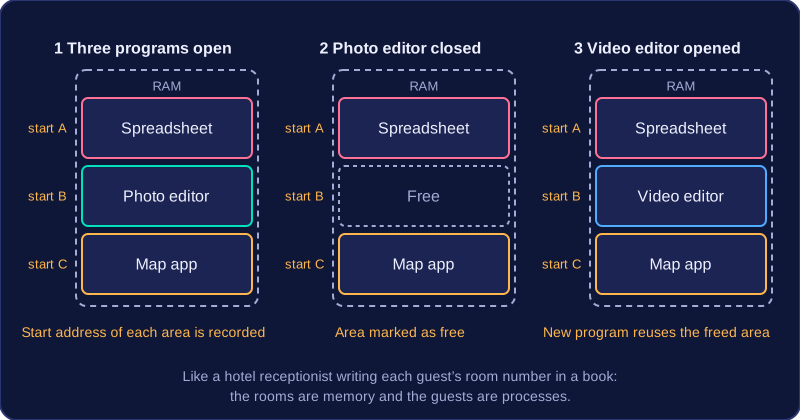
The operating system allocates areas of RAM to each process: a block for the program's instructions and blocks for the data it is working on. It records the location of each block so it can find the program and its data again later. You can picture it like a hotel receptionist giving each guest a room and writing the room number in a book — the rooms are memory, the guests are processes.
Why it matters
Without this management, two programs could be given the same area of RAM. One would overwrite the other's data and both would go wrong. Before placing a program or its data into memory, the operating system checks which areas are free and picks one that is not already in use. It also prevents one process writing into memory that belongs to another.
Freeing memory
When a program closes or finishes running, the operating system frees the memory it was using. Those areas are marked as free so they can be reused by another program or its data. If memory were never freed, RAM would fill up with leftovers from closed programs.
For example, a laptop has a spreadsheet, a photo editor and a map app open. The operating system gives each one its own area of RAM and records the start address of each area. You close the photo editor, so its area is freed. When you then open a video editor, the operating system can reuse that space. This is how several programs and their data can be held in RAM at the same time — the operating system shares out the limited space between them.
Memory management is not the same as file management, which deals with files on a disk. It is about RAM while programs are running.
Practise this
Edexcel GCSE Computer Science · Memory Management
Edexcel GCSE Computer Science · Purpose & Function of Operating Systems