Network Security
Preventing Network Security Risks
Contents
Access control restricts who can use a system and what they can do. It is more than logging in: logging in checks who you are, but access control also decides which parts of the system your account may use.
Each user account has access permissions attached to it. The operating system checks these permissions whenever you try to open, change, move or delete something. If your account does not have the right permission, the action is refused. This protects files from being seen or altered by people who should not have them.
Rights at three levels
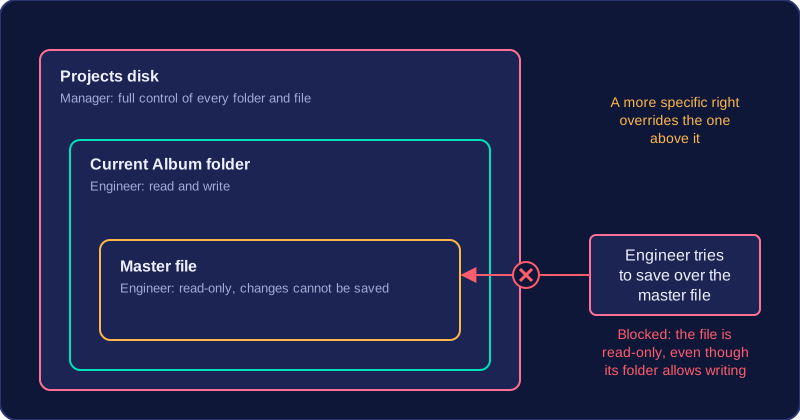
User access levels are the sets of rights given to accounts. These rights can be set on a whole disk, on a folder, or on an individual file.
| Level | Example right | What it affects |
|---|---|---|
| Disk | Full control | Every folder and file on that disk, unless a more specific permission overrides it |
| Folder | Read and write | The folder and the files inside it |
| File | Read-only | One file only; changes cannot be saved |
A small recording studio stores its work on a shared Projects disk. The manager account has full control of the disk. An engineer account can read and write inside the Current Album folder, but the finished master file is read-only for engineers. A visitor account can read the Samples folder but cannot open the Current Album folder. When an engineer tries to save over the master file, the operating system blocks it because that file's permission does not allow writing, even though the Current Album folder does. Setting only the rights each person needs limits accidental damage and makes it harder for someone to tamper with work that is not theirs.
Biometric authentication checks who you are by measuring a physical characteristic of your body. A sensor takes a fresh reading and compares it with a stored copy of that characteristic. If the two are close enough to match, your identity is verified and you are allowed in.
Because a biometric belongs to you, there is no password to forget or card to lose, and it is harder to share than a password.
Common methods
| Method | What is measured | Typical use |
|---|---|---|
| Fingerprint | The ridges and whorls on a fingertip | Unlocking a phone or clocking in at work |
| Facial recognition | Distances between features such as the eyes, nose and jaw | Unlocking a laptop or passing through an airport gate |
| Retinal scan | The pattern of blood vessels at the back of the eye | A high-security door into a room holding servers |
| Palm vein recognition | The vein pattern beneath the skin of the palm | Opening a bank vault or using a cash machine |
| Ear recognition | The shape and ridges of the outer ear | Specialist identity checks |
| Voice recognition | The sound and pattern of a person speaking | Confirming identity during a phone call to a bank |
For example, a leisure centre could fit a gate that reads the vein pattern in a member's palm, so members enter without carrying a card that could be lost or handed to a friend.
Biometrics are not foolproof. A photograph may trick a simple facial recognition camera, and a recording may trick voice recognition, so high-value systems often combine a biometric with a password or PIN. Biometric systems can also reject the correct person, for instance when a finger is cut or a voice is croaky from a cold.
An acceptable use policy (AUP) is a document that explains how employees must act when they use an organisation's IT systems. Staff read and sign it before they are given an account, so everyone knows what is allowed and what happens if they break the rules.
What an AUP covers
- Password policy — the rules for how strong a password must be and how often it must change.
- Logging off or locking computers — for example locking the screen when you leave your desk, so a passer-by cannot use your account.
- Internet use — which websites and downloads are allowed, so malware is less likely to get onto the network.
- Email use — what may be sent from a work account, which helps prevent confidential files leaving the organisation.
- Personal devices — whether phones and tablets may connect; a device the IT team has not checked and updated could carry malware.
How it is enforced
An AUP cannot physically stop anything happening — technical controls such as a firewall do that. It works by defining permitted activities and the consequences of breaking the rules: a first breach usually brings a formal warning, and a serious one, such as deliberately leaking customer records, can lead to dismissal or legal action. Because staff know the result in advance, most avoid risky behaviour, so the policy deters unsafe practice.
Password policies in detail
A password policy sets the rules for a strong password: a minimum length, at least one lowercase letter, one uppercase letter and one symbol, and a regular change, for example every 90 days. Passwords must not be based on personal information such as a name or birthday, on a dictionary word, or on anything easily guessed, because attackers know these patterns. A brute-force attack keeps trying combinations, and each extra character and symbol makes the number of guesses needed far larger. Bluebird2011 fails twice over: “bluebird” is a dictionary word and the year could be found on social media. Something like vQ7#mLp2 has no meaning to guess from.
Physical security protects hardware, software and networks using physical methods: real-world barriers and checks rather than logins or software. A server, router or backup drive can only be stolen, unplugged or tampered with if someone can reach it, so physical security keeps people away from the equipment in the first place. CCTV and guards are only two of the methods — many others stop an intruder getting in at all.
Controlling who can reach the equipment
Locks on doors, cabinets and server racks mean only someone with the right key or code can open them. Fences, walls and gates mark the boundary of a site and slow intruders down. A turnstile lets one person through at a time, so nobody can slip in behind a member of staff, and a security guard can check visitors and refuse entry. ID cards show at a glance whether a person belongs in a restricted area.
Detecting and deterring intruders
CCTV records what happens, which deters some intruders and gives evidence afterwards. Intruder alarms sound when a door or window is forced. Movement sensors detect motion in an area that should be empty, such as a corridor after closing time. Security lighting keeps entrance doors, fire exits and the car park lit after dark so nobody can creep about unseen. A security tag fixed to a laptop sounds an alarm if the laptop is carried past a sensor near the door. Signs and warning posters tell visitors that cameras are running and which rooms they must not enter.
For example, a youth club keeps the laptop holding its membership records in a locked office. Staff enter through a door with a keypad, wear ID cards, and the office door has an intruder alarm. If the door is forced, the alarm alerts the manager, and the camera above the entrance shows who was there.
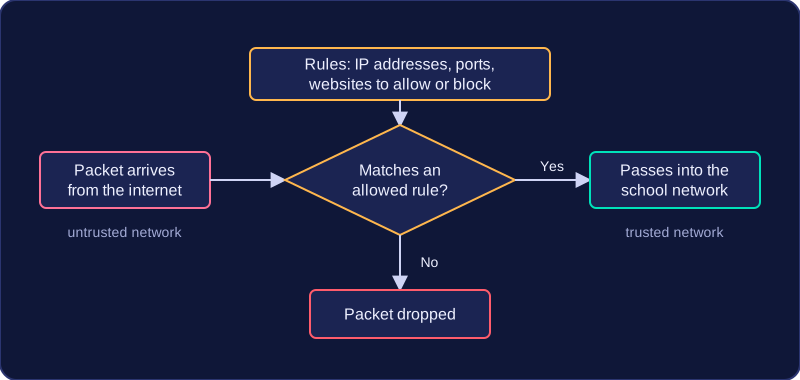
A firewall is a security system that separates a trusted network, such as a school's network, from an untrusted network such as the internet. It sits on the boundary and controls what traffic can pass between the two. It is a network security measure, not a physical lock on a door.
Data sent across a network is split into packets. The firewall monitors and checks each packet against a set of rules. A rule might allow only authorised computers, IP addresses or protocols to communicate, or allow data out but not in. If a packet matches an allowed rule, it passes; if it does not match, it is dropped. Dropping packets that fail the rules is called packet filtering.
What firewalls can block
- Malicious IP addresses: packets from a known harmful computer can be filtered out, so it cannot reach devices on your network.
- Ports: a firewall can prevent access to certain ports, which are numbered entry points for services. For example, a school could block the port used for remote desktop access from outside, while allowing the port used for secure web pages. This is port blocking.
- Websites: a firewall can block addresses of malicious or inappropriate websites, stopping users from opening them.
Hardware and software
A hardware firewall is a physical device, either a dedicated unit at the edge of a network or built into a router. It protects every device behind it. A dedicated unit costs more, because it is separate equipment that needs power, space and someone to set it up. A software firewall is installed on an individual computer. It is cheaper and travels with that device, but it uses the computer's processing power, so it can slow the computer down.
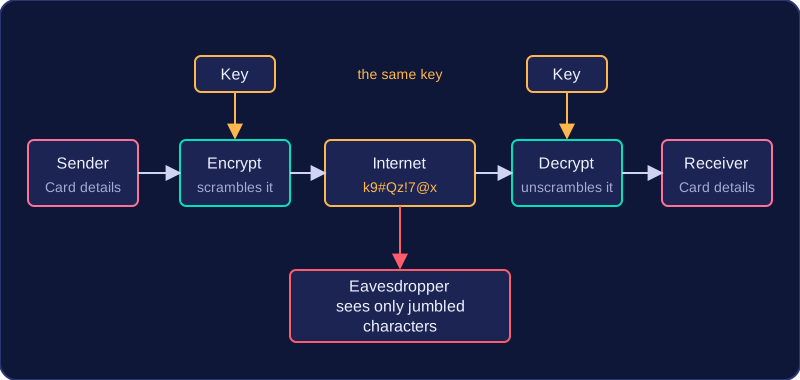
Encryption is the process of scrambling data using an encryption key so that it becomes unreadable to anyone who does not have that key. The key is the piece of information used to turn the scrambled data back into something you can understand. Because data is useless without the key, encryption protects information even if someone manages to get hold of it.
Encryption is often used when data is transmitted, especially over the internet. If you buy a ticket online, the details you type travel across the internet encrypted. Anyone who intercepts that traffic sees only meaningless characters, so your card details and address stay private. Without encryption, an eavesdropper on a public network could read everything you send.
Protecting stored data
Data that is stored can be encrypted too. Websites often encrypt the passwords they keep in their databases. If a hacker breaks in and copies the database, a password stored as plain text such as BlueOtter19 could be read straight away. Encrypted, the same password appears as a long jumble of characters, and the hacker would need the key to work out what it really is.
Devices such as laptops and phones can have their storage or hard disk encrypted as well. If the device is lost or stolen, the files on it cannot be opened without the key or PIN. This is why encryption is not the same as password protection: a password check controls who can log in, but encryption scrambles the data itself, so it stays protected even if someone removes the drive and connects it to another computer.