Programming Fundamentals
Records

Contents
A record stores all the data about one item — one member of a club, one player, one order — as a single unit. Each piece of data inside it is a field, and the fields can hold different types of data: text for a name, a whole number for an age, a Boolean (shown here as Yes or No) for whether a fee is paid. Because the fields are kept together, the record can be stored, searched, updated and output as one thing, instead of as separate pieces that could get out of step.
Here each row is one member's record. All rows use the same four columns, always in this sequence: Member ID, Name, Age, Fee paid?
| Member ID | Name | Age | Fee paid? |
|---|---|---|---|
| M-104 | Priya | 14 | Yes |
| M-207 | Owen | 15 | No |
| M-315 | Aisha | 13 | Yes |
This is how data is organised in a database table, and in a file where each line holds one record. Rows are records and columns are fields, so a record you build in a program lines up with what a table or file already stores.
Keeping the fields together pays off when you use the data. Change M-207's fee status and Owen's name and age are already in the same row — no need to update three separate lists and hope they stay in step. Update one field and the rest of the record stays with it.
Because each row follows the same fixed layout, one loop can process every row in the same way: the name always sits at index 1, the age at index 2, so the same code works for every row. The loop works for three records or three hundred without extra code.
# fixed positions: name is record[1], age is record[2]
members = [
    ["M-104", "Priya", "14", "Yes"],
    ["M-207", "Owen", "15", "No"],
    ["M-315", "Aisha", "13", "Yes"]
]

for record in members:
    print(record[1] + " is " + record[2] + " years old")
Output:
Priya is 14 years old
Owen is 15 years old
Aisha is 13 years old
If one row had its fields in a different order, that same index would pick up a different field and the results would be wrong — which is why the shared layout matters.
A record is one item's worth of related data split into fields. In Python you can hold a single record in a one-dimensional array, which is just a list with one field per element. The record below describes one bike hired from a cycle shop: its bike ID, the customer's surname, the number of hours hired and whether the bike came back damaged.
bike = ["BK-2290", "Ahmed", "3", "False"]

# field order: bike ID, customer surname, hours hired, damaged
print(bike[1])
print(bike[2] + " hours hired")
Output:
Ahmed
3 hours hired
The order of the fields is fixed, and it is the program that has to remember it. For this record, element 0 is the bike ID, element 1 the customer's surname, element 2 the hours hired and element 3 the damaged flag. Nothing in the list labels those positions, so swapping two fields would silently break every line of code that uses the record.
Why every field ends up as a string
A real record can mix data types: text, whole numbers, real numbers and Boolean values. An array can hold only one data type, so a record held in a one-dimensional array stores every field as a string. The bike record holds "3" as text, not as a number, and the damaged flag is held as the text "False", not as a Boolean.
That has three consequences you must handle:
- Numeric fields must be cast with
int()orfloat()before you add them, compare them with a number or use them in any calculation. - A Boolean field is stored as the text
"True"or"False", so you compare it as text, for examplebike[3] == "True", rather than treating it as a real Boolean value. - A field that is already a string can be joined straight to other text with
+for output, with no casting needed.
Comparing bike[2] == 3 is always false: the string "3" and the number 3 are different things, even though they look alike. Cast first, then compare.
Once the fields are cast, the record behaves like any other data. Here the hours hired are turned into a number, compared with a limit, and the surname is used in messages without any casting at all.
bike = ["BK-2290", "Ahmed", "3", "False"]

hours = int(bike[2])

if hours >= 3:
    print(bike[1] + " has reached the time limit")

if bike[3] == "True":
    print(bike[1] + " must pay for damage")
Output:
Ahmed has reached the time limitSearching a table held in a 2D array means checking every record for a match on one field. The table is a list of records, and each record is a list of fields, so you keep the record index and the field index separate.
Check one column in every record
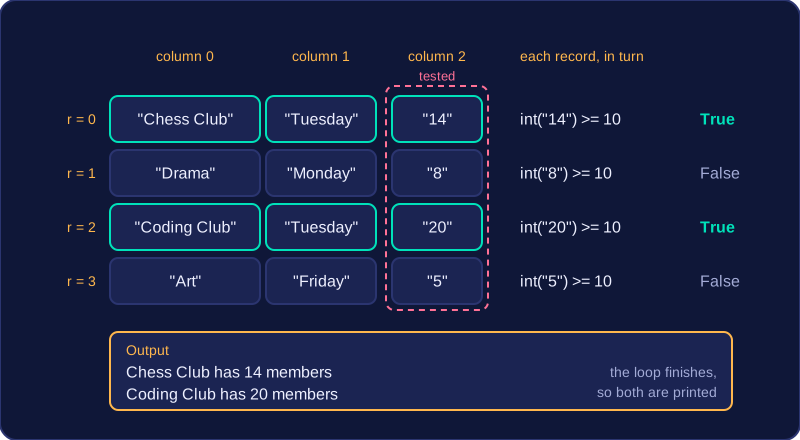
Use a loop over the record indexes, from 0 to len(table) - 1. In each record, test the field at a fixed column index: table[r][1] == "Tuesday" always checks the second field of record r. The record index comes first and the field index second.
When a record matches, output the fields you need from that record, such as its name and day. Do not stop at the first match unless only one match is possible, for example when the tested field is a unique membership number. A day of the week can appear in several records, so the loop must finish and report every match.
Cast numeric fields before comparing
Every field in a table held in a 2D array is stored as a string, even when it looks like a number. Comparing table[r][2] >= 10 compares text with an integer and causes an error. Cast the field first: int(table[r][2]) >= 10. Use float() for a decimal field.
clubs = [
    ["Chess Club", "Tuesday", "14"],
    ["Drama", "Monday", "8"],
    ["Coding Club", "Tuesday", "20"],
    ["Art", "Friday", "5"]
]

for r in range(len(clubs)):
    if int(clubs[r][2]) >= 10:
        print(clubs[r][0], "has", clubs[r][2], "members")
Output:
Chess Club has 14 members
Coding Club has 20 members
The loop tests column index 2 of every record, casts each value with int(), and outputs the name and member count from each record that has 10 or more members. Chess Club and Coding Club both match, so both are printed.
In Python, a table of records is held as a list of lists, and every field is stored as a string, so a numeric field like a score or a price is really text that looks like a number. To total that field, you build a running total in a number variable, then cast the answer back to text for output.
Totalling a field
Three steps, in this order:
- Set the total to
0before the loop, so the first record is added to nothing. - Inside the loop, add
int()of the field for each record. - After the loop, wrap the finished total in
str()so it can be joined to text inprint().
Step 2 matters because "7" + "3" gives "73", not 10, and 0 + "7" stops the program with a TypeError: Python will not add a string to a number. The cast tells Python to read the field as a whole number. Step 3 matters for the same reason in reverse: print("Total: " + 24) fails, because you cannot join text to an integer.
Here each player's score is stored at column 2, so the loop below casts every score as it adds it.
scores = [["Ade", "Red", "18"], ["Mira", "Blue", "25"], ["Tom", "Red", "9"]]
total = 0
for record in scores:
    total = total + int(record[2])
print("Total points: " + str(total))
Output:
Total points: 52Updating a field
To update a field, find the record you want, then assign a new value to that one element using [record][field]. You overwrite what was there, so the rest of the record is untouched.
A numeric update is cast both ways: int() to take the old value out and calculate with it, then str() to put the new value back, because the element must stay a string like every other field in the table. A plain number stored there would crash the next program that joined that field to text.
Here the club at index 1, column 2 gains 4 members.
clubs = [["Drama", "Hall", "24"], ["Chess", "Lab 2", "12"], ["Robotics", "Workshop", "18"]]
chosen = 1
joined = 4
count = int(clubs[chosen][2])
count = count + joined
clubs[chosen][2] = str(count)
print(clubs[chosen][0] + " members: " + clubs[chosen][2])
Output:
Chess members: 16Notice that count is a number while you work with it, and only becomes text again when it is stored back into the table.