Records
Searching a table held in a 2D array

Searching a table held in a 2D array means checking every record for a match on one field. The table is a list of records, and each record is a list of fields, so you keep the record index and the field index separate.
Check one column in every record
Use a loop over the record indexes, from 0 to len(table) - 1. In each record, test the field at a fixed column index: table[r][1] == "Tuesday" always checks the second field of record r. The record index comes first and the field index second.
When a record matches, output the fields you need from that record, such as its name and day. Do not stop at the first match unless only one match is possible, for example when the tested field is a unique membership number. A day of the week can appear in several records, so the loop must finish and report every match.
Cast numeric fields before comparing
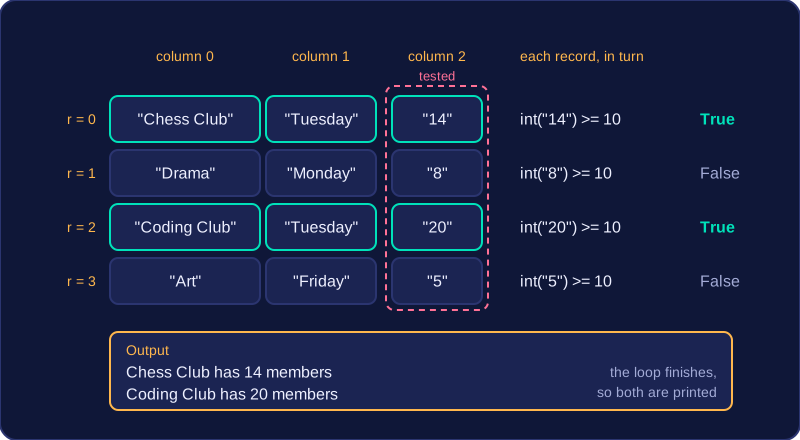
Every field in a table held in a 2D array is stored as a string, even when it looks like a number. Comparing table[r][2] >= 10 compares text with an integer and causes an error. Cast the field first: int(table[r][2]) >= 10. Use float() for a decimal field.
clubs = [
    ["Chess Club", "Tuesday", "14"],
    ["Drama", "Monday", "8"],
    ["Coding Club", "Tuesday", "20"],
    ["Art", "Friday", "5"]
]

for r in range(len(clubs)):
    if int(clubs[r][2]) >= 10:
        print(clubs[r][0], "has", clubs[r][2], "members")
Output:
Chess Club has 14 members
Coding Club has 20 members
The loop tests column index 2 of every record, casts each value with int(), and outputs the name and member count from each record that has 10 or more members. Chess Club and Coding Club both match, so both are printed.
Practise this
OCR GCSE Computer Science · Records