Programming Fundamentals
2D Arrays

Contents
A two-dimensional (2D) array stores its elements in rows and columns, all held under a single identifier. Because the data has two dimensions, every element is found using two indexes: the row index first, then the column index.
Why rows and columns?
Some data simply has two dimensions: a word search grid, a battleships board, or a stock list showing how many of each product each shop holds. Keeping it in one 2D array holds the whole table together, so you can work with a row, a column or the entire grid instead of juggling dozens of separate variables.
Every element in a 2D array holds the same data type: all numbers or all strings, because the array represents one kind of data. A 2D array of ticket prices can store the amounts, but it cannot also store the film titles, as those are text.
A row is one line across the array, found by the first index. A column is the set of elements in the same position in every row, found by the second index. Columns are not stored separately: you gather a column by keeping the second index the same and moving down through the rows.
2D arrays in Python
In Python a 2D array is written as a list of lists. The outer list holds the rows, and each inner list is one complete row. Every inner list should contain the same number of elements, and that number is how many columns the array has.
car_park = [
    ["taken", "empty", "empty", "taken"],
    ["empty", "empty", "taken", "empty"],
    ["taken", "taken", "empty", "taken"]
]

print(car_park[1])      # the whole second row
print(car_park[2][3])   # one space: row 2, column 3
Output:
['empty', 'empty', 'taken', 'empty']
taken
This car park has three rows of four spaces, so there are 3 × 4 = 12 elements in total. car_park[1] gives you the whole second row (a single inner list) and car_park[2][3] picks out one space, naming the row first and the column second. If one inner list had a different length, the array would no longer be a neat grid, so all rows are kept the same size.
An element in a 2D array is found using two indexes: the row first, then the column. Both start at 0, so the first row is row 0 and the first column is column 0. Getting the order wrong finds a different element.
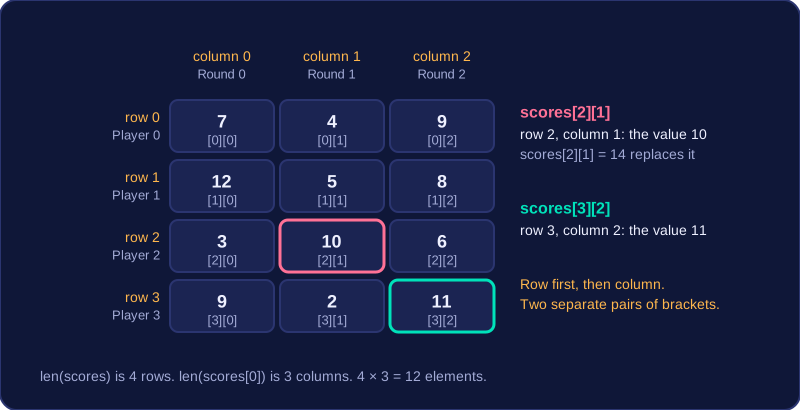
In Python, put the row index in the first pair of square brackets and the column index in the second. If scores holds the points scored by four players in three rounds, scores[2][1] is the value at row 2, column 1. Writing scores[2, 1] in one pair fails, so use two separate pairs.
Reading and changing a value
The same two indexes are used whether you read a value or assign one. To replace the value at row 2, column 1 with 14, write scores[2][1] = 14; to copy it, write points = scores[2][1]. The index tells you where the element is, but the index and the value stored there are not the same thing.
Working out the size
For a list of lists, len(scores) gives the number of rows, because the outer list holds one inner list per row. len(scores[0]) gives the number of columns, because the first row has one element per column. A grid of r rows and c columns has r × c elements, with row indexes 0 to r−1 and column indexes 0 to c−1. A 6 by 4 grid has 24 elements, so the rows are 0 to 5 and the columns are 0 to 3.
Using the description to choose indexes
Questions often show the data as a table and say what the rows and columns stand for. Find the row from the description, then the column, and keep that order in the indexes.
| Round 0 | Round 1 | Round 2 | |
|---|---|---|---|
| Player 0 | 7 | 4 | 9 |
| Player 1 | 12 | 5 | 8 |
| Player 2 | 3 | 10 | 6 |
| Player 3 | 9 | 2 | 11 |
Player 2's score in round 1 is at row 2, column 1, which is 10. Round 2 for player 3 is row 3, column 2, which is 11. The value need not match the index: scores[0][0] is 7, which tells you nothing about where 7 is stored.
scores = [[7, 4, 9], [12, 5, 8], [3, 10, 6], [9, 2, 11]]

print(scores[2][1])          # 10 before the change
scores[2][1] = 14
print(scores[2][1])          # 14 after the change

print(len(scores))           # 4 rows
print(len(scores[0]))        # 3 columns
print(scores[3][2])          # 11
Output:
10
14
4
3
11A 2D array in Python is a list of lists, so you can create one with its starting values already in place. The outer list holds the rows, and each inner list holds the values for one row, one per column.
Writing the whole array at once
Write one outer pair of square brackets and put an inner list inside it for every row. The stock array below represents 3 shelves with 4 spaces on each shelf, and every space starts at 0:
stock = [[0, 0, 0, 0], [0, 0, 0, 0], [0, 0, 0, 0]]
print(stock)
Output:
[[0, 0, 0, 0], [0, 0, 0, 0], [0, 0, 0, 0]]This is quick to read and quick to type, so it is the usual choice when you already know the values and the size of the array.
Building it row by row
When the starting values follow a pattern, or when the number of rows and columns is held in variables, build the array one row at a time:
- Create an empty outer list to hold the whole array.
- For each row, create a new inner list (empty at first).
- Append a starting value for each column to that inner list (here, four zeros).
- Append the finished inner list to the outer list.
rows = 3
columns = 4
stock = []
for shelf in range(rows):
    new_shelf = []
    for space in range(columns):
        new_shelf.append(0)
    stock.append(new_shelf)

print(stock)
Output:
[[0, 0, 0, 0], [0, 0, 0, 0], [0, 0, 0, 0]]The outer loop runs once per row. For each row, the inner loop adds four starting values to the new inner list, and then that finished row is appended to the outer list. After three passes the outer list holds three finished rows, and each row holds four starting values.
Every row needs its own list
The inner list must be created inside the loop. If you create one inner list before the loop and append it on every pass, the outer list ends up holding several references to the same list. You then have one row shown three times, not three rows: changing a value in the first row also changes the second and third, because there is really only one list being pointed at from three places. Creating a fresh inner list each time keeps the rows independent, so a change to one row leaves the others alone.
A 2D array stores values in rows and columns. You often need the total for just one row or one column, such as one shop's stock of every product, or one product's stock across every shop. To do that, keep one index fixed and let a single loop run over the other index.
| product 0 | product 1 | product 2 | product 3 | |
|---|---|---|---|---|
| shop 0 | 12 | 8 | 15 | 10 |
| shop 1 | 9 | 14 | 7 | 11 |
| shop 2 | 13 | 6 | 12 | 9 |
Shop 1's stock counts are the row stock[1]; the stock counts for product 2 are the column stock[0][2], stock[1][2] and stock[2][2].
Totalling one row
To total a row, fix the row index and use a single loop over the column index. The first index never changes, so every value you add comes from that one row, whichever column the loop is currently on.
stock = [[12, 8, 15, 10], [9, 14, 7, 11], [13, 6, 12, 9]]
shop = 1
shop_total = 0
for product in range(len(stock[shop])):
    shop_total = shop_total + stock[shop][product]
print("Shop", shop, "total stock:", shop_total)
Output:
Shop 1 total stock: 41If you total several rows one after another, set shop_total back to 0 before each row starts. Otherwise the second row's total also counts the values you added for the first row.
Totalling one column
To total a column, fix the column index and loop over the row index instead. The second index stays the same while the first one changes, so you take one value from each row and walk down the column.
Averages
The average is the total divided by the number of values you added, so the divisor depends on which way you looped. A row total is divided by the number of columns, len(stock[0]), because you added one value from each column. A column total is divided by the number of rows, len(stock), because you added one value from each row. Using the wrong one still gives a sensible-looking number, so check that the divisor matches the direction of your loop. In the table, each shop's average divides by 4 and each product's average divides by 3.
stock = [[12, 8, 15, 10], [9, 14, 7, 11], [13, 6, 12, 9]]
product = 2
product_total = 0
for shop in range(len(stock)):
    product_total = product_total + stock[shop][product]
average = product_total / len(stock)
print("Average stock for product", product, "per shop:", average)
Output:
Average stock for product 2 per shop: 11.333333333333334To process every value stored in a 2D array, use nested loops. The outer loop steps through each row, and the inner loop steps through every column in the current row. The inner loop finishes all its columns before the outer loop moves to the next row, so each element is processed exactly once.
If there are r rows and c columns, the body of the inner loop runs r × c times. For example, a grid with 5 rows and 6 columns has 30 elements, so the inner loop body runs 30 times.
Keeping totals
While the nested loops run, you can keep a running total for the current row. Reset that row total to 0 at the start of each new row, before adding to it. You can also add each row total to an overall total, so the whole 2D array is summarised in one pass.
temperatures = [[18, 22, 25, 19], [21, 17, 24, 23], [20, 26, 21, 16]]
overall_hot_days = 0
for city_index in range(len(temperatures)):
    city_hot_days = 0
    for day_index in range(len(temperatures[city_index])):
        if temperatures[city_index][day_index] > 20:
            city_hot_days = city_hot_days + 1
    print("City", city_index + 1, "had", city_hot_days, "hot days")
    overall_hot_days = overall_hot_days + city_hot_days
print("Total hot days:", overall_hot_days)
Output:
City 1 had 2 hot days
City 2 had 3 hot days
City 3 had 2 hot days
Total hot days: 7
The outer loop uses len(temperatures) to visit each city. The inner loop uses len(temperatures[city_index]) to visit every reading in that city. The running total for each city is reset inside the outer loop, before the inner loop runs, so each city's count of hot days starts from 0.
To find the highest (or lowest) value in a 2D array you keep track of two things at once: the best value found so far, and the position it sits at — its row index and its column index. Begin by copying the very first element into a variable, for example topPoints = points[0][0], and set topRow = 0 and topCol = 0.
Starting from a real element matters. If you started from 0 and every value in the grid were negative, 0 would beat them all and you would report a value — and a position — that never appears in the array.
Comparing every element
Nested loops visit each element in turn: the outer loop over the rows, the inner loop over the columns of that row. A single loop only walks along one row, or down one column, so on its own it can never reach every element of the grid. At each element, compare it with the stored value using if. When the new element is higher, replace the stored value and update the row and column indexes in the same step — updating the value but forgetting the indexes leaves you pointing at the wrong cell.
In this program the array holds the scores of three players at an arcade machine over three rounds.
points = [[18, 24, 9], [31, 12, 40], [7, 26, 15]]
topPoints = points[0][0]
topRow = 0
topCol = 0
for r in range(len(points)):
    for c in range(len(points[r])):
        if points[r][c] > topPoints:  # found a bigger score
            topPoints = points[r][c]
            topRow = r
            topCol = c
print("Best score:", topPoints, "at row", topRow, "column", topCol)
Output:
Best score: 40 at row 1 column 2The 40 in row 1, column 2 is never beaten, so the program reports 40 at row 1, column 2. The first element only sets the starting values, so it is never higher than itself; after that, each element is compared with the best score so far.
| Element checked | Index | Higher than stored? | Stored value | Stored position |
|---|---|---|---|---|
| 18 | [0][0] | no | 18 | row 0, column 0 |
| 24 | [0][1] | yes | 24 | row 0, column 1 |
| 9 | [0][2] | no | 24 | row 0, column 1 |
| 31 | [1][0] | yes | 31 | row 1, column 0 |
| 12 | [1][1] | no | 31 | row 1, column 0 |
| 40 | [1][2] | yes | 40 | row 1, column 2 |
| 7 | [2][0] | no | 40 | row 1, column 2 |
| 26 | [2][1] | no | 40 | row 1, column 2 |
| 15 | [2][2] | no | 40 | row 1, column 2 |
For the lowest value, use exactly the same structure with < instead of >, and still start from the first element rather than from zero.