2D Arrays
2D array indexes

An element in a 2D array is found using two indexes: the row first, then the column. Both start at 0, so the first row is row 0 and the first column is column 0. Getting the order wrong finds a different element.
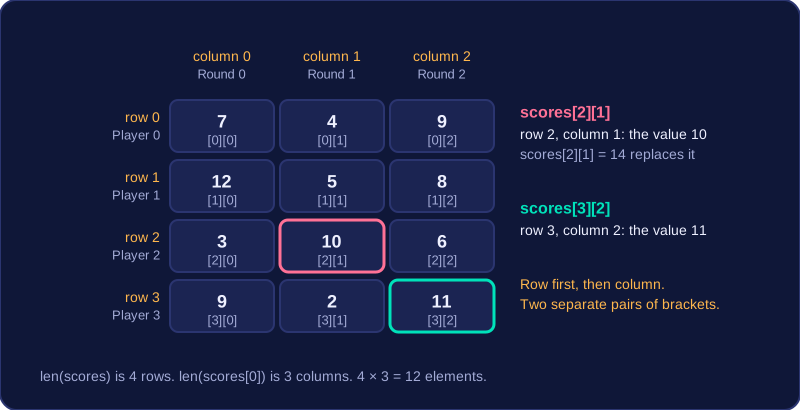
In Python, put the row index in the first pair of square brackets and the column index in the second. If scores holds the points scored by four players in three rounds, scores[2][1] is the value at row 2, column 1. Writing scores[2, 1] in one pair fails, so use two separate pairs.
Reading and changing a value
The same two indexes are used whether you read a value or assign one. To replace the value at row 2, column 1 with 14, write scores[2][1] = 14; to copy it, write points = scores[2][1]. The index tells you where the element is, but the index and the value stored there are not the same thing.
Working out the size
For a list of lists, len(scores) gives the number of rows, because the outer list holds one inner list per row. len(scores[0]) gives the number of columns, because the first row has one element per column. A grid of r rows and c columns has r × c elements, with row indexes 0 to r−1 and column indexes 0 to c−1. A 6 by 4 grid has 24 elements, so the rows are 0 to 5 and the columns are 0 to 3.
Using the description to choose indexes
Questions often show the data as a table and say what the rows and columns stand for. Find the row from the description, then the column, and keep that order in the indexes.
| Round 0 | Round 1 | Round 2 | |
|---|---|---|---|
| Player 0 | 7 | 4 | 9 |
| Player 1 | 12 | 5 | 8 |
| Player 2 | 3 | 10 | 6 |
| Player 3 | 9 | 2 | 11 |
Player 2's score in round 1 is at row 2, column 1, which is 10. Round 2 for player 3 is row 3, column 2, which is 11. The value need not match the index: scores[0][0] is 7, which tells you nothing about where 7 is stored.
scores = [[7, 4, 9], [12, 5, 8], [3, 10, 6], [9, 2, 11]]

print(scores[2][1])          # 10 before the change
scores[2][1] = 14
print(scores[2][1])          # 14 after the change

print(len(scores))           # 4 rows
print(len(scores[0]))        # 3 columns
print(scores[3][2])          # 11
Output:
10
14
4
3
11