Programming Fundamentals
1D Arrays

Contents
An array is a data structure that holds several values together under a single identifier. Each value held in the array is called an element, and each element is located by an index that gives its position.
Indexing is zero-based: the first element sits at index 0, the second at index 1, and so on. The index counts how far an element is from the start, so the front element takes no steps and is numbered 0. An array of five elements therefore uses indexes 0 to 4.
Elements and indexes
The program below stores the lap times, in seconds, that a runner recorded. All five values are integers, held together under the identifier lap_times.
# a one-dimensional array of five integers
lap_times = [62, 58, 71, 65, 59]
print(lap_times[0])
print(lap_times[3])
Output:
62
65| Index | 0 | 1 | 2 | 3 | 4 |
|---|---|---|---|---|---|
| Element | 62 | 58 | 71 | 65 | 59 |
The identifier names the whole collection, while an index in square brackets picks out one element; index 2 of lap_times holds 71.
One-dimensional arrays in Python
A one-dimensional array stores a single sequence of values, so one index is enough to locate any element. In Python you write one as a list: the values go inside square brackets, separated by commas, as in the lap times program.
An array holds elements of one data type, so you build an array of integers or strings, not a mixture. Keeping to one type means the same operation makes sense on every element: you can add up every number in an array of integers. Python will not actually stop you mixing types in a list, but the array you need to describe holds values of one type.
Arrays are widely used in high-level languages because programs work with collections of related values, such as lap times, players or prices. In Python the list is the array structure, so the square-bracket syntax creates and uses one.
An array is a fixed-length (or static) structure: you decide how many elements it will hold when you set it up, and that number stays the same for the whole run of the program. Because the size never changes, the program always knows how many elements it has to work with.
A fixed length does not mean the contents are frozen. Each element can be given a new value while the program runs by assigning to its index, so an array of ticket prices could have one price corrected without the array changing size.
Starting with the values written out
Writing the values inside square brackets creates the array at full size straight away, so every element is ready to be read or replaced by index. For example, prices = [15, 22, 9, 30, 18, 12] creates an array of six elements, one for each ticket type; prices[4] = 20 replaces the fifth element, but the array still holds six elements.
# Six plants in a row, created with each plant's height in cm
plant_heights = [12, 25, 18, 30, 22, 9]
plant_heights[2] = 21      # one height is corrected, the length does not change
print(plant_heights)
print(len(plant_heights))
Output:
[12, 25, 21, 30, 22, 9]
6
Building from empty with append
You can also start with an empty array and use append to add one element to the end each time. If the array needs six elements, append six times; once the last element is added the array is complete, and from then on you read and change elements by index instead of appending again. Python will let you keep appending to a list, so it is up to you to fix the size: work out how many elements are needed, add exactly that many and treat the array as full.
# A fixed six-element array built by appending one element at a time
visitors = []
for day in range(1, 7):
    visitors.append(day * 40)
visitors[5] = 260          # one value changes, the length stays at six
print(visitors)
print(len(visitors))
Output:
[40, 80, 120, 160, 200, 260]
6Reading and changing an element
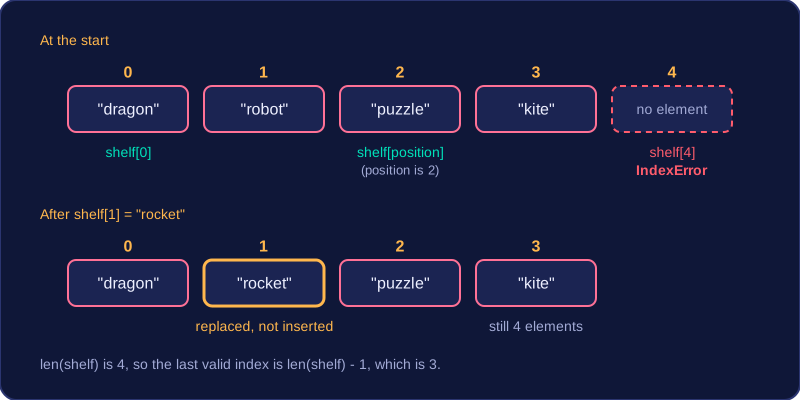
To use a single value from an array, write the array identifier followed by the element's index in square brackets. Indexing starts at zero, so for an array called shelf, shelf[0] is the first element and shelf[2] is the third.
| Index | 0 | 1 | 2 | 3 |
|---|---|---|---|---|
| Element | dragon | robot | puzzle | kite |
shelf = ["dragon", "robot", "puzzle", "kite"]
position = 2
print(shelf[0])
print(shelf[position])
shelf[1] = "rocket"
print(shelf[1])
print(len(shelf))
print(shelf[len(shelf) - 1])
Output:
dragon
puzzle
rocket
4
kite
The index does not have to be written out as a number. It can be a variable such as position, or a calculated expression such as i + 1. That is what allows a loop to work through an array, using its counter as the index so a different element is reached on each pass.
Assigning to an element with = replaces whatever value was already stored at that index. It does not insert an extra element or shuffle the others along, so the array keeps the same length: the contents change, but the structure stays as it was.
Length and indexes out of range
The function len() returns the number of elements an array holds, so len(shelf) is 4. Because counting starts at zero, the last valid index is always one less than the length, which here is len(shelf) - 1, or 3. Writing the last index as len(shelf) reaches one place too far.
Any index outside the range of the array, such as shelf[4] for this array, causes an IndexError. This is a runtime error rather than a syntax error: the code is valid and starts running, but it crashes at that line and nothing after it is carried out.
badges = ["bronze", "silver", "gold"]
print(badges[3])
Output:
IndexError: list index out of range (line 2)To fill an array from user input, read a value inside a loop and assign it to the next index of the array. The loop variable acts as the index, so each pass stores its value in a different element.
heights = [0, 0, 0, 0]
for i in range(0, len(heights)):
    heights[i] = int(input("Height in cm: "))

for i in range(0, len(heights)):
    print("Sunflower", i + 1, "is", heights[i], "cm tall")
Output when the user types 34, 41, 29, 46:
Height in cm: 34
Height in cm: 41
Height in cm: 29
Height in cm: 46
Sunflower 1 is 34 cm tall
Sunflower 2 is 41 cm tall
Sunflower 3 is 29 cm tall
Sunflower 4 is 46 cm tall
The array is created holding four zeros — [0, 0, 0, 0] — and the loop then replaces each one with a typed value. On the first pass i is 0, so the first height goes into heights[0]; on the second pass i is 1, so the next height goes into heights[1], and so on. The loop runs once for every element, so each index is filled exactly once.
Printing every element
To print every element, loop over the indexes and output the element at each one. The second loop does this with print("Sunflower", i + 1, "is", heights[i], "cm tall"). Because i changes on each pass, a different element is read each time. The number printed is i + 1, so the element at index 0 is shown as sunflower 1 — the position, not the index.
Using len(heights) as the end of the loop means the loop always matches the array: the last index is len(heights) - 1, and range(0, len(heights)) stops there without going past the end.
Why use an array?
Without an array you would need a separate variable to hold each value, plus its own input line and its own print line for every one — four heights would mean four of each. Related values would be scattered across many names, and adding a fifth sunflower would mean editing lots of lines. An array keeps the values together under one name, and one loop can process all of them: the loop variable supplies the index, so the same short code fills or prints every element.
The array's size is fixed when it is created, so the number of elements does not change while the program runs; using len() keeps the loops in step with whichever size you chose.
To find the highest value in an array, keep a variable holding the highest value seen so far. Copy the first element into that variable, then compare each later element with it. If an element is larger, replace the stored value; if it is not, leave the stored value alone. After the last comparison, the variable holds the array's highest value.
The lowest value uses the same pattern. Copy the first element into a lowest-so-far variable, then replace it whenever a smaller element appears. Start with the first element rather than with 0, because 0 may not be a value in the array: it would be wrongly kept as the highest in an array of negative numbers, or as the lowest in an array of positive numbers.
Worked example
For the sunflower heights [132, 148, 121, 157], start both values at 132 and compare from index 1:
| Index | Value | Highest so far | Lowest so far |
|---|---|---|---|
| start | 132 | 132 | 132 |
| 1 | 148 | 148 | 132 |
| 2 | 121 | 148 | 121 |
| 3 | 157 | 157 | 121 |
The final highest value is 157 and the final lowest value is 121.
heights = [132, 148, 121, 157]
highest = heights[0]
lowest = heights[0]
for i in range(1, len(heights)):
    if heights[i] > highest:
        highest = heights[i]
    if heights[i] < lowest:
        lowest = heights[i]
print("Tallest sunflower: " + str(highest))
print("Shortest sunflower: " + str(lowest))
Output:
Tallest sunflower: 157
Shortest sunflower: 121
The loop starts at index 1 because element 0 is already stored. It uses len(heights) as the stop value, so the same code works however many heights there are, without hard-coding 3.
Some array tasks do more than print every element: they count elements that meet a condition, change elements that meet a condition, or report whether a particular value appears anywhere. Each one works through the array with a loop and tests every element inside it.
Counting and changing
To count, make a counter and set it to 0 before the loop. Inside the loop, add 1 to the counter only when the current element meets the condition. Keep the counter outside the loop so it keeps its value between passes; resetting it inside would throw away the earlier counts.
To change elements, assign a new value to the element's index inside the loop — for example, add 3 to every height below 10. Use an index loop when you need to write back into the array; looping directly over the items gives you each value but not its position.
plant_heights = [8, 12, 6, 15, 9]
for i in range(len(plant_heights)):
    if plant_heights[i] < 10:
        plant_heights[i] = plant_heights[i] + 3
print(plant_heights)
Output:
[11, 12, 9, 15, 12]Checking whether a value appears
A Boolean flag is a variable that is either True or False. Set it to False before the loop. Inside the loop, set it to True when the matching value is found. After the loop, test the flag once and print the result, so the message is produced only once.
Printing a not-found message inside the loop with an else is a logic error. The else runs for every element that does not match, so a later match cannot cancel the earlier messages and you may report that the value is not found even when it is there. The decision can only be made after every element has been checked.
batteries = [88, 100, 14, 52, 7, 93]
low_count = 0
full_battery = False
for i in range(len(batteries)):
    if batteries[i] < 20:
        low_count = low_count + 1
    if batteries[i] == 100:
        full_battery = True
print("Low batteries:", low_count)
print("Battery at 100% found:", full_battery)
Output:
Low batteries: 2
Battery at 100% found: True