Develop Code
Syntax and Logical Errors
Contents
Not every mistake in a program is the same type. You can compare the three types of error by when the computer finds them and by what happens to the program as a result.
| Error type | When it is found | Effect on the program | Example |
|---|---|---|---|
| Syntax error | Before execution, when the code is checked | The program will not run at all until it is fixed | A missing colon after if score > 10 |
| Runtime error | During execution, when the faulty line is reached | The program starts, then stops at that line | Using players[5] when the list holds only three names |
| Logic error | Not found automatically; you notice it by testing | The program runs to the end but gives the wrong result | Printing loser when you meant to print winner |
A syntax error breaks the rules of the language, so the code cannot be translated into machine code. Nothing runs: not even the lines before the mistake. A runtime error is different because the code is valid enough to start. The program may work for some inputs and then crash when an impossible operation is attempted. A logic error does not crash the program. The computer follows your instructions exactly, but the instructions themselves are wrong, so the output is incorrect and no error message appears.
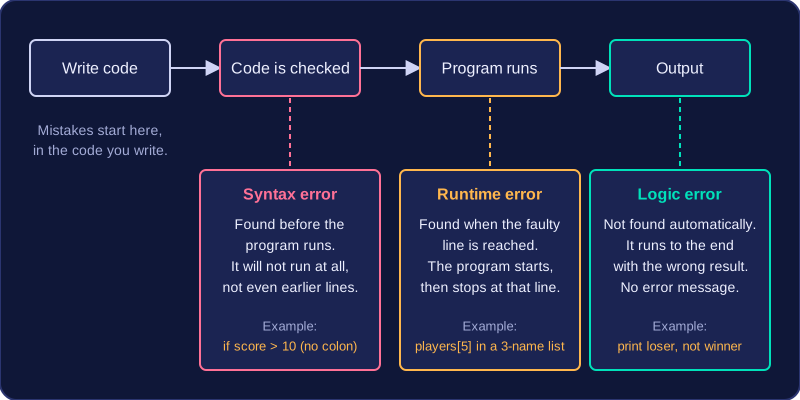
One program can contain more than one error, and they may be of different types. Fixing a syntax error might let the program run for the first time, revealing a runtime error that was hidden. After that is fixed, testing could show a logic error. Each fault has to be identified and corrected separately.
When a program will not run, or it stops part-way through, the compiler, interpreter or IDE gives you a message and a line number. Reading these first takes you straight to the faulty line instead of searching the whole program.
An error message is the description of the problem the compiler or interpreter has found, and the line number is the place in your code it refers to. An IDE often shows the same information as a red underline, and clicking the message jumps to the line.
Reading the report
Syntax errors are reported before the program runs. The message shows the line where the compiler or interpreter could no longer make sense of the code, because a rule, or piece of grammar, of the language has been broken.
age = int(input("Age: "))
if age = 16:
    print("You can ride the go-kart")
Output:
SyntaxError: invalid syntax. Maybe you meant '==' or ':=' instead of '='? (line 2)In this program = has been used to test the condition, where the comparison operator == is needed. The language rules are broken, so the program never starts. Start at the line in the report and check the punctuation and spelling there and on the line above, because that is usually where the real cause sits.
Exceptions in Python
Runtime errors are reported as exceptions. Python stops at the faulty line, prints a traceback ending in the line number, and names the exception. The exception name tells you the kind of impossible operation that was attempted, which narrows down the cause before you read any code in detail.
names = ["Ava", "Ben", "Cleo"]
pick = int(input("Which name? "))
print(names[pick])
Output when the user types 3:
Which name? 3
IndexError: list index out of range (line 3)| Exception name | What it tells you |
|---|---|
| ZeroDivisionError | A number was divided by zero. |
| NameError | A name was used that has not been given a value, often because of a misspelling. |
| IndexError | A list index is outside the positions the list actually has. |
| TypeError | Values of the wrong types were combined, such as text joined to a number with +. |
Go to the line the traceback names, then use the exception name to work out what went wrong on it. A logic error does not usually produce any message, so error messages point you at syntax and runtime faults.
Debugging with print statements means adding extra print() lines to a program so that it shows you the value held by a variable at a chosen moment. You add them while hunting for a logic error — a mistake that lets the program run but gives the wrong result — and you take them out again once the fault is found and corrected.
Choosing where to print
A logic error produces no error message, so you have to make the program tell you what it is doing as it runs. Two useful places to put a print statement are:
- After each change to a variable, so you can see whether it grows the way you expected. A running total that jumps unexpectedly, or one that never changes, points straight at the faulty line.
- At a decision point, just before an
ifstatement, so you can see the value being tested and check that the condition sends the program down the branch you intended.
A worked example
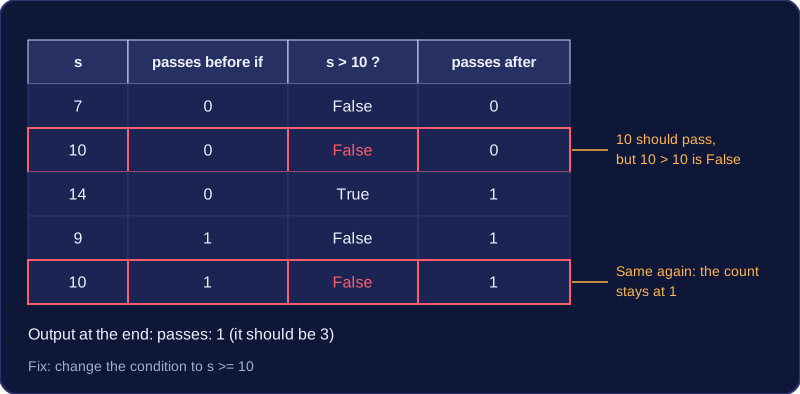
This program should count how many quiz scores are a pass, where a pass is 10 or more. It should report 3 passes but reports 1, so a print has been added inside the loop.
scores = [7, 10, 14, 9, 10]
passes = 0
for s in scores:
    print("checking " + str(s) + " with count " + str(passes))
    if s > 10:              # logic error: 10 should count as a pass
        passes = passes + 1
print("passes: " + str(passes))
Output:
checking 7 with count 0
checking 10 with count 0
checking 14 with count 0
checking 9 with count 1
checking 10 with count 1
passes: 1
Each time round the loop the output shows the score being tested and the running count. The two scores of 10 appear, yet the count does not go up after them, which proves that the condition is rejecting them. Changing it to s >= 10 corrects the logic. Without the print you would only know the final answer was wrong, not which line caused it.
Clearing the prints away
Debug prints are scaffolding. They are not part of what the program is meant to do, and they clutter the output the user sees, so delete them or comment them out by putting # in front: Python then ignores the line, but you can switch it back on quickly if the bug returns.
scores = [7, 10, 14, 9, 10]
passes = 0
for s in scores:
    # print("checking " + str(s) + " with count " + str(passes))
    if s >= 10:
        passes = passes + 1
print("passes: " + str(passes))
Output:
passes: 3Only two things changed from the faulty version — the condition was corrected and the print was commented out — so the program still does exactly the job it was designed for.
Correcting a program error follows three steps: identify the type of error, locate the faulty line, then amend that line so the code follows the rules of the language and produces the result you intended. Naming the type first tells you what kind of change to make, so you are fixing rather than guessing.
- Identify: a program that will not start, one that crashes part-way through, and one that finishes with the wrong answer point to different kinds of fix.
- Locate: find the line responsible before you change anything.
- Amend: change as little as possible. Rewriting lines that already work can add fresh errors.
Syntax and runtime errors
For a syntax error, correct the punctuation, such as a missing colon or an unclosed bracket, or a name that breaks the rules, such as one starting with a digit.
When a runtime error is caused by an operation that is impossible for some inputs, do not simply remove the offending line. Add a check before it so the impossible operation is never attempted, and make the alternative path do something useful with the data. The change has to make sense for the program's logic, not just stop the crash.
# check the position before it is used
scores = [12, 7, 20, 5]
position = int(input("Which position? "))
if position < 1 or position > len(scores):
    print("That position does not exist")
else:
    print(scores[position - 1])
Output when the user types 7:
Which position? 7
That position does not exist
Without the check, entering 7 would ask for an item that does not exist and the program would stop with an error. The check catches the bad value first and gives the user a sensible message instead of a crash.
Logic errors
A logic error is corrected by changing the design of the code rather than its grammar: alter the condition, the operator, the variable being updated, or the indentation that decides which statements sit inside a selection or a loop. Your target is that the output matches the intended design.
age = int(input("How old are you? "))
if age > 13:
    print("Welcome to the club")
else:
    print("Sorry, you must be 13 or over")
Output when the user types 13:
How old are you? 13
Sorry, you must be 13 or over
Someone who is exactly 13 is old enough to join, so the condition should be age >= 13. Changing that one operator leaves the rest of the program untouched and makes the message match the rule.