Syntax and Logical Errors
Comparing Error Types
Not every mistake in a program is the same type. You can compare the three types of error by when the computer finds them and by what happens to the program as a result.
| Error type | When it is found | Effect on the program | Example |
|---|---|---|---|
| Syntax error | Before execution, when the code is checked | The program will not run at all until it is fixed | A missing colon after if score > 10 |
| Runtime error | During execution, when the faulty line is reached | The program starts, then stops at that line | Using players[5] when the list holds only three names |
| Logic error | Not found automatically; you notice it by testing | The program runs to the end but gives the wrong result | Printing loser when you meant to print winner |
A syntax error breaks the rules of the language, so the code cannot be translated into machine code. Nothing runs: not even the lines before the mistake. A runtime error is different because the code is valid enough to start. The program may work for some inputs and then crash when an impossible operation is attempted. A logic error does not crash the program. The computer follows your instructions exactly, but the instructions themselves are wrong, so the output is incorrect and no error message appears.
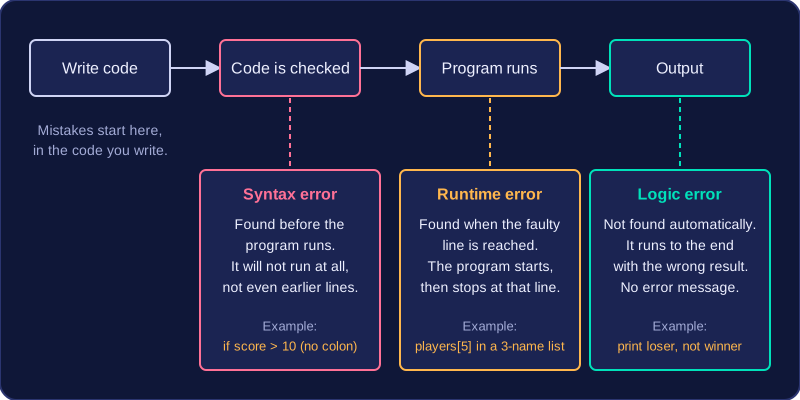
One program can contain more than one error, and they may be of different types. Fixing a syntax error might let the program run for the first time, revealing a runtime error that was hidden. After that is fixed, testing could show a logic error. Each fault has to be identified and corrected separately.
Practise this
Edexcel GCSE Computer Science · Syntax and Logical Errors