Syntax and Logical Errors
Print Statements for Debugging
Debugging with print statements means adding extra print() lines to a program so that it shows you the value held by a variable at a chosen moment. You add them while hunting for a logic error — a mistake that lets the program run but gives the wrong result — and you take them out again once the fault is found and corrected.
Choosing where to print
A logic error produces no error message, so you have to make the program tell you what it is doing as it runs. Two useful places to put a print statement are:
- After each change to a variable, so you can see whether it grows the way you expected. A running total that jumps unexpectedly, or one that never changes, points straight at the faulty line.
- At a decision point, just before an
ifstatement, so you can see the value being tested and check that the condition sends the program down the branch you intended.
A worked example
This program should count how many quiz scores are a pass, where a pass is 10 or more. It should report 3 passes but reports 1, so a print has been added inside the loop.
scores = [7, 10, 14, 9, 10]
passes = 0
for s in scores:
    print("checking " + str(s) + " with count " + str(passes))
    if s > 10:              # logic error: 10 should count as a pass
        passes = passes + 1
print("passes: " + str(passes))
Output:
checking 7 with count 0
checking 10 with count 0
checking 14 with count 0
checking 9 with count 1
checking 10 with count 1
passes: 1
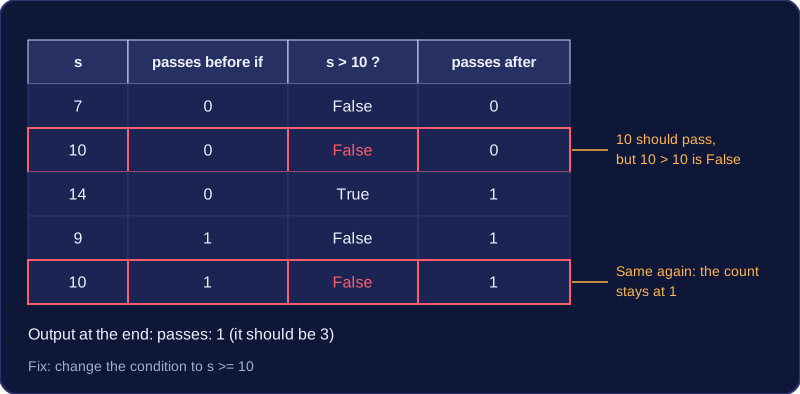
Each time round the loop the output shows the score being tested and the running count. The two scores of 10 appear, yet the count does not go up after them, which proves that the condition is rejecting them. Changing it to s >= 10 corrects the logic. Without the print you would only know the final answer was wrong, not which line caused it.
Clearing the prints away
Debug prints are scaffolding. They are not part of what the program is meant to do, and they clutter the output the user sees, so delete them or comment them out by putting # in front: Python then ignores the line, but you can switch it back on quickly if the bug returns.
scores = [7, 10, 14, 9, 10]
passes = 0
for s in scores:
    # print("checking " + str(s) + " with count " + str(passes))
    if s >= 10:
        passes = passes + 1
print("passes: " + str(passes))
Output:
passes: 3Only two things changed from the faulty version — the condition was corrected and the print was commented out — so the program still does exactly the job it was designed for.
Practise this
Edexcel GCSE Computer Science · Syntax and Logical Errors