Protocols
POP and IMAP

POP (Post Office Protocol) and IMAP (Internet Message Access Protocol) are protocols that retrieve your email from a mail server — a computer that stores and handles email. Email is stored on a mail server, not a web server: a web server's job is to send web pages to browsers. Both protocols retrieve messages; sending email is a separate job.
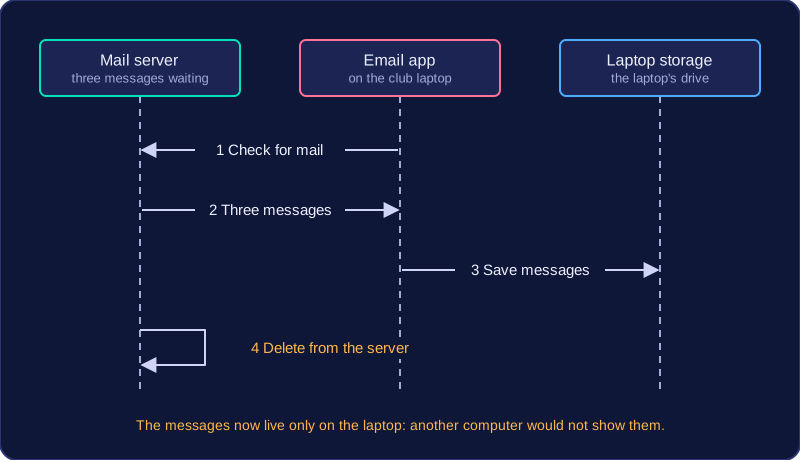
POP: download to one device
POP copies messages from the mail server onto a single device, and in most set-ups the copy on the server is removed once the download has finished. Because the message now sits on that device, you can read it without an internet connection. But it is only on that one device: it is not kept in sync with your other devices, and it can be lost if that device is lost or broken.
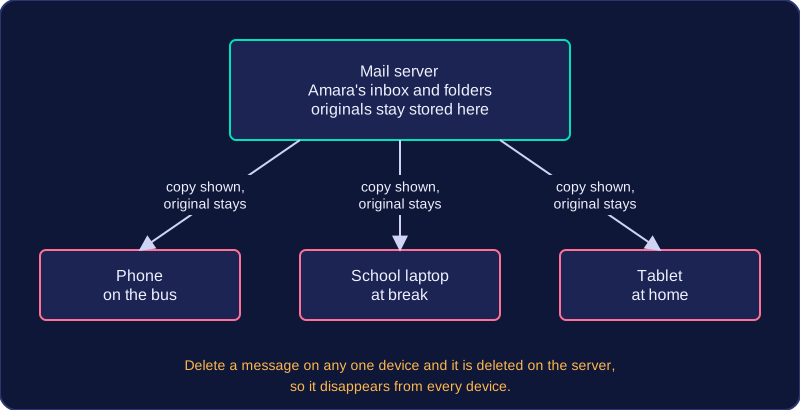
IMAP: keep and synchronise on the server
IMAP accesses and retrieves email while the messages stay on the server. Each device keeps a synchronised copy. If you read an email, delete it or move it into a folder on one device, that change is made on the server and appears on all your devices. Because messages stay on the server instead of being removed after download, an IMAP mailbox needs more server storage than a POP one.
Choosing between them
| POP | IMAP | |
|---|---|---|
| Where email is kept | Downloaded to one device; usually removed from the server | Stays on the mail server |
| Across devices | Not synchronised | Synchronised copies |
| Changes | Only on that device | Made on the server, seen on all devices |
| Offline reading | Yes, once downloaded | Designed for server storage and syncing, not offline reading |
| Server storage | Lower | Higher |
| Best for | A single device, reading offline | Email that must stay on the server and stay in sync |
Choose POP when email is to be downloaded to a single device and read offline. Choose IMAP when email must stay on the server and remain synchronised across multiple devices. For example, a message about a choir rehearsal downloaded with POP on a club computer is only on that computer. With IMAP, it stays on the mail server, so if you read it on the club computer, it is marked as read when you open your mailbox on a home computer.
Practise this
OCR GCSE Computer Science · Protocols