Network Security
Identifying and preventing vulnerabilities
Contents
A vulnerability is a weakness in a computer system or network that an attacker could exploit. It is not the same as an attack: the vulnerability is the opening, and the attack is the method used to get through it. A window left open is a vulnerability; someone climbing through it is the attack. Closing the window removes the weakness, which is different from blocking an attacker in the moment.
Vulnerabilities usually fall into three groups.
- Software vulnerabilities: bugs in a program, or software that has not been patched (updated to fix known bugs). A bug in a school's quiz site might let a pupil see the correct answers before the test starts. Unpatched software is risky because the flaw is already known and attackers may have instructions for using it.
- User account vulnerabilities: weak passwords, shared accounts, or accounts with more permissions than the job needs. If a whole department logs into one shared account, nobody can tell who did what, and one leaked password exposes everyone's files. A temporary cover teacher given control of the entire network can reach far more than the role requires.
- Physical access vulnerabilities: unlocked doors, unattended devices and screens left visible. A tablet left on a reception desk is open to anyone walking past, and a screen showing a pupil record can be read over someone's shoulder.
Finding and fixing vulnerabilities
Organisations should identify vulnerabilities and remove them. Identifying means checking what is actually there: which software versions are installed, which accounts exist and what each can reach, and whether doors and devices are secure. Removing means fixing what you find, for example installing updates, deleting unused accounts, reducing permissions to what a role needs, and locking rooms that hold equipment.
New flaws appear over time, so identifying and fixing must be ongoing. Organisations also apply prevention methods to limit threats, such as anti-malware software, firewalls, encryption and physical security, so an attack is less likely to succeed and any damage is smaller. Several methods are used together, because no single one covers every weakness.
Prevention methods are steps taken to protect computer systems and data from unauthorised access and attack. Each method has a main purpose, so you can recognise it from a short description of what it does.
The seven common prevention methods
| Method | Main purpose |
|---|---|
| Penetration testing | Authorised experts try to break into a system so weaknesses can be found and fixed. |
| Anti-malware software | Scans for and blocks or removes malicious software. |
| Firewall | Monitors and filters network traffic using rules. |
| Encryption | Scrambles data so it can only be read with the correct key. |
| Passwords | Requires a secret value before a user can log in. |
| User access levels | Gives each user only the permissions needed for their role. |
| Physical security | Limits who can reach hardware, using locks and key cards; CCTV and guards deter intruders. |
Using more than one method
No single prevention method stops every attack. A firewall can filter network traffic, but it does not remove malware already stored on a computer. Encryption can make data unreadable if it is stolen, but it does not stop an attacker from flooding a website with traffic to take it offline. Using several methods together covers different threats and leaves fewer gaps.
When you choose methods for a scenario, match each one to the specific threat. For example, a small online board game shop stores customer order details. It uses encryption so order files are unreadable without the key if the storage device is stolen, anti-malware software to scan staff laptops for malicious programs, and user access levels so a compromised staff account cannot change every order record. Each method addresses a different risk, and together they protect the system better than any one method alone.
Penetration testing is when an organisation gives authorised experts permission to attack its own system on purpose, so that weaknesses are found and fixed before a real attacker finds them. The testers work inside an agreed scope, which is the set of parts of the system they are allowed to test. That permission is what makes the testing legal: doing the same things without it would be an illegal attack.
What testers try
Testers think like an attacker. They might:
- try to get past a login screen by guessing or cracking passwords;
- try to reach data they should not see, such as another user's records;
- exploit a software flaw, such as a web page that saves uploaded files into a folder anyone can browse, so a document meant to stay private can be opened.
They also test web forms for SQL injection by typing crafted text into a search or login box, to see whether the site passes it straight to the database and hands back data that should stay hidden.
After the test
Testers fix nothing themselves: they write a report listing each weakness, how they reached it and how serious it is. The organisation then fixes the problems, for example by updating the program, tightening the code behind a form or changing permissions, and may ask for a second test to check the fixes worked. For example, a college's booking system is tested and an old page is found that lets testers open a tutor's admin screen; the page is rebuilt and the test repeated.
Why it counts as prevention
Penetration testing does not block an attack as it happens, in the way a firewall filters traffic. It leads to the weakness itself being removed, so there is nothing left for a real attacker to use. It is one of several methods used together, because no single method stops every threat.
Anti-malware software is a prevention method that detects, blocks and removes malware on a computer system. It runs alongside normal use, quietly checking things as you work, and raises an alert only when it finds something suspicious.
What it scans
Anti-malware software examines the places malware likes to hide:
- Files on the hard drive, including downloads and attachments you have saved.
- Memory, because some malware only exists while it is running and never sits in a file.
- Incoming data, such as a file arriving over the network or on a USB stick, so the malware is caught before it settles in.
It compares what it finds against a list of known malicious patterns — pieces of code that earlier malware was built from. For example, if a photo-editing app you installed contains a pattern linked to a program that secretly records keystrokes, the scanner recognises it and stops it.
Quarantine or delete
Once malware is found, the software can quarantine the file, moving it somewhere it cannot run so it can do no harm while you decide what to do, or simply delete it. Quarantining is useful when a file might be a false alarm, since it can be restored.
Why it is not enough on its own
Anti-malware cannot guarantee a system will never be infected. Brand-new malware has no known pattern yet, so a scanner may let it through until its list of patterns is updated. This is why anti-malware is used together with other prevention methods such as firewalls and user access levels.
It is not the same as a firewall: a firewall filters network traffic by rules and decides what may enter or leave, while anti-malware looks inside files and memory for malicious software. Anti-malware also does not stop a denial-of-service attack or an SQL injection; those need different prevention methods.
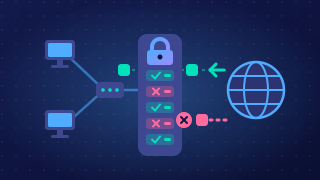
A firewall is a security tool that monitors incoming and outgoing network traffic and blocks any traffic that is not allowed by its rules. It acts as a barrier between a network and the internet, or between one part of a network and another, so messages have to pass through it and be checked.
How the rules work
A firewall holds a list of rules, and each rule can allow or block traffic. Rules usually work in one of three ways:
- By address — allow traffic to and from known, trusted addresses and refuse anything else.
- By port — open only the ports a service actually needs, such as port 443 for secure web pages, and close the rest.
- By protocol — permit the types of traffic the network uses and refuse the rest.
For example, a school network might allow outgoing web traffic on the secure web port but block every incoming connection except to its own web server. Traffic that matches no allow rule is dropped.
Stopping a denial-of-service attack
During a denial-of-service attack, huge numbers of requests are sent from particular addresses to overwhelm a service. If the firewall is told to block traffic from those addresses, the flood is refused before it reaches the server, which helps keep the service available for genuine users.
What a firewall cannot do
A firewall filters traffic; it does not detect or remove malware. A virus inside a file that arrives on an allowed port passes straight through, which is why other security software is still needed. A firewall is also not a defence against SQL injection on its own, because the malicious command is hidden inside an ordinary web request that is allowed by the rules. A firewall is one of several prevention methods, so it is used alongside other safeguards.
Encryption is a prevention method that scrambles data using an algorithm and a key, so anyone who captures it sees meaningless characters instead of readable information.
How encryption works
The algorithm is the set of steps that rearranges the data. The key is the secret value that controls exactly how the rearrangement happens, so the same algorithm with a different key produces completely different scrambled data. Without the correct key, the scrambled data cannot be turned back into anything readable.
The receiver carries out decryption: the same process in reverse, using the key to turn the scrambled data back into its original form. For example, a school sends a pupil's report across the internet to a parent's email account. The report is encrypted with a key before it leaves the school, and the parent's email app decrypts it with the matching key so the report can be read. Anyone who captured the message on the way would hold only a jumble of characters.
What encryption does and does not do
- It protects data in transit, such as data travelling across a network, because an attacker who intercepts it cannot read it.
- It protects data at rest, such as the files stored on a tablet that is stolen, because the thief cannot open them without the key.
- It does not stop the interception or the theft from happening. The data can still be captured and the device can still be taken; encryption only makes what is taken unreadable.
- It does not stop a denial-of-service attack, where a service is flooded with traffic until it fails. Encryption does not reduce how much traffic reaches a server, so a firewall is the method used to block that traffic instead.
Encryption therefore limits the damage caused by data interception and theft rather than preventing those events, and it is used alongside other methods such as firewalls and user access levels.
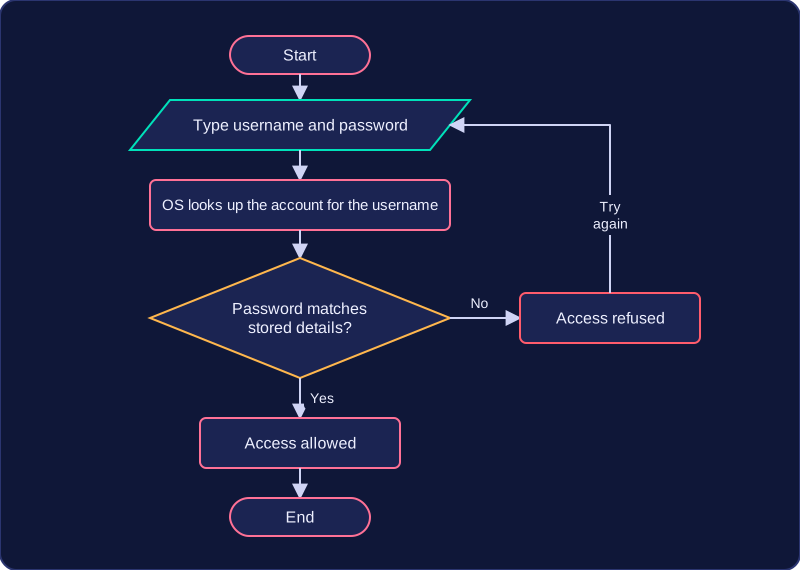
A password is a secret value that must be typed before a system allows access. This is authentication: the system checks that whoever is asking for access knows something that only the account holder should know. If the value typed does not match the stored one, access is refused.
What makes a password strong
A strong password is long and mixes upper and lower case letters, digits and symbols. Length matters because every extra character multiplies the number of combinations an attacker must work through, and mixing character types has the same effect. Compare pony with Pony7!stable: a program can work through every possible four-character password in seconds, but the longer mixed password has far too many possible forms to work through quickly.
Resisting brute-force attacks
A brute-force attack tries password after password until one is accepted. Strong passwords make this approach impractical, and account lockout supports them: once several guesses in a row fail, the system refuses further tries for a short time. Without that limit, a fast program could send thousands of guesses a minute; with it, the attacker runs out of attempts long before the password is found.
Social engineering and the limits of passwords
Strong passwords also limit one route for social engineering, where someone tricks a person into giving away information. An attacker who knows your birthday or your pet's name may guess a password built from them, so a long, random password that avoids personal details cannot be worked out that way. A strong password does not stop you being tricked into telling someone what it is, though, so technical methods alone cannot fully stop social engineering.
Passwords do not stop every threat. Malware can record keystrokes or copy files whatever the password is, a denial-of-service attack floods a service with traffic and never needs one, and SQL injection abuses a badly written web form rather than an account. Passwords are one prevention method, so they are used with others such as user access levels, anti-malware software and firewalls.
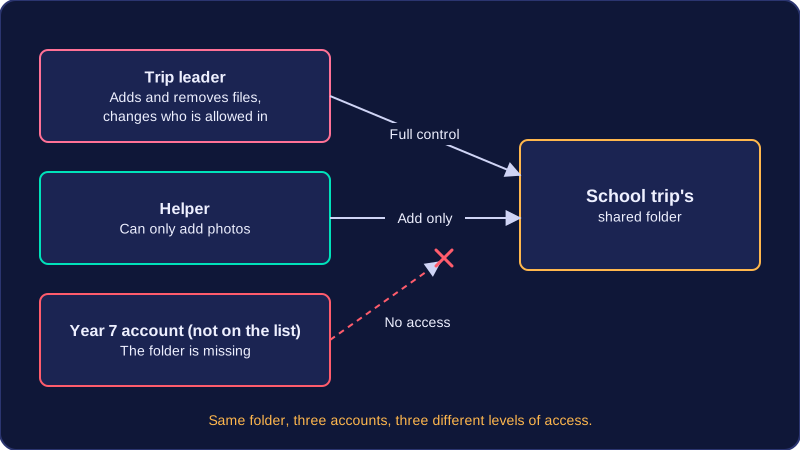
User access levels are sets of permissions attached to each account, chosen by an administrator. Each user gets only the permissions their job needs: on a school clubs website, a student account can book a place and see their own bookings, but cannot cancel someone else's booking or change the ticket price.
Because every account is limited, a compromised account is limited too. If an attacker guesses a student's password, they can only book a place — not open the admin area and rewrite every record. The damage stays small, and the school can reset the password once it notices.
Fewer accidents and less malware
Limited permissions also reduce accidental changes. A club leader whose account cannot delete records cannot wipe them by mistake at the end of a busy lunchtime, because the delete option was never there.
Installing software needs an administrator's permission, so if ordinary users cannot install software, malware arriving as an email attachment or a downloaded file is far less likely to take hold, even when nobody recognises the infected file.
Limiting what attacks achieve
Restricting database access limits SQL injection. The booking form connects to the database using an account that can only read the bookings table, so an attacker who slips extra SQL into the form cannot pull addresses out of other tables or drop records.
Limiting permissions also reduces what social engineering can achieve. If a caller tricks a receptionist into reading out the files on their screen, the attacker learns only what the receptionist's account can see, not files belonging to the whole organisation.
All of this follows the principle of least privilege: give each account the smallest set of permissions that still lets the person do their job, and change those permissions when someone's role changes.
Physical security means using barriers and people to control who can get near the hardware: the computers, servers and storage devices that hold data. It is a prevention method because it stops unauthorised people reaching the equipment at all, so an attacker never gets to touch the machine.
Common measures
- Locks on doors and server racks keep out anyone without a key, so even someone standing in the room cannot open a case and take a hard drive.
- Key cards open only the doors a member of staff needs, and the system records who entered and when.
- CCTV cameras record activity, which discourages an intruder and gives evidence if something goes missing.
- Security guards can check identity at an entrance, challenge a stranger and respond immediately to an incident.
Access is also restricted to a few named people. A small theatre, for example, keeps the laptop holding its ticket and card payment records in a locked safe overnight, so a break-in after the show gains an intruder nothing.
Why it limits threats
Devices hold data, so stealing a laptop or pulling a disk out of a server steals the data on it. Physical security reduces theft of devices and therefore limits data theft. It also stops direct access: someone sitting at the machine could log on with a stolen password, copy files onto a memory stick, or plug in an infected USB device that installs malware. If nobody can touch the hardware, those routes close.
Physical security is part of cybersecurity even though no software is involved. Software defences assume the machine is in trusted hands, so an attacker who takes the disk out can read it on another machine, getting past firewalls, passwords and anti-malware.
Used with other methods
It works alongside encryption, so a stolen drive is unreadable without the key, and alongside user access levels, so a visitor who reaches a logged-on computer cannot open other people's files. No single method stops every threat, which is why organisations combine several.
Network policies are the written rules that set out how a network and its users should behave. They do not block an attack on their own; they make sure everyone knows what is expected and what to do when something goes wrong.
What a policy can cover
A typical policy covers four areas:
- Acceptable use – which websites and programs may be used, and whether personal devices or removable storage can be connected.
- Password rules – how long a password must be, how often it changes, and that it must never be shared.
- Access rules – which staff or students may use which systems and files.
- Incident procedure – who to tell, how quickly it must be reported, and what not to do, such as trying to fix the problem yourself.
How policies prevent attacks
Clear expectations help the other prevention methods work. A password is only useful if everyone follows the rule not to share it. User access levels only limit damage if staff ask for the right level instead of borrowing a manager's account. Physical security works better when a policy names the person who holds the key to the room that houses the network switch, and states that every visitor must sign in at reception.
For example, a leisure centre uses a booking network. Its policy says reception staff must lock their screens when they leave the desk, only the manager can change prices, and a lost tablet must be reported to the duty manager straight away. The manager can then disable the account and change the password. The policy has turned passwords, access levels and physical security into everyday habits.
Network policies are not one of the seven common prevention methods, such as firewalls or anti-malware software. They are an organisational measure: they guide people's behaviour so that technical and physical controls are used properly. A rule banning personal USB drives, for example, stops malware spreading from an infected stick, which a firewall would not check.
Different attacks get past different defences, so different prevention methods limit each one. Match the method to the threat and combine several, because no single method stops every attack.
| Attack | Prevention methods | How it limits the attack |
|---|---|---|
| Malware | anti-malware software, a firewall, user access levels that stop ordinary users installing software | anti-malware finds and removes it, the firewall blocks traffic that breaks its rules, and users cannot install software themselves |
| Social engineering and phishing | user access levels, strong passwords, anti-malware software | a fooled account reaches little, a strong password is hard to guess, and anti-malware stops a rogue download |
| Brute-force | strong passwords, account lockout | a long password makes guessing too slow, and lockout stops attempts after a set number of failures |
| Denial of service | a firewall | it can block traffic from the addresses sending the attack, which helps keep the service available |
| Data interception and theft | encryption, physical security | intercepted data is unreadable without the key, and locks and key cards stop devices being taken |
| SQL injection | penetration testing, user access levels on the database, input validation | authorised testing finds the weakness first, limited database rights shrink the damage, and validation rejects the input |
Choosing methods for a scenario
Pick methods that answer the specific threat, and say what each one does. A leisure centre's online class-booking site stores bookings in a database that staff reach through a login page:
- Encryption makes the card details unreadable to anyone who intercepts them.
- Input validation on the booking form rejects unexpected characters, and staff database accounts have user access levels, so a login cannot read every table. Both limit SQL injection.
- Strong passwords with lockout after five failures limit a brute-force attack, and the firewall blocks addresses flooding the site.
- Backup drives are kept in a locked cabinet, so a thief cannot take the data.