Network Security
Access and Physical Security
Contents
A system can enforce password rules before it accepts a new password. Rules commonly set a minimum length and require a mix of character types, such as uppercase letters, lowercase letters, digits and symbols. The system checks the password as you create it and refuses any that does not meet the rules, so you cannot choose a very short or simple password.
For example, a ticket-booking account might ask for at least 12 characters, including a digit and a symbol. If you type only lowercase letters, the system rejects it and asks you to try again. A longer, more varied password makes a brute-force attack impractical, because there are far more combinations to try before one works.
Forcing a new password
A system can also force a user to set a new password. This happens when a password is known to have leaked: the old one stops working and you must choose a different one at your next login. It also happens when a default password is still in use. Devices such as routers often arrive with the same starting password for every unit, so setup can make you replace it before the device can be used.
Protecting stored and sent passwords
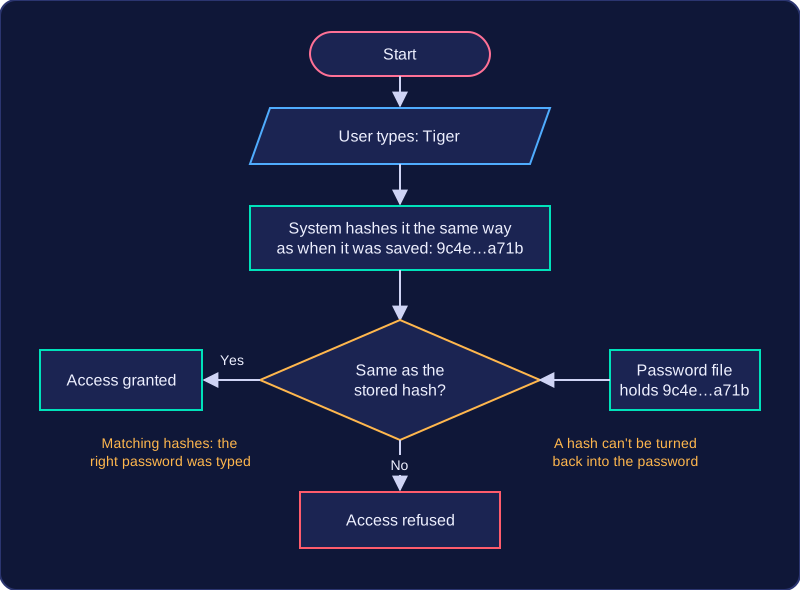
The system must protect passwords as well as the user. Stored passwords are not kept as plain text; they are reduced to a hash, a scrambled value that cannot easily be turned back into the password, so someone who opens the password file still cannot read them. When a password is sent, it travels over an encrypted connection, so an intercepted copy is unreadable.
All of these measures make unauthorised access harder, but they do not stop every threat: a phishing email can still trick you into typing your password into a fake page, and malware can still capture what you type.
Two-factor authentication asks for a second proof as well as your password. The two proofs must be different kinds, called factors: the password is something you know, and the second proof is usually something you have, such as a small keyring device that shows a new number every 30 seconds, or a smart card that you tap on a reader. Typing a second password does not count, because that is the same kind of proof as the first.
It helps because a guessed or stolen password on its own is not enough. If an attacker works out your password, they still cannot log in without the second proof. That proof is a separate object they would also have to steal or copy, so the account is much harder to break into.
For example, imagine the treasurer of a youth football club uses an online banking account to pay for new kit. The account asks for a password and then a one-time code from a keyring token kept in the treasurer's pocket. Someone who has watched the treasurer type the password over their shoulder still cannot move any money, because they do not have the token. The stolen password alone does nothing.
Two-factor authentication is a valid extra layer of protection, but the prevention methods used to keep a network secure are passwords, user access levels and physical security, and two-factor authentication is an example you can use alongside them.
Physical security does not only mean protecting a room or a building. It also covers the individual device: keeping the hardware where it belongs, and keeping other people out of an account that is already logged in. Two simple measures deal with the two most common real-world risks.
Cable locks
A cable lock is a steel cable with a loop at one end. You pass the loop around a desk leg or a fixed anchor point and clip the other end into a small security slot on the laptop or monitor. The device stays tied to the furniture, so a thief cannot simply pick it up and walk out with it; cutting the cable or damaging the desk takes time and attracts attention.
The cable therefore mainly defeats the opportunist, who spots an unattended laptop in a busy room and takes it. It protects the hardware, and the data on it, because the device and its files cannot be carried off together.
Locking the screen
Screen locking means setting the computer to ask for the password again after a short time with no activity, or pressing the lock key before you walk away. A logged-in machine with nobody at it is an open door: anyone passing can send messages in your name, delete your work, read private files or install software. The password is only checked when the computer returns to the login screen, so an unlocked machine never asks.
Locking the screen also blocks shoulder surfing, where someone reads your screen or watches your fingers as you type a password. A locked machine shows only the login box, and keeping a hand over the keys as you type covers the other half of the problem.
For example, a college art studio cables each computer to the desk frame and asks students to press the lock key when they go to collect their prints. A visitor wandering in can neither carry a computer away nor work inside a student's account.
Three ways to cut down the threats a network faces are passwords, user access levels and physical security. Each limits a different threat, and the threat it targets shows why it works.
| Method | Threat it limits | How it limits that threat |
|---|---|---|
| Password | Unauthorised access to an account, and brute-force guessing | A secret value must be given before anyone gets in. Rules on length and character types make the guesses needed enormous, and a lockout after repeated failures stops the attacker trying again. |
| User access level | Damage from a stolen or misused account, malware being installed, staff seeing data they do not need | Each account gets read, write, delete or no permission only where the job needs it, so a misused account cannot wipe records or install software. |
| Physical security | Theft of devices and the data on them, and an intruder joining the network | Locks, key cards and guards keep people away from the hardware, and CCTV deters and records anyone who tries, so nobody can carry off a laptop or plug into a network socket. |
Passwords and user access levels are software-based: the rules live inside the system, so they only work while it is running. Physical security is not software-based — a locked door keeps people out even when the computers are switched off. A password typed at a login screen is never physical security, however strong it is.
In a scenario
A community radio station streams its shows over the internet. Presenters use the studio computer to add tracks to a playlist and record their own show, but only the station manager can publish a finished recording or delete anything from the archive. The playout computer sits in a locked rack, in a room entered with a key fob.
- Password: the manager's account is guarded by a long passphrase, so a program trying thousands of guesses is shut out.
- Access level: a presenter can add tracks but cannot publish or delete, so a hijacked account cannot wipe the archive.
- Physical security: the key fob and locked rack keep strangers from the playout computer, so nobody can unplug it mid-show.