Memory & Storage
Sound

Sound travels through the air as a wave: the air pressure rises and falls, and your ear turns those changes into what you hear. If you drew a sound on a graph with time going across and the wave's height going up and down, you would get a smooth curve. Sound in the real world is analogue, which means it changes continuously: the wave has a value at every instant, with no gaps and no steps between one value and the next.
At any moment you pick, the wave is some distance above or below its middle resting line. That distance is the amplitude at that moment. A tall peak is a large amplitude; a point near the resting line is a small amplitude. Amplitude is not fixed for a whole sound: it changes as the sound changes. Picture a single drum hit. The moment the stick lands, the wave shoots up to a tall peak, and as the sound dies away the peaks shrink. A quiet moment has a small amplitude; a loud moment has a large amplitude.
Amplitude at a moment is not the same as how quickly the wave repeats, which is what sets the pitch you hear. A high-pitched whistle repeats quickly but can still be quiet or loud.
Sound reaches your ears as an analogue signal: the air pressure rises and falls smoothly and continuously, so the wave has a height at every single instant. A computer cannot store a signal like that directly, because its memory and storage hold everything as binary — patterns of 1s and 0s. Analogue sound must therefore be converted into digital form before it can be saved, played back or processed.
Analogue and digital compared
An analogue signal changes smoothly, so between any two points on the wave there is always another point. A digital signal is a list of separate, exact values written in binary, with nothing stored in between.
| Analogue | Digital | |
|---|---|---|
| What is kept | The shape of the wave itself, such as the groove cut into a vinyl record | A list of binary numbers, one for each measurement |
| How many values | Endless: every instant can have its own height | A fixed, countable number, set by how often you measure |
| Making a copy | Re-recording adds hiss and distortion | Copying the numbers gives an identical file |
Why the wave must be converted
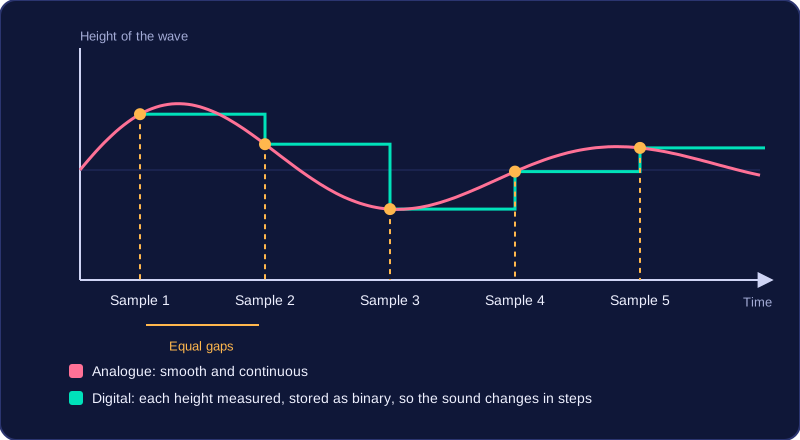
The processor can only compare and calculate with 1s and 0s, and storage can only hold those patterns. A continuously changing wave has no gaps in it where a number could be written, so the computer measures the height of the wave at regular intervals instead, storing each height as a binary number. That measuring is called sampling.
Imagine recording a blackbird singing on a tablet. The microphone turns the changing air pressure into a changing voltage, an analogue copy of the song. The tablet measures that voltage again and again and writes each height down as a binary number, so the saved file is a long list of numbers. The speaker later turns those numbers back into movement, following the song.
Because the wave is only measured at certain moments, the digital file is an approximation of the original: the shape of the wave between one measurement and the next is never stored.
Sampling is the process that turns a continuously changing analogue sound wave into digital data a computer can store. A microphone produces a smoothly varying voltage, but a computer can only keep numbers, so the wave has to be measured again and again.
Measuring the amplitude
At regular intervals, the sampler measures the amplitude of the wave — how far the wave is from its resting position at that exact moment, which is how loud the sound is at that instant. It is the amplitude that is measured, not the pitch or frequency of the sound. The sampler does not count how many waves pass each second.
Storing the samples
Each measurement is converted into a binary number and stored. A sound file stores these samples, saved one after another in the order they were taken, so the computer can later work out which measurement came first, second and so on.
For example, a tiny recorder might store five measurements of a dog barking as 001, 111, 100, 010, 000. On its own each number means little; in sequence they show the loudness shooting up to a peak as the bark starts and then fading away.
Playing the sound back
On playback, the stored measurements are joined back together to recreate the shape of the wave. The result is an approximation of the original, not an exact copy, for two reasons. Anything the wave did between two samples was never recorded, so the computer has to fill in that gap by joining the known measurements together. Also, each measurement was rounded to one of the fixed levels available, so a value that fell between two levels was pushed to the nearest one.
Taken together, this means a digital recording captures the shape of the sound closely enough to sound right, while still being a slight simplification of what the microphone actually heard.
The sample rate of a digital sound is the number of samples taken each second. Each sample records the height (amplitude) of the sound wave at that moment. Sample rate is measured in hertz (Hz), where 1 Hz means one sample per second.
A higher sample rate takes more samples every second. The stored points follow the original wave more closely, so the reconstructed sound is more accurate and playback quality is better. A sudden peak or dip in the wave is also more likely to be captured rather than missed between samples. However, more samples means more data, so the file is larger. For example, recording a doorbell chime at 4,000 Hz takes 4,000 samples each second, giving a more faithful recording than the same chime at 1,000 Hz — but the 4,000 Hz file is bigger.
A lower sample rate takes fewer samples each second. Some of the wave's detail is missed, so the playback is less faithful and the file takes up less storage.
Changing the sample rate changes how often samples are taken, not the number of bits used to store each sample. The bits per sample are set by the bit depth, which is a separate setting.
Bit depth is the number of bits used to store each sample of a digital sound, so a recording is described as 8-bit or 16-bit. When the amplitude of a sound wave is measured, the value is stored as a binary number, and the bit depth tells you how many bits long that number is.
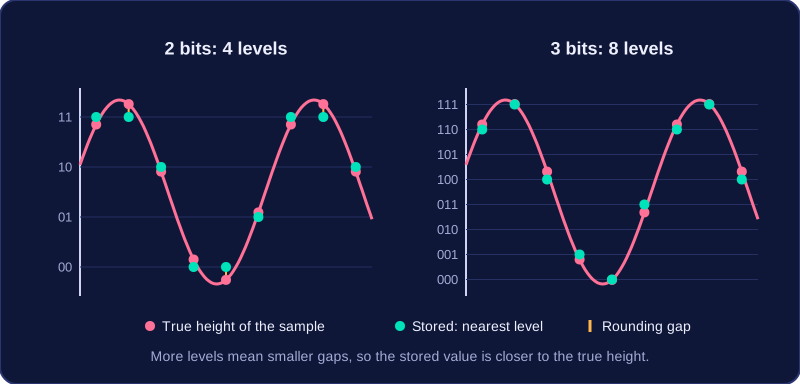
Because each sample is held as a binary number, a bit depth of n bits allows 2 to the power n different binary codes, and every code stands for one amplitude value. With 3 bits there are 2 to the power 3 = 8 levels; with 6 bits there are 2 to the power 6 = 64 levels. Each extra bit doubles the number of levels, because one more binary digit doubles the number of patterns you can make.
Imagine recording the rustle of a leaf. If the true amplitude falls between two available levels, the computer rounds it to the nearest one. At 3 bits the levels are far apart, so quiet details get rounded away. At 6 bits there are eight times as many levels, so each stored value can sit much closer to the real amplitude.
| Bit depth | Levels available | Accuracy of each sample | File size for the same duration and sample rate |
|---|---|---|---|
| 3 bits | 8 | Rougher rounding | Smaller |
| 6 bits | 64 | Finer rounding | Larger |
A higher bit depth gives more possible levels, so each sample is more accurate and playback quality is better. However, every sample needs more bits, so the file is larger. A lower bit depth gives fewer possible levels, so values are rounded more and the playback sounds rougher — but the file takes up less space.
Bit depth does not change how many samples are taken each second; that is the job of the sample rate. Bit depth changes only the number of levels available for storing each sample.
Duration is the number of seconds of audio in a sound file. It tells you how long the recording lasts when you play it, not how detailed or clear it sounds. A 2-minute piano piece and a 5-minute piano piece have different durations, even if both were recorded with the same equipment.
If the same sample rate and bit depth are used, a longer duration means more samples are taken in total. Each extra second adds another set of samples, and every sample takes up storage, so the file becomes larger. Doubling the duration doubles the number of samples and the file size, while each second is still captured in the same way.
Duration does not change playback quality. Quality depends on how often the wave is sampled and how many bits store each sample. Adding extra seconds gives you more audio to listen to, but it does not make each second more accurate or less accurate. A long, low-quality clip is still low quality, and a short, high-quality clip is still high quality.
When you use duration in a sound file size calculation, give it in seconds. For example, a clip lasting 3 minutes must be written as 180 seconds; using 3 would make the answer far too small. If a duration is given in minutes, multiply by 60 before putting it into the calculation.
Sound file size is the amount of storage a digital sound recording needs. Once you know the sample rate, the duration and the bit depth, you can calculate it exactly.
Finding the total number of samples
The sample rate is the number of samples taken each second. Multiplying it by the duration in seconds gives the total number of samples in the recording, because samples per second × seconds leaves just samples. For example, a rate of 12,000 Hz for 4 seconds gives 48,000 samples.
The file size formula
Each sample is stored using the bit depth, so multiply the total number of samples by the bit depth. The answer is in bits, because each sample is that many bits long:
file size in bits = sample rate × duration in seconds × bit depth
Before you substitute, make sure the duration is in seconds and the sample rate is in hertz. A rate written in kilohertz is multiplied by 1,000, so 9 kHz becomes 9,000 Hz. A duration of 1 minute 30 seconds becomes 90 seconds.
A worked example
A 5-second recording of a school bell is sampled at 16,000 Hz with a bit depth of 8 bits.
16,000 × 5 × 8 = 640,000 bits
There are 8 bits in a byte, so divide by 8 to convert: 640,000 ÷ 8 = 80,000 bytes. Divide by 1,000 for kilobytes: 80,000 ÷ 1,000 = 80 KB. Divide by 1,000 again if you need megabytes.
Because the three factors are multiplied, doubling any one of them doubles the file size. The formula counts a single channel of sound: sample rate, duration and bit depth are all it needs, so mono or stereo is not part of the calculation.