Memory & Storage
Binary and Hexadecimal Basics

Contents
Computers use binary because of the way their hardware is built. Inside a computer are huge numbers of tiny switches called transistors, and each one can only be in one of two states: on or off. Those two states are written as 1 for on and 0 for off. Binary is therefore a natural fit for the electronics rather than a style choice made by programmers.
Two states are quick and reliable
A transistor is switched by a voltage. A high voltage means on (1) and a low voltage means off (0). It is easy for a circuit to tell these two apart, even if the voltage drifts a little, so mistakes are rare.
Imagine a torch with one switch: pressed is on, released is off. Now picture a row of eight such switches side by side. Each switch adds one more bit, so the row as a whole can hold a pattern such as 0 1 1 0 1 0 0 1. A machine could be built with ten voltage levels instead of two, but neighbouring levels would be close together and easily misread, so sticking to two states is far safer.
Everything becomes a pattern of bits
Every item of data and every instruction is held and worked on as a sequence of 1s and 0s. A single binary digit is called a bit, and it is always either 0 or 1. A photograph, a song, a paragraph of writing and an instruction such as add two numbers all end up as different arrangements of bits. The computer never sees the picture or the words themselves: it only ever flips switches on and off in a chosen order, and the meaning comes from how that pattern of 1s and 0s is interpreted.
Denary is the number system you use every day — prices in a shop, scores in a game, the number of a bus. It is called base 10 because it is built from exactly ten digits: 0, 1, 2, 3, 4, 5, 6, 7, 8 and 9.
Having only ten digits is what makes the columns behave the way they do. Once you reach 9 you have run out of digits, so you start a fresh column on the left and begin again at 0. That is why every column is worth ten times the column to its right.
| Column | What one digit there is worth |
|---|---|
| Thousands | 1000 |
| Hundreds | 100 |
| Tens | 10 |
| Ones | 1 |
Place value is the value a digit gains from the column it sits in, so the same digit can mean very different amounts in different columns.
Here is a worked example. In the number 694, the 6 is in the hundreds column, so it stands for 6 × 100 = 600. The 9 is in the tens column, so it stands for 9 × 10 = 90. The 4 is in the ones column, so it stands for 4 × 1 = 4. Adding the columns gives 600 + 90 + 4 = 694, which is the number you started with.
The right-hand column is always the ones column, so a digit sitting there is worth exactly its face value. A zero still matters, though: 704 and 74 are different numbers, because the 0 in 704 holds the tens column open and keeps the 7 in the hundreds.
Binary is a number system that is base 2: it uses only two digits, 0 and 1. Every place in a binary number is worth twice as much as the place to its right, so the place values double as you move left.
Place values
In an 8-bit binary number the place values from left to right are 128, 64, 32, 16, 8, 4, 2 and 1. A nibble is 4 bits, so it uses only the place values 8, 4, 2 and 1.
| Position in an 8-bit number | Place value |
|---|---|
| 1st (leftmost) | 128 |
| 2nd | 64 |
| 3rd | 32 |
| 4th | 16 |
| 5th | 8 |
| 6th | 4 |
| 7th | 2 |
| 8th (rightmost) | 1 |
Each 1 adds the place value of its position and each 0 adds nothing, so you only add up the places that hold a 1. In the nibble 1010 the 1s are in the 8 and 2 places, so the value is 8 + 2 = 10. In the 8-bit number 10011000 the 1s are in the 128, 16 and 8 places, giving 128 + 16 + 8 = 152.
Leading zeros and length
Leading zeros are zeros written to the left of the first 1. They do not change the value of a binary number because those places add nothing. For example, 111 and 00000111 both have the value 7. Binary values are often padded with leading zeros to 8 bits so that a whole byte is written out and values line up neatly when you compare them.
A binary number does not have to be exactly eight bits long to be valid. Binary values you will meet can be anything from 1 to 8 bits, so 1, 101 and 11010110 are all valid binary values. Eight bits is just a common, consistent length.
A bit is one binary digit, so it can only be 0 or 1. Bits are grouped into fixed-size chunks so that patterns of them are easier to read, count and talk about: a nibble is 4 bits and a byte is 8 bits.
Bits, nibbles and bytes
A single bit on its own carries very little information, so data is nearly always handled in groups. A nibble is exactly four bits and a byte is exactly eight bits, so one byte is the same size as two nibbles.
| Unit | Number of bits | Also worth knowing |
|---|---|---|
| Bit | 1 | A single binary digit, 0 or 1 |
| Nibble | 4 | Half of a byte |
| Byte | 8 | Two nibbles |
For example, the byte 10100111 splits down the middle into 1010 and 0111. Each half is four bits long, so this byte is made of two nibbles. Nothing about the value changes: the split just lets you describe half of the byte at a time.
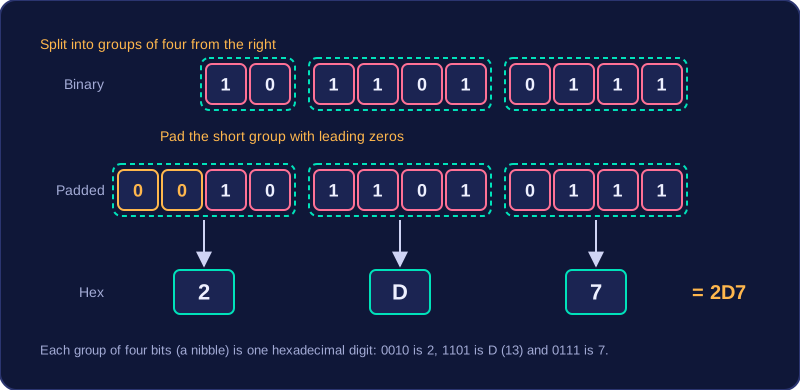
Because every nibble is the same size, one nibble can be written as a single hexadecimal digit (0 to F), which is why a byte is often shown as two hexadecimal digits.
Every binary number is built from bits, and the two bits at the ends of the number have special names. The most significant bit (MSB) sits at the far left of the number, in the column with the biggest place value. The least significant bit (LSB) sits at the far right, and its place value is always 1.
Why the names make sense
"Significant" here means how much the bit is worth. In the 8-bit number 10110010, the bits sit in the columns 128, 64, 32, 16, 8, 4, 2 and 1. The 1 at the far left is worth 128, so it is the MSB. Changing that bit from 1 to 0 takes 128 away from the total, which is the biggest change any single bit can make. The 0 at the far right is worth 1, so it is the LSB, and switching it from 0 to 1 changes the total by just 1.
| Term | Position | Place value in 8 bits |
|---|---|---|
| Most significant bit | Far left of the number | 128 |
| Least significant bit | Far right of the number | 1 |
Shorter numbers
The names follow the position of a bit, not the digit itself. In the 4-bit number 0110 the place values are 8, 4, 2 and 1, so the 0 on the far left is worth 8 and is the MSB, while the 0 on the far right is worth 1 and is the LSB. Written with leading zeros as 00000110 the value is still 6, but the MSB is now the leftmost of the eight zeros, worth 128, because that is the bit sitting in the biggest column. So the MSB is always the leftmost bit, even when that bit is a 0.
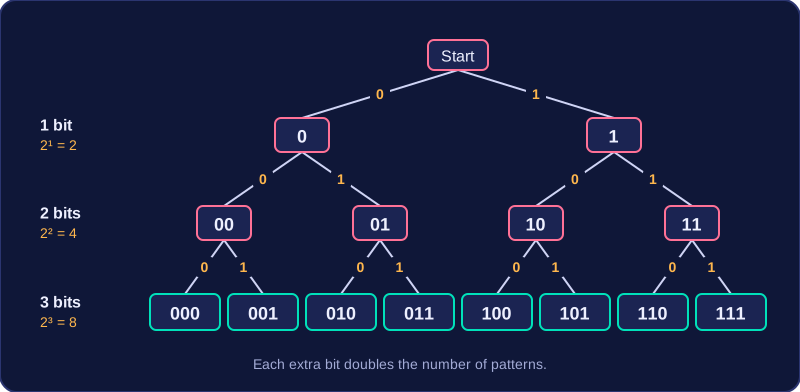
A bit is a single binary digit, so it has only two patterns: 0 or 1. Adding a second bit lets each pattern so far be extended with a 0 or a 1, so the count of patterns doubles. Add a third bit and it doubles again. That is why the number of binary patterns grows by a factor of two with every extra bit.
Counting patterns and the largest value
For n bits, the number of different patterns is 2 to the power n. Counting starts at zero, so the largest value is 2 to the power n minus 1: one of the patterns is spent on zero, which puts the top value one below the total count.
For example, 12 bits give 2 to the power 12 = 4096 patterns, running from 0 to 4095, so 12 bits are enough for any whole number smaller than 4096.
| Number of bits | Number of patterns (2 to the power n) | Values represented |
|---|---|---|
| 3 | 8 | 0 to 7 |
| 5 | 32 | 0 to 31 |
| 6 | 64 | 0 to 63 |
| 10 | 1024 | 0 to 1023 |
The 8-bit range
With 8 bits there are 2 to the power 8 = 256 patterns, so the denary values run from 0 to 255. The same range written in binary is 00000000 to 11111111, and in hexadecimal it is 00 to FF.
Only positive whole numbers are covered here: negative numbers, two's complement, sign and magnitude and binary fractions are not required.
Hexadecimal is a number system with base 16. It uses sixteen digits: 0 to 9 and then A to F. The letters A to F continue the count after 9: A is ten, B is eleven, C is twelve, D is thirteen, E is fourteen and F is fifteen. Every value from 0 to 15 therefore has a single hexadecimal digit, and it also fits in a 4-bit binary pattern. For example, denary 6 is 0110 in 4 bits and 6 in hexadecimal, while denary 12 is 1100 in 4 bits and C in hexadecimal.
Each hexadecimal digit represents exactly one nibble, which is 4 bits. A byte is 8 bits, so one byte is written as two hexadecimal digits, not one. For example, the two-digit hexadecimal number 7A represents one byte.
Place values
In a two-digit hexadecimal number, the left digit counts 16s and the right digit counts 1s. For example, in 3C the 3 counts three 16s and the C counts twelve 1s. This is why hexadecimal is base 16: each place value is 16 times the place value to its right.
Why hexadecimal is useful
Hexadecimal is shorter than binary: eight binary digits become just two hexadecimal digits. This makes it easier for humans to read, remember and type than long binary patterns, so fewer errors are made. It also converts easily to and from binary because each hexadecimal digit is exactly one nibble.
Hexadecimal does not make a file or memory smaller. Inside the machine the data remains binary; hexadecimal is just a convenient display for people. People use it when they need a readable way to inspect or enter binary data, such as memory addresses in a crash report or raw values in a file viewer.