Images
Colour Depth

Colour depth records how many bits are set aside for the colour of one pixel, so it is measured in bits per pixel. Each pixel shows one colour at a time, and that colour is held as a binary code whose length is the colour depth.
Bits per pixel and the number of colours
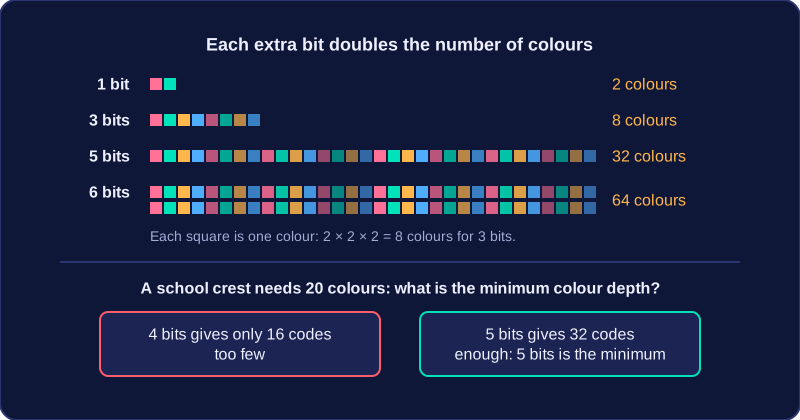
Every extra bit doubles the number of codes you can make, so a colour depth of n bits gives 2 to the power of n different colours. A depth of 1 bit gives 2 colours, 3 bits give 2 × 2 × 2 = 8 colours, and 8 bits give 256 colours.
| Colour depth (bits per pixel) | Colours available |
|---|---|
| 1 | 2 |
| 3 | 8 |
| 5 | 32 |
| 6 | 64 |
To find the minimum colour depth for a set number of colours, choose the smallest bit count whose colour total is at least that number. A school crest that needs 20 colours cannot use 4 bits, because that gives only 16 codes; 5 bits give 32, which is enough, so 5 bits per pixel is the minimum.
What changing the colour depth does
Increasing the colour depth gives more colours to choose from, so each pixel can be stored closer to its true colour. Colour accuracy and image quality improve, and colour banding — where a smooth change such as a sunset sky is stored as visible stripes of slightly different shades — becomes less likely because there are more shades in between. Decreasing the colour depth does the opposite: fewer shades are available, colours are less accurate and banding is more likely.
File size changes too. Every pixel is stored using the chosen number of bits, so a higher colour depth means more bits for every pixel and a larger file; a lower colour depth means fewer bits per pixel and a smaller file. An image of 500 pixels stored at 5 bits per pixel uses 2,500 bits, while the same image at 6 bits per pixel uses 3,000 bits. Colour depth changes the number of bits per pixel, not the number of pixels, so it does not change the image's resolution.
Practise this
OCR GCSE Computer Science · Images