Images
Bitmap Images

A bitmap image is a picture stored as a grid of pixels. Photographs taken on a phone and drawings made in a paint program are bitmaps: underneath, the computer only stores which colour belongs in each square of the grid.
Pixels
A pixel is the smallest unit or part of an image. It is one small square of colour, and it shows exactly one colour at a time — a pixel never holds two colours, even where two different colours meet. Zoom in far enough on a bitmap and the individual squares become visible.
Colours as binary codes
A binary code records the colour of each pixel. Every colour used in the image is given its own code, and the same colour always uses the same code wherever it appears, so the computer can rebuild the picture by turning each code back into its colour.
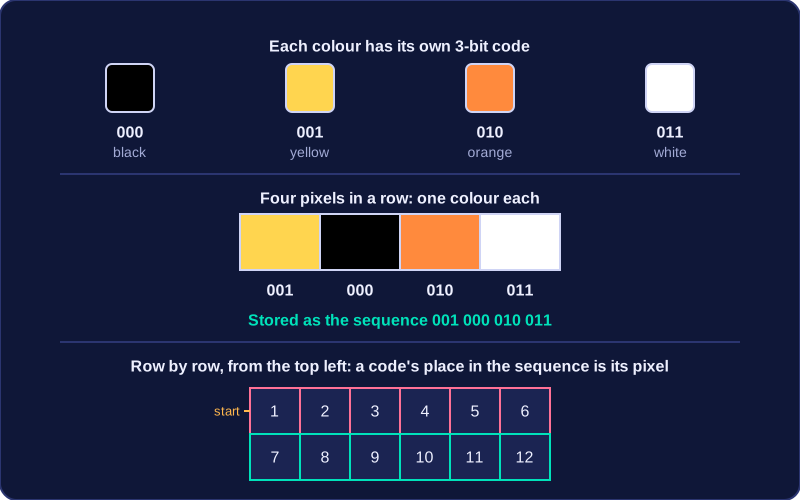
For example, a small game sprite might use three-bit codes, including 000 for black, 001 for yellow, 010 for orange and 011 for white. Four pixels in a row — yellow, black, orange, white — are stored as the sequence 001 000 010 011.
Why the order matters
The image is stored as a sequence of these codes, one per pixel, usually row by row:
- Start at the top-left pixel and store its code.
- Move right along the row, storing one code per pixel.
- At the end of the row, carry on at the left of the next row down.
- Repeat until every pixel has a code.
The codes themselves carry no position — the computer works out which pixel a code belongs to by counting its place in the sequence. A code that is fifth along in the top row must belong to the fifth pixel of that row. This is why the rows have to be stored in a consistent order: swap two codes and those two pixels change colour, but leave a code out and every pixel after it shifts along by one, scrambling the rest of the picture.