Images
Image Resolution

Resolution is the number of pixels that make up an image. It is written as the width in pixels by the height in pixels, for example 400 × 250. It is not the physical size of the picture: a poster on a wall and a small thumbnail on a phone screen can have exactly the same resolution, because resolution counts pixels rather than centimetres.
Counting the pixels
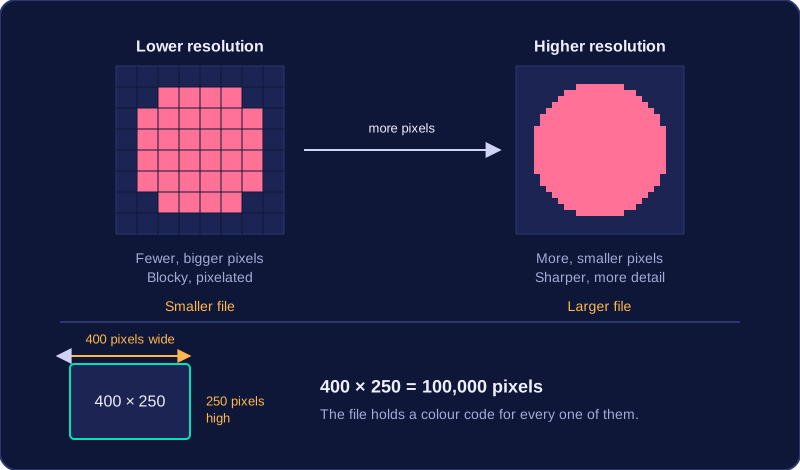
Multiply the width by the height to find the total number of pixels. An image that is 400 pixels wide and 250 pixels high is made of 400 × 250 = 100,000 pixels, so the file has to hold a colour code for every one of those 100,000 squares.
What changing the resolution does to the picture
Raising the resolution means the image is made from more, smaller pixels, so each pixel covers a smaller part of the scene. Fine features, such as the spokes of a bicycle wheel or the letters on a shop sign, each get their own pixels instead of being merged into one square. The image therefore shows more detail and looks sharper.
Lowering the resolution means fewer, bigger pixels. Anything smaller than one pixel is merged into it, and the edges of shapes become visible squares, so the picture looks blocky or pixelated. A low-resolution photo shown on a large screen looks like this too, because each of its pixels is drawn bigger.
What changing the resolution does to the file
Each pixel needs its own colour code storing, so the amount of data rises and falls with the number of pixels. An image stored at 400 × 250 must save a code for all 100,000 of its pixels, so its file is larger than the same scene stored at a lower resolution, where there are fewer pixel codes to save.
| Change | Number of pixels | Detail and sharpness | File size |
|---|---|---|---|
| Higher resolution | More | Sharper, more detail | Larger |
| Lower resolution | Fewer | Blocky, pixelated | Smaller |
Practise this
OCR GCSE Computer Science · Images