Using Cloud and Traditional Systems Together
Cloud and traditional systems
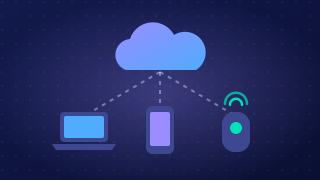
A mixed system uses everyday local hardware — a laptop, tablet or desktop computer — alongside a cloud service. The device does the processing and keeps files it can open straight away, while the cloud provides storage you can reach from any location with an internet connection. The two halves are joined together by synchronisation, so the local and cloud parts behave like one system rather than two separate ones.
Cloud storage as the central hub
Picture the cloud as the hub of a wheel and each device as a spoke. Every device holds its own copy of the files in a synced folder, and a small sync program compares that copy with the hub.
- If a file was changed on the device, it is uploaded to the cloud.
- If the hub holds a newer version, the device downloads it and replaces its older copy.
Because every device checks against the same hub, changes travel in both directions and the copies stay consistent between devices and locations. A device can also keep working on its own local copy when there is no internet connection, then synchronise once it reconnects.
| Job | Where it happens |
|---|---|
| Opening, editing and saving a file | On the local device |
| Holding the master copy every device checks against | Cloud storage (the hub) |
| Spotting which copies differ and moving changes each way | Synchronisation |
Notifications
A notification is an alert the cloud service sends when something in a shared folder changes. It tells you who made the change and when, so a group working on the same plan knows straight away that it has been updated and does not carry on using an older version.
Worked example
A school drama club builds its running order on a tablet in the hall, while a teacher adds prop notes on a classroom laptop. Neither machine is in the same room, yet both save into the same synced folder. The tablet uploads its updated running order to the hub, the hub sends it down to the laptop, and the laptop's prop notes travel back up and down to the tablet. Next morning both devices show one identical, up-to-date plan — no memory sticks and no emailing files to yourself.
A program can check a device's folder against the hub and report which way each file needs to travel:
local_files = ["running_order.txt", "prop_notes.txt"]
cloud_files = ["running_order.txt", "prop_notes.txt"]

# anything only on the device must go up to the hub
for name in local_files:
    if name not in cloud_files:
        print("Upload:", name)

# anything only on the hub must come down to the device
for name in cloud_files:
    if name not in local_files:
        print("Download:", name)
Practise this
Pearson BTEC Digital Information Technology · Using cloud and traditional systems together