User Interfaces
Graphical User Interface

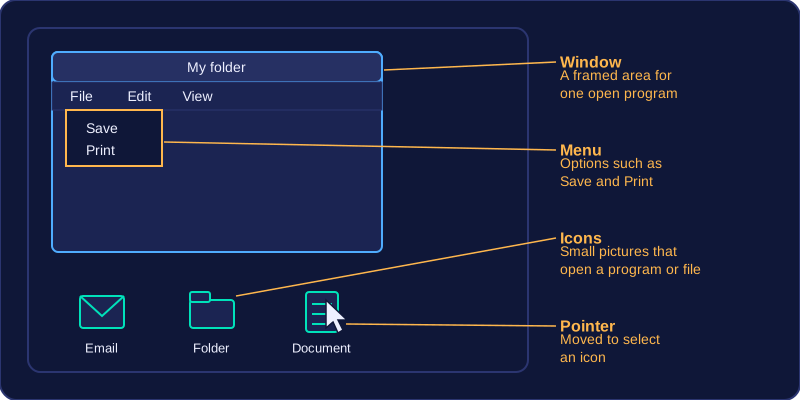
A graphical user interface (GUI) lets you control a computer by choosing pictures and options on screen instead of typing instructions. Its visual elements are usually summed up as WIMP.
| Element | What it is |
|---|---|
| Windows | Separate framed areas, each showing one open program or folder |
| Icons | Small pictures that open a program or file when selected |
| Menus | Lists of options you pick from, such as Save or Print |
| Pointer | The pointer (usually an arrow) on screen that you move to select things |
You work a GUI mainly with a pointing device, such as a mouse or trackpad, or by touching the screen. Actions are done by pointing at something and selecting it, so very little is typed.
Advantages
A GUI is easy to learn and use, especially for beginners. You recognise an icon or a menu option rather than remembering the exact instruction behind it. A pupil opening their school email for the first time can spot the envelope picture and select it, even though they know no commands at all.
Disadvantages
- A GUI needs more memory and processing power, and takes up more storage space, than a text-based interface. Every window, icon and menu has to be held in memory and drawn on screen, so the computer works harder just to display the interface, and the software that draws them takes up more storage space. Being easier to use does not make it lighter on resources.
- A GUI is slower for an experienced user doing repetitive or complex work, because a task that takes one command in a text-based interface may take several clicks. Renaming thirty files one by one, for example, means thirty rounds of pointing and clicking, where a single command could deal with them all at once.