User Interfaces
User Interfaces

A user interface is the part of the operating system that lets a person communicate with the computer. Without one you could not give the computer instructions, and you could not see what it had done.
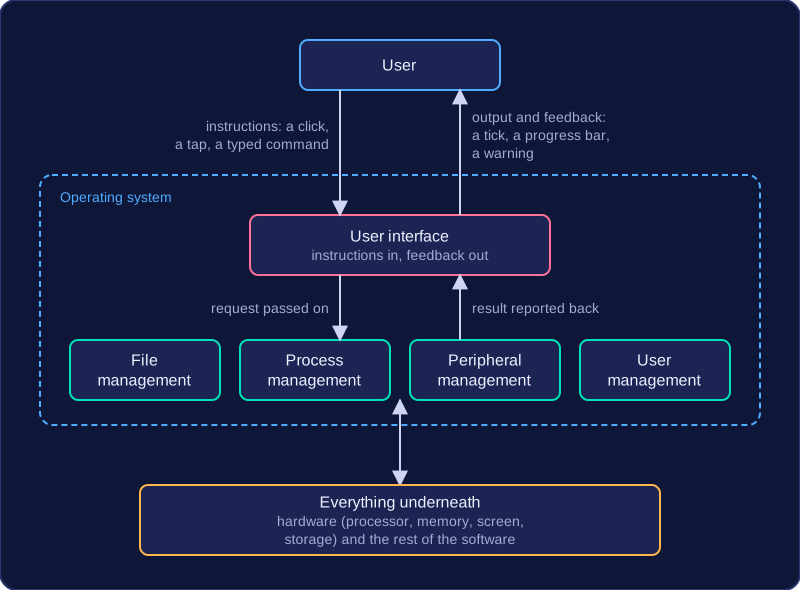
It works in both directions. It takes in your instructions — a click, a tap on a screen, a typed command — and passes them on to the operating system. It also presents output and feedback, such as a tick appearing next to a file you have just saved, a progress bar while a video uploads, or a warning that your password was wrong.
Where it sits
The user interface is a layer between you and everything underneath it: the hardware (processor, memory, screen, storage) and the software (the rest of the operating system and your programs). Because it handles that contact for you, you never deal with the hardware directly. You do not need to know which part of the disk holds your saved work, or the exact instructions the processor needs to fetch it — you simply pick the file and open it.
| What you do | What the interface deals with |
|---|---|
| Press Save on a document | Passes the request to file management so the file is written to storage |
| Enter a username and password | Passes the details to user management, then shows you the result |
| Send a job to the printer | Passes the job to peripheral management and reports back on progress |
One function, not the whole system
The user interface is only one function of the operating system, not the operating system itself. The same software also manages files (storing, naming and finding them), processes (deciding which program uses the processor next), peripherals (printers, keyboards and sensors) and users (accounts and permissions). A helpful way to picture it is a café counter: it is the part you talk to, but plenty of work is going on behind it.
Not every user interface is graphical: some systems use a command line or a set of menus instead, which changes how you give your instructions.