Peripheral Management
Print Queue and Buffer

A print queue is the list of print jobs waiting to be printed. It is held in a buffer, a special area of memory where the operating system keeps data waiting to be sent to a printer. This is needed because peripherals work at their own pace: a printer can only accept a small amount of data at a time, while the computer produces data far more quickly. Without somewhere to hold the surplus, the computer would have to stop and wait for the printer to catch up.
The operating system sends data from the buffer to the printer in chunks, commonly a page at a time. Each time the printer finishes a chunk, the next one is released. The buffer does not have to be inside the computer: it can sit on a print server shared by several machines, or in memory built into the printer itself.
Keeping jobs in order
When several jobs arrive, the queue keeps them in order and the operating system releases them one at a time, so pages from different documents are not mixed up. It also records whether each job is queued, printing or finished, so the operating system can manage the order and progress of the jobs. The queue is temporary memory, not the paper tray and not a pile of finished pages: once a job is done it leaves the queue and its memory is freed.
For example, the music department sends three concert programmes to the office printer: orchestra, choir and jazz band. The printer takes one sheet at a time, so the choir and jazz band programmes wait in the queue while the orchestra one prints, then follow in the order they were sent.
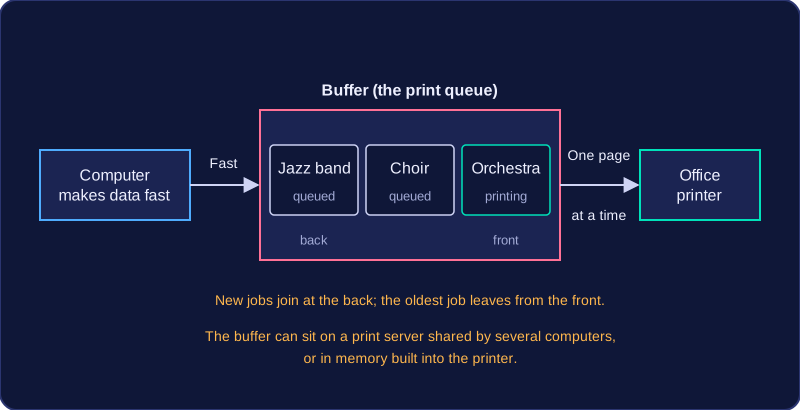
A queue works like a list where new jobs join at the end and the oldest job leaves the front.
Practise this
Edexcel GCSE Computer Science · Peripheral Management