Peripheral Management
Device Drivers

A device driver is a program that controls a peripheral device. It sits between the device and the operating system: it turns a request from the operating system into the signals the device understands, and passes anything the device sends back up to the operating system.
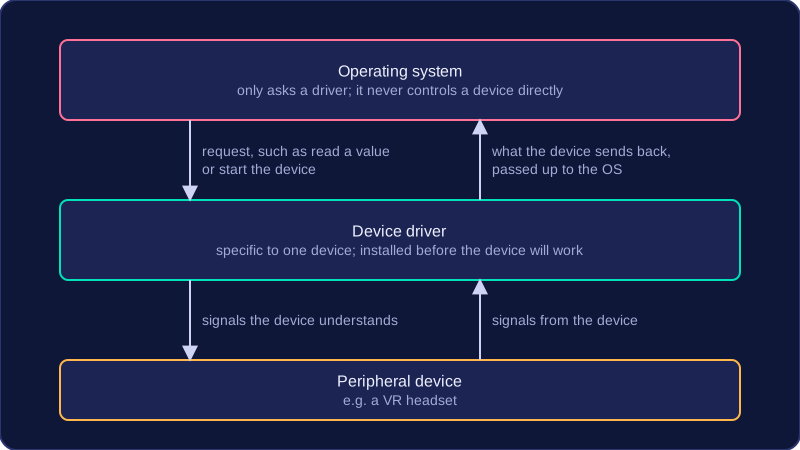
Each device needs its own driver
Every peripheral communicates with the operating system through its own device driver. The operating system never controls a device directly: it only knows how to ask a driver to do something, such as read a value or start the device. A driver is specific to the device it controls, because each make and model of hardware has its own set of commands and its own way of reporting back. A driver written for a USB microphone would be no use for a barcode scanner, even though both plug into the same type of port.
Where drivers come from
Many device drivers are included with the operating system, which is why a common peripheral often works the moment you plug it in.
A new or different device may be supplied with its own driver, either on a disc or as a download from the manufacturer, and that driver must be installed before the operating system can use the device. Until the correct driver is available, the operating system has no way of sending instructions to the peripheral, so the device will not work — even though it is connected and receiving power.
For example, the VR headsets in the art room work on the desktop computers, because the technician installed each headset's driver when the room was set up. Plug the same headset into a laptop in the library and it still lights up, but nothing else happens: turning your head does nothing and no picture appears. The laptop has a working headset attached, but no driver that understands its signals. Install the driver and the headset starts working.
| Driver included with the operating system | Driver supplied with the device |
|---|---|
| Already on the computer when you get it | Comes on a disc or from the manufacturer's website |
| Usually lets a common device work as soon as it is plugged in | Must be installed first, before the device will work |
| Covers widely used peripherals | Covers new, unusual or updated versions of a device |
Practise this
Edexcel GCSE Computer Science · Peripheral Management
Edexcel GCSE Computer Science · Purpose & Function of Operating Systems