Topologies
Mesh Topology

In a mesh topology each node connects to more than one other node, and every node acts as a router: it takes in data, works out where the data needs to go and passes it on. With so many links there is usually more than one possible path between two devices.
Why a mesh is resilient
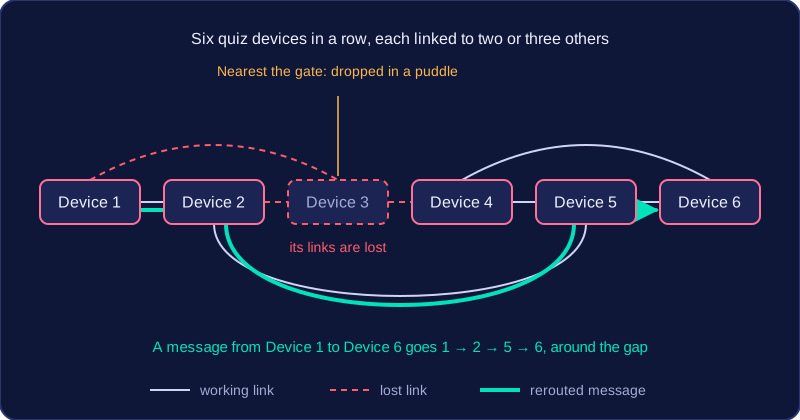
The spare links are called redundancy. They give data alternative routes, so if a cable is cut or a device is switched off, traffic simply travels a different way. This means a mesh has no single point of failure and keeps working when part of it breaks, which is why it is described as resilient.
A mesh also lets different devices transmit at the same time, and each node can send and receive together, so lots of traffic can flow without everything queueing behind one shared cable. Nodes can be added, moved or removed without disrupting everyone else. This is easiest when the mesh is software-based: the nodes are programmed to discover each other and choose routes automatically, so a new node just needs power and a wireless connection. A wired mesh is harder to extend, because each new node needs physical cabling and a network interface card.
For example, imagine a row of six handheld quiz devices at an outdoor activity centre. Each one talks to two or three of its neighbours and passes answers along, so when the device nearest the gate is dropped in a puddle, the remaining five route the messages around the gap and the quiz carries on.
What a mesh costs you
All that redundancy has a price. Extra connections add cost and complexity, and a wired mesh is expensive to install because every link is a cable that has to be bought and laid. With so many devices and paths, maintenance and administration are difficult: tracking down a faulty link or updating settings across a busy mesh takes far more effort than looking after one central switch.
Practise this
Edexcel GCSE Computer Science · Topologies