Topologies
Bus Topology

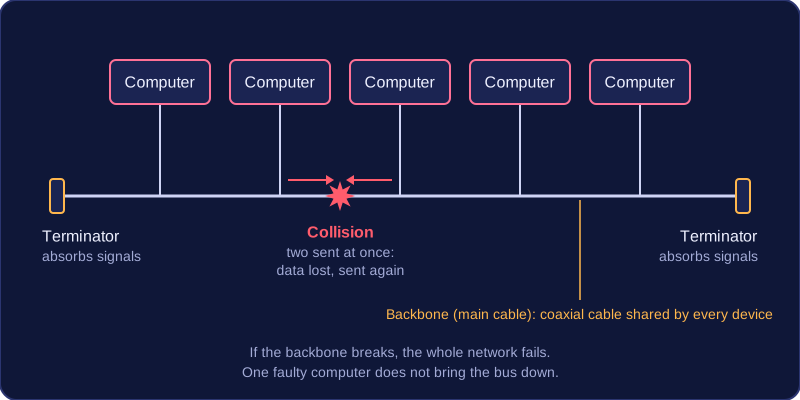
A bus topology connects every device to one shared backbone, also called the main cable. This backbone is coaxial cable, and each device connects to it rather than having its own cable to a central device.
At both ends of the backbone there is a terminator. It absorbs signals so they do not reflect back along the cable. If a terminator is missing or faulty, reflected signals interfere with new transmissions and the network does not work properly.
Why a bus can be useful
A bus needs less cable than topologies that run a separate cable to every device, so installation can be cheaper. Adding a device is also easy: it only has to connect to the main cable, with no new link back to a central device.
Drawbacks of sharing one cable
Because every device uses the same backbone, only one device can transmit at a time. If two devices transmit together, their signals collide, so data is lost and must be sent again. As more devices or users are added, collisions become more frequent and throughput falls.
For example, if eight computers in a youth club office share one backbone and several send print jobs at once, the collisions make files take longer to arrive. The shared cable is also a security risk: every device on the bus can see every data packet, even packets meant for another device.
If the main cable breaks, the whole network fails because no device can reach the others. A single faulty device does not bring the bus down; it is failure of the backbone or terminators that does.
Practise this
Edexcel GCSE Computer Science · Topologies