Protocols & Layers
POP3

POP3 (Post Office Protocol version 3) is an email retrieval protocol. It is the set of rules your email software follows to collect incoming messages from your mail server and bring them down to your own device. Sending mail is a separate job, handled by SMTP.
Downloading to one device
When an email account is set up using POP3, the email app contacts the mail server and downloads the waiting messages onto your device — a laptop, phone or tablet. They are stored there, so you can read and organise them even when you have no connection.
For example, Priya sets up her school club's inbox with POP3 on the club laptop. When she checks for mail, the server hands over the three messages waiting for the club and they are saved on the laptop's drive. She can read them on the bus home with no signal at all.
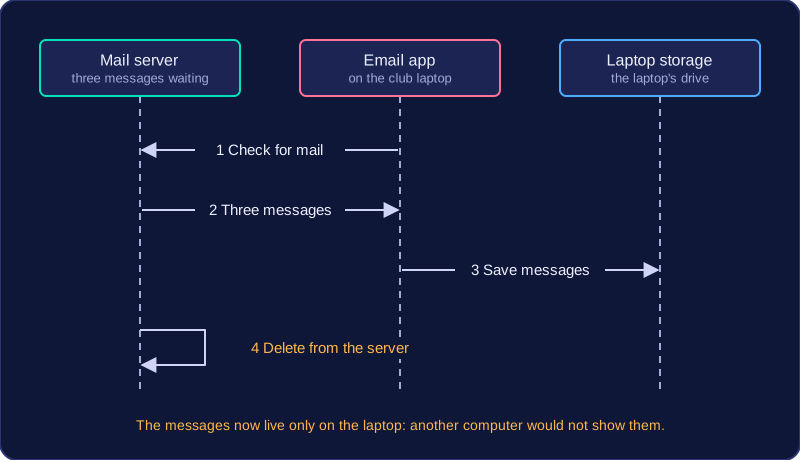
Messages are normally deleted from the server
Once a message has been downloaded successfully, POP3 normally deletes it from the server. The server acts as a holding point rather than a permanent store: it keeps mail only until a device collects it. This frees up space on the server and means each message lives in one place — on the device that downloaded it.
The effect is that the message is now tied to that device. If Priya later opens the club account on a different computer, the three messages will not appear there, because they were moved to the laptop rather than left behind. If the laptop is lost or broken, those emails are lost with it unless they were backed up somewhere else.
Practise this
Edexcel GCSE Computer Science · Protocols & Layers