Protocols & Layers
IMAP

IMAP (Internet Message Access Protocol) is an email retrieval protocol: it is the set of rules a device follows to collect email that is waiting for you on a mail server. Its key feature is that it does not take messages away — they stay on the server.
Messages stay on the server
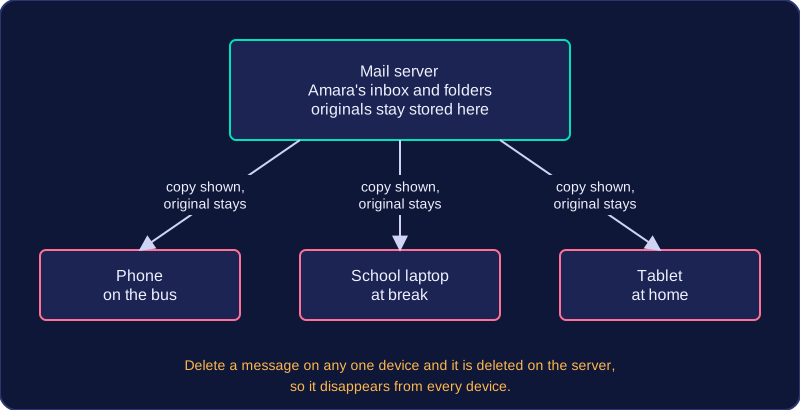
When your email app checks your inbox using IMAP, the server sends it a copy of each message so you can read it, but the original stays where it is. A message is removed only when you delete it, and because that deletion happens on the server it applies everywhere.
Because the mailbox lives on the server rather than on one machine, the same account can be used from several devices. Imagine Amara reading email on her phone on the bus, then on a school laptop at break, then on a tablet at home. Each device shows the same inbox, with the same folders and the same read and unread messages, because each one is looking at the copy held on the server rather than downloading and keeping its own. This is also why IMAP suits people who switch devices often: nothing is stranded on a single computer.
| What you do | What happens on the mail server |
|---|---|
| Open your inbox on a tablet | A copy is shown on the tablet; the originals stay stored |
| Read a message on your phone | The message stays, and it shows as read on other devices too |
| Delete an old newsletter | The message is removed from the server, so it disappears from every device |
Access through a web browser
IMAP is not limited to a dedicated email program. Because the messages are held on the server, you can also log in to the same account through a web browser and see the same inbox, folders and read markers — the browser is simply another way of viewing the one stored mailbox, not a second copy of it. POP3, by contrast, downloads messages to one device and normally deletes them from the server, which is why it does not give you this shared, multi-device inbox.
Practise this
Edexcel GCSE Computer Science · Protocols & Layers