Protocols & Layers
HTTPS

HTTPS is the secure version of HTTP. It is the protocol your browser uses to request web pages, but with one vital extra: everything sent between your device and the web server is encrypted, scrambled so that anyone who intercepts it sees only meaningless characters.
Why encryption matters
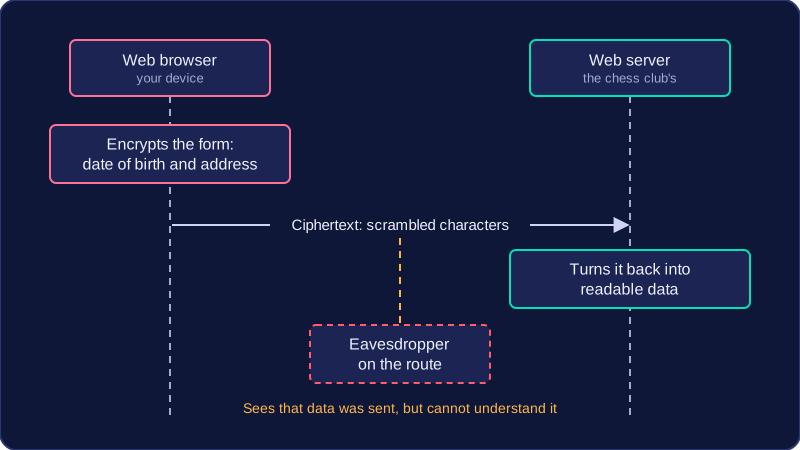
When you load a page over HTTP, the data travels across the internet as plain text. Any device on the route, such as a shared router in a café, can read the contents. With HTTPS, that same data is turned into ciphertext before it leaves your device and is only turned back into something readable by the server at the other end. An eavesdropper can still see that data was sent, but cannot understand what it says.
For example, imagine you enter your date of birth and home address into a form to join an online chess club. Over HTTP, both would be visible to anyone snooping on the connection. Over HTTPS, they arrive at the club's server intact while remaining unreadable to everyone in between.
When HTTPS is used
HTTPS is chosen wherever personal or sensitive information is transmitted, because the cost of that data being read is high. That covers:
- logging in with a username and password, so the credentials cannot be captured and reused
- submitting your home address and date of birth to register with a doctor's surgery online
- sending messages or uploading documents that are meant to stay private
- any page where you are signed in and the server sends your account details back to you
A browser usually shows a padlock symbol to tell you the connection is using HTTPS. That padlock confirms the data is encrypted in transit; it does not prove the website is trustworthy or that the information it shows is accurate, so treat it as a sign of protection rather than a guarantee of honesty.
HTTPS and HTTP side by side
| Feature | HTTP | HTTPS |
|---|---|---|
| Purpose | Requests and delivers web pages | Requests and delivers web pages securely |
| Protection of data | Sent unencrypted; readable if intercepted | Encrypted; unreadable if intercepted |
| Typical use | Public pages with nothing private on them | Logins, payments, personal details, private messages |
HTTPS is not a different protocol doing a different job: it is HTTP with encryption added, which is why the two share the same name.
Practise this
Edexcel GCSE Computer Science · Protocols & Layers