File Handling
Writing Strings to a File
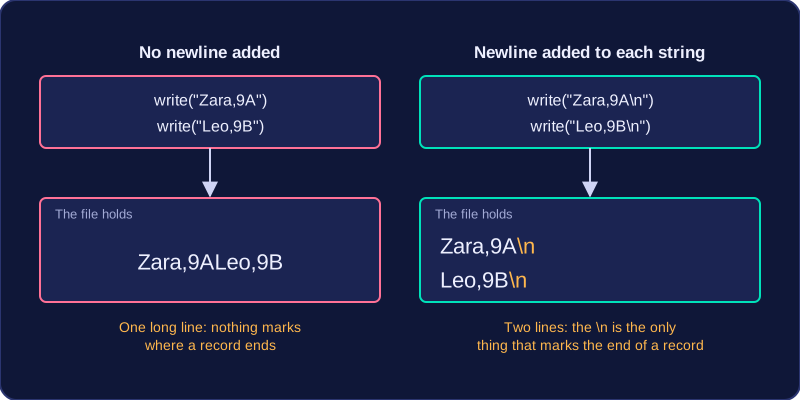
write() takes one string and sends exactly those characters to the file at the current position. It adds nothing of its own — no spaces, no punctuation and no line feed. Writing "Zara,9A" and then "Leo,9B" leaves the file holding Zara,9ALeo,9B, because the second record carries straight on from the first. To put each record on its own line you add the newline character "\n" to the end of the string yourself, so the line becomes "Zara,9A\n". The file has no idea where one record ends — the line feed is the only thing that marks it.
writelines() takes a list of strings and writes them all, one after another. It still puts nothing between them, so every string in the list must already end with "\n". A list holding "Zara,9A" and "Leo,9B" with no newline characters produces one long run-together line, exactly as two write() calls would.
Build each record as one complete string and call write() once for it, rather than calling write() separately for the name, the comma, the class and the rest. One call per record is easier to read, keeps the commas and the line feed together in one place, and lets you check the finished line before it is saved.
For example, if one list holds player names and a second list holds their scores, a single loop can step through both lists with the same index. Inside the loop, join the name, a comma, the converted score and the newline character into one string, then pass that string to write(). The str() call matters because the scores are numbers and + only joins text. Because the "\n" is part of the string being written, the loop copes with any number of records, and each one still begins on a fresh line when the file is opened again.