File Handling
Writing CSV Records
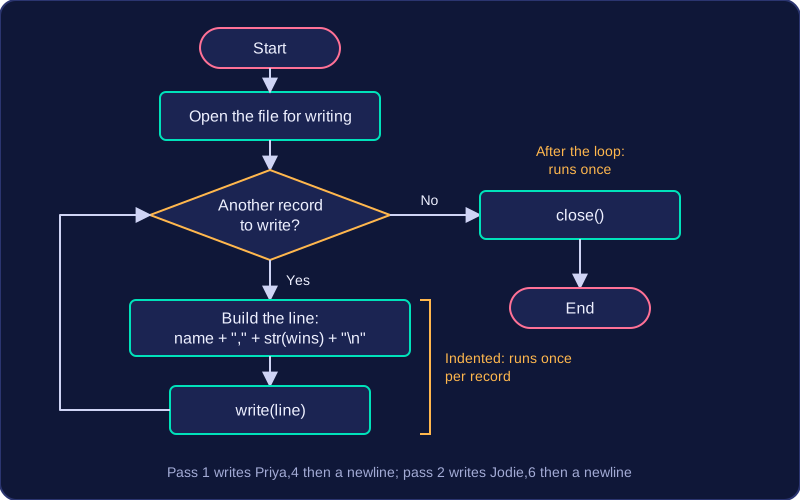
To write CSV data, build each output line as one string and send that whole string to the file with write(). The fields go in the order the format requires, joined with +, with a comma between one field and the next but not after the last field. A trailing comma creates an extra empty field when the file is read back, so the record no longer matches the expected output. Finish the line with the newline character "\n" so the next record starts on a fresh line.
| Record | Line built and written |
|---|---|
| Priya, 4 wins | Priya,4 then a newline character |
| Jodie, 6 wins | Jodie,6 then a newline character |
Each row becomes one string: name, comma, wins, newline. Converting the wins value to text first lets it be joined to the name with +, and the comma sits only between the two fields.
Place the statements carefully
Keep write() inside the loop so every record produces a line, and keep close() after the loop, lined up with the for statement. Indentation is what decides this: indented statements run once per record, while statements at the loop's level run once, after the loop has finished. The file therefore stays open until every record has been written; closing inside the loop would shut it after the first record and the rest would be lost.
Use constants
Store the file name and the separator characters in constants and use those constants throughout the program. If the file name or the comma needs changing, you edit one line rather than hunting through repeated text.
Check the finished file
If the output file is checked against an expected format, the field order, every comma and every newline must be exactly right. Compare your finished file with the expected version line by line to catch a missing comma, an extra comma, or two records joined onto the wrong line.