Sound
Bit Rate and Sound File Size

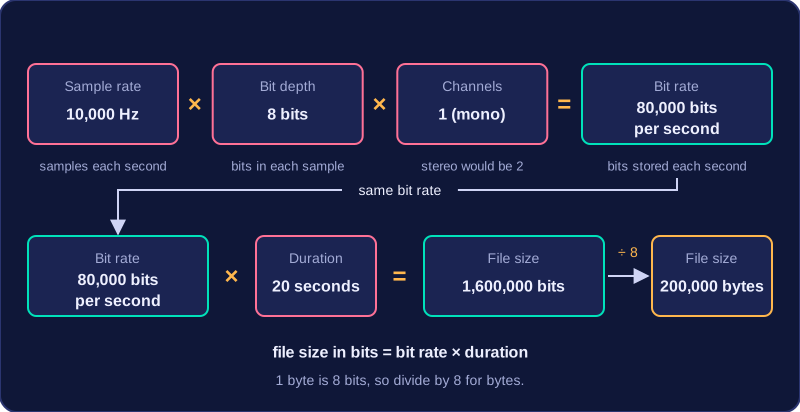
Bit rate is the number of bits stored for every second of sound. You work it out by multiplying the sample rate by the bit depth, then by the number of channels: bit rate = sample rate × bit depth × channels. A mono recording at 12,000 Hz with a bit depth of 8 bits has a bit rate of 12,000 × 8 × 1 = 96,000 bits per second. Stereo stores two channels, so the same recording has twice that bit rate. Bit rate is a good measure of both quality and file size, because it counts the bits stored for each second.
Working out file size
For an uncompressed sound file, the size depends on the sample rate, bit depth, duration and number of channels. Mono uses one channel; stereo uses two. Because bit rate already counts the channels, the formula is:
file size in bits = bit rate × duration = sample rate × bit depth × channels × duration
A 20-second mono recording at 10,000 Hz with a bit depth of 8 bits has a bit rate of 80,000 bits per second. Its file size is 80,000 × 20 = 1,600,000 bits, which is 200,000 bytes.
# Work out the bit rate and file size of an uncompressed recording
sample_rate = int(input('Sample rate in Hz: '))
bit_depth = int(input('Bit depth in bits: '))
duration = int(input('Duration in seconds: '))
channels = int(input('Number of channels: '))
bit_rate = sample_rate * bit_depth * channels
total_bits = bit_rate * duration
print('Bit rate: ' + str(bit_rate) + ' bits per second')
print('File size: ' + str(total_bits) + ' bits')
print('Size in bytes: ' + str(total_bits // 8))
Output when the user types 10000, 8, 20, 1:
Sample rate in Hz: 10000
Bit depth in bits: 8
Duration in seconds: 20
Number of channels: 1
Bit rate: 80000 bits per second
File size: 1600000 bits
Size in bytes: 200000
Quality and file size trade-off
Raising the sample rate means more samples are taken each second, so fast changes in the wave are captured more closely. Raising the bit depth means each sample is stored more precisely. Both improve quality, but both raise the bit rate and the file size. Bit rate is not bit depth: bit depth is the number of bits for one sample, while bit rate is the number of bits for one second of sound.
| Setting | Sample rate | Bit depth | Bit rate | File size for 20 s mono |
|---|---|---|---|---|
| A | 10,000 Hz | 8 bits | 80,000 bits per second | 1,600,000 bits (200,000 bytes) |
| B | 20,000 Hz | 16 bits | 320,000 bits per second | 6,400,000 bits (800,000 bytes) |
Setting B stores four times as many bits each second as setting A, so its file is four times larger, but it keeps more detail. Lowering either value saves space but loses quality.
Practise this
Edexcel GCSE Computer Science · Sound
Edexcel GCSE Computer Science · Units & Conversion