Cybersecurity
Malware

Contents
Malware is short for malicious software: programs written to cause harm to a computer system, damage or steal data, or gain unauthorised access to it. It is software rather than a physical fault, so it must arrive as code that has got onto your computer in some way.
Malware only works once it runs
Malware is executable code, which means the processor has to carry out its instructions before anything happens. A file sitting in a downloads folder or on a memory stick is only stored data; on its own it cannot change, delete or send anything.
| Situation | Can the malware do harm? | Why |
|---|---|---|
| Infected file still attached to a message | No | It is data stored elsewhere; nothing has run |
| File saved on the computer but never opened | No | Its instructions have not been executed |
| File opened and executed | Yes | The processor carries out its instructions |
This is why getting the code to run is the whole aim of an attacker. Once it runs, the malware works with the permissions of whoever launched it: code started by an ordinary user account can read and delete that user's documents, while code started by an administrator account can reach far more of the system. Malware that manages to run can also keep running quietly in the background, so a person may not notice anything until files or data go missing.
For example, Priya saves a file from a message and leaves it unopened in her downloads folder for a week, and nothing at all happens. The moment she double-clicks it, its instructions execute and it begins deleting the photos in her pictures folder. The same file, never opened, would have caused no damage.
A virus is malware that hides inside another file or program. It attaches its own code to that host file, then copies itself into other programs once it gets the chance to run.
Why a virus needs you
A virus cannot move about on its own. It sits inside its host file doing nothing until a user opens the document, launches the program or runs the installer it is attached to. Only then does the virus code start running. That is why viruses are often tucked inside files that look worth opening, such as a downloadable recipe collection, a shared club spreadsheet or an attachment pretending to be a ticket.
Once the infected file is opened or launched, the virus searches for other files and programs it is able to write to, and writes a copy of itself into them. Anyone who later opens one of those newly infected files starts the process again, so one careless open can spread the virus through a whole shared folder.
What a virus does to a computer
An active virus harms the computer by interfering with the files stored on it. It may delete files so they are removed from the system, corrupt them so they will not open or the data inside is damaged, or modify them so they still open but the contents are wrong. Because the virus changes files rather than breaking the hardware, the machine usually still switches on and behaves normally at first, which makes the damage easy to miss.
Imagine a virus hidden in a recipe file you download to plan a family meal. When you open it, the virus copies itself into the other recipe files in the same folder and changes the oven temperatures in two of them, so the dishes no longer cook correctly. Nothing looks wrong at the time; the errors only appear days later when someone follows the recipes.
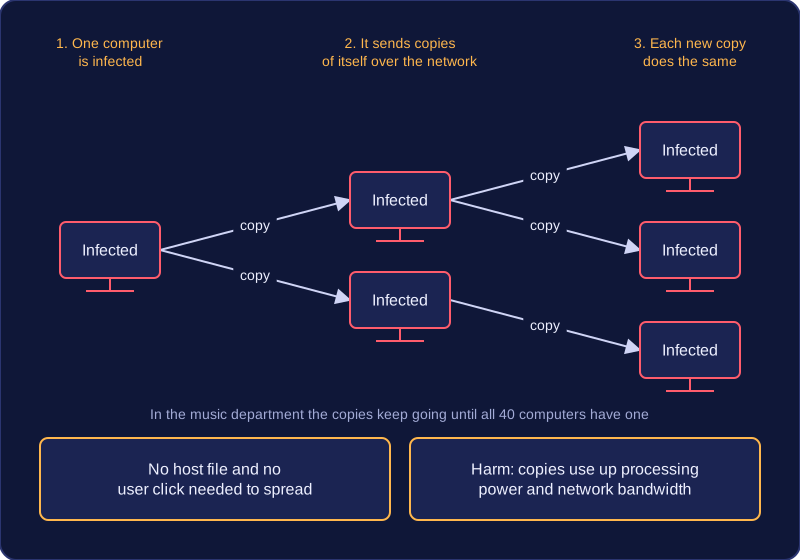
A worm is a standalone program that copies itself and spreads to other computers. It does not need a host file, so it is not attached to a document or another program, and it does not need you to click or open anything for it to spread.
Once a worm is running on one computer, it makes copies of itself and sends those copies across a network to other machines. Each new copy can then do the same, so the number of infected computers can grow quickly. This is different from a virus, which needs a host file and a user to run the infected file.
Why a worm can still be harmful
You might assume malware must delete files to be a problem. A worm may cause no direct damage at all: your files can stay complete and your programs can still work. The harm comes from the resources it uses.
- Processing power: each infected computer runs a copy, which uses the processor to make more copies and look for other computers. Less processing power is left for your own work, so the computer feels slow.
- Network bandwidth: the copies travel across the network. This uses up capacity, so shared files open slowly and video calls break up.
For example, imagine a school music department with 40 computers. A worm reaches one computer in a practice room and begins copying itself to the others. No student notices missing work, but the shared sheet-music folder takes much longer to open and online lessons keep freezing. The computers and the network are struggling because of the worm's copies, not because any data has been destroyed.
A Trojan is malware that disguises itself as legitimate or desirable software, so you install it voluntarily. It might pretend to be a browser update, a free photo editor, or a security tool offering to clean up your computer. The installer looks normal or does something useful, which is why you run it instead of deleting it.
Once a Trojan is running, it can cause harm in three main ways:
- Damage the system - deleting, corrupting or changing files and settings so the computer stops working properly.
- Take control of the computer - changing what the computer does or installing other software without your knowledge.
- Give the attacker access - letting someone outside read your files, watch what you do or use your computer for their own purposes.
A Trojan does not self-replicate. It cannot copy itself into other files or send itself to another computer on its own; it relies on tricking a user into running it. For example, a student clicks a pop-up saying their browser is out of date and installs the 'update'. The browser still works afterwards, so nothing seems wrong. While it runs, it could quietly let an attacker connect to the computer or delete saved files. If the student never ran the fake update, that Trojan could not act.
Ransomware is malware that denies access to a computer or its data. Some ransomware locks the system so you cannot use it, while other ransomware encrypts your files so they cannot be opened. Many attacks do both, so a computer that looks locked may also have its files scrambled.
For example, a photographer's laptop holds the edited photos from a weekend wedding. On Monday every photo file has a different file extension and will not open, and a message on the screen says the files have been locked and gives instructions for making a payment.
The ransom demand
The attacker demands a payment before access is restored. Encrypted files normally cannot be recovered unless a backup exists, because the data has been scrambled and the attacker holds the key needed to unscramble it. Removing the ransomware from the computer does not usually bring the files back by itself.
Why paying is discouraged
Paying a ransom is discouraged because it funds criminal activity: the money supports the people who wrote and spread the ransomware and helps them pay for more attacks. Restoring your data from a backup is the reliable way to recover it, so a payment should not be treated as the normal solution.
Backups
A backup is a separate copy of your data, kept apart from the computer and its network so the ransomware cannot encrypt it too. If ransomware encrypts the files on your computer, you can restore them from the backup without paying the ransom. That is why backing up regularly is part of protecting data: a copy taken before the attack gives you a clean set of files to go back to.
A keylogger records every keystroke you make. Each key press is stored in a log, so anything you type, such as a password, a private message or a bank card number, can be read later by the person who set it up. It captures everything, including typos and the backspaces that delete them, which can reveal even more than the final message.
Hardware keyloggers
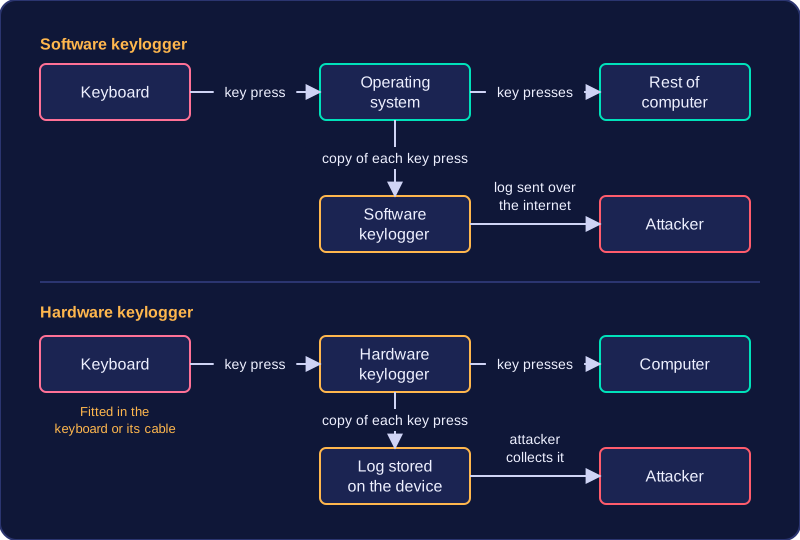
A hardware keylogger is a physical device rather than a program. Some are built into a replacement keyboard so that nothing looks out of place; others are fitted into the keyboard's cable. Either way it captures the keyboard's signal before the computer receives it, so it works even if no keylogging software is installed. Fitting one needs physical access to the machine, but no files have to be changed.
Software keyloggers
A software keylogger is a program running on the computer. It can be installed without the user realising. It runs in the background and records keystrokes as they pass through the operating system. Because it is only software, it can be installed remotely, without anyone touching the machine.
Software keyloggers can send their logs to the attacker over the internet automatically, so the attacker never has to return to the computer. Some hardware keyloggers store the log on the device instead, and the attacker has to collect it. Once the text reaches the attacker it becomes stolen data they can use from anywhere: if the log contains your game account password, they can sign in as you and take over the account.
Hackers rarely get in by guessing a password at random. They look for a weakness in a system and use it to get in. That weakness can be technical, in the software itself, or human, in the people who use it.
Technical vulnerabilities
Unpatched software is a program that is still running without an update which fixes a security flaw. When a company finds a flaw it writes a patch and releases it as an update for everyone. Attackers find out about the same flaw, so they know exactly how to get in until the update is installed. For example, the computers in a college design studio still run an old version of the image-editing software: the update was downloaded months ago but never installed, so anyone who knows about the flaw can break into those machines.
Out-of-date anti-malware is a weakness because the software can only recognise malware that was already known when it was last updated. New malware is written every day, so anti-malware last updated months ago has no record of anything written since. It is still running, so the computer looks protected, but a newly written piece of malware can be installed and run with no warning appearing.
Social engineering
Social engineering means attacking the person rather than the software. The hacker manipulates you into doing something that helps them: opening an attachment that installs malware, or telling them something you are meant to keep secret. For example, someone phones the school office, says they are from the broadband company sorting out an outage, and asks for the admin password so they can test the line. Nothing technical is needed, because a person simply hands the password over.
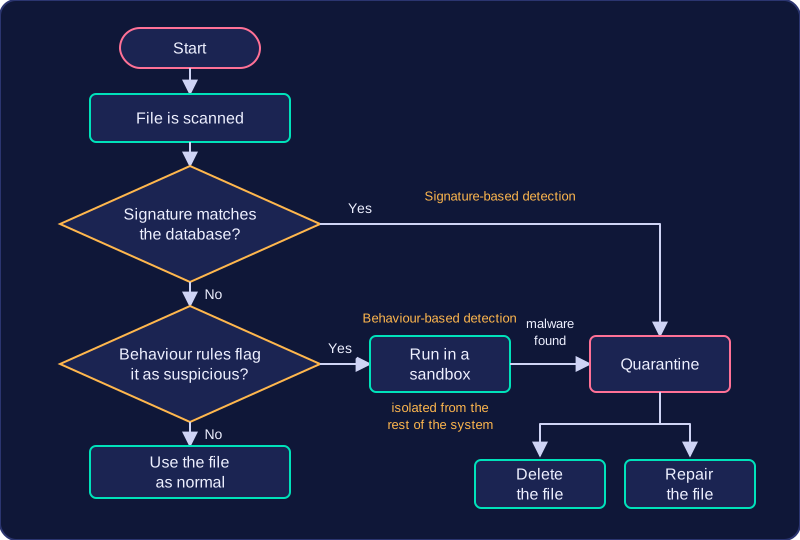
Anti-malware software decides whether a file is dangerous in two main ways: it compares the file with malware it already knows, or it judges how the file behaves. Once something is caught, the software has to deal with it safely.
Matching known malware
Signature-based detection compares files against a database of code patterns called signatures, taken from known malware. A signature might be a short run of bytes found inside a particular piece of ransomware, for example. The scanner checks each file against thousands of these patterns, which makes detection very accurate for threats that have already been identified.
The weakness is that a signature can only exist after the malware has been found in the wild, so brand-new malware matches nothing. That is why the signature database must be updated regularly: each update adds patterns for newly released malware, and a scanner left out of date simply will not recognise it.
Watching for suspicious behaviour
Behaviour-based detection uses heuristics: rules describing what suspicious software tends to do, rather than what its code looks like. A rule might flag a program that suddenly starts rewriting every document in a folder, or one that tries to switch off the anti-malware itself. Because it does not need a matching signature, it can catch malware that is too new to be in the database, but the rules are only a judgement, so a harmless program can occasionally be flagged by mistake.
A file that looks suspicious can be run in a sandbox, an isolated environment cut off from the rest of the system, so its behaviour can be watched in safety. Whatever it tries to do, the real files and settings are untouched.
Dealing with a find
If malware is found, the file is quarantined: it is moved to an isolated location where its code is not allowed to run. From there it can be deleted, or repaired by removing the malicious code so the file can be used again. If the scan finds nothing, it simply ends and you carry on using the file as normal.