Cybersecurity
Social Engineering

Contents
Social engineering is obtaining confidential information or access by manipulating people. The attacker does not break into the computer system; they persuade someone who is allowed to use it to hand over what they need.
Pretending to be someone trusted
An attacker's request only works if the victim believes it is genuine. Attackers therefore impersonate a person or organisation the victim already deals with, such as their employer, school, a delivery company or a colleague in another department. A phone call, message or face-to-face conversation can all be used, so the attacker does not need any technical skill.
For example, a man wearing a lanyard and carrying a toolbox arrives at a school reception. He says the company that maintains the school network has sent him to check the server room, and mentions the name of the deputy head as though he has worked with her before. The receptionist signs him in and lends him a key. Nobody challenges him because he looks as though he belongs.
What the attacker is after
Attackers want information that unlocks money or systems:
- Usernames and passwords, which give access to accounts and networks.
- Bank and card details, which are used to spend the victim's money or take out credit in their name.
- Other personal data, such as dates of birth or addresses, which is sold on or used to make the next trick more convincing.
Often only the first step
Social engineering is frequently used alongside a technical attack. Details handed over during a convincing conversation let the attacker log in as a real user, install malware or copy files out. The technical attack succeeds because the attacker already has valid access.
Social engineering works because it goes around the technology and aims straight at you. It is a way of manipulating people, not a piece of software. Anti-malware can spot a suspicious file and a firewall can block traffic from a dangerous address, but neither can spot a convincing lie, so attackers target the person rather than the machine.
The human qualities attackers use
Almost every attack leans on an ordinary human quality:
- Trust — you believe someone who sounds official or familiar.
- Fear — you act quickly to avoid losing money or access.
- Curiosity — you open something just to find out what it is.
- Politeness — you help someone who asks nicely instead of being rude.
- Carelessness — you are tired, busy or distracted and skip a check.
None of these is a fault in the software. A visitor with an armful of folders asks you to swipe your card so they can follow you through a locked door: politeness does the work, and no program is involved.
Pressure stops you checking
Attackers add a reason to act now. Urgency and fear shrink the time you have to think, such as a message saying an account closes in ten minutes. An offer that seems too good to be true, like a games console for a tenth of the price, works the same way, because wanting it overrides the small voice asking whether it is real. The aim is not to make you believe something ridiculous, but to stop you pausing long enough to check.
Why technical defences miss it
Anti-malware and firewalls block things trying to get in, but in social engineering the victim lets the attacker in: you type the password into the fake page yourself, or read out the code. Nothing was broken, so nothing gets blocked. Software also struggles to judge a message that is technically ordinary but wrong in its intent.
Attacks like these are often combined. A single message might offer a prize, warn that an account is about to close and demand a reply within minutes, so the same attack could be given more than one technique name. What matters is judging the request itself, not the label.
Shoulder surfing is a social engineering technique in which an attacker obtains information such as a password, PIN or door code by watching, or otherwise observing, a person as they enter it. Nothing is attacked or broken: the details are simply read as they are typed.
Up close or from a distance
The simplest version happens face to face: the attacker stands near enough to see your hands and the screen, waiting at the next locker while you key in a combination, standing beside you at a door panel, or leaning in to ask a question while you tap in your PIN.
Distance is no protection, because a camera can do the watching for them. Someone can prop a phone on a café table and film your fingers as though they were checking messages, or leave it recording beside a keypad nobody thought was watched. Footage can be paused, zoomed in and replayed until every digit is clear.
| Method | How it is carried out | Why it works |
|---|---|---|
| In person | Standing close by while you type, such as at a cash machine | Your hands and the screen are in full view for a few seconds |
| From a distance | Filming with a phone, or leaving one recording nearby | Zoom and slow-motion playback reveal keys you could not read from afar |
The weakness is you, not the system
Shoulder surfing targets what you type rather than any weakness in the software or network. Even a long, strong password is useless if someone reads it as you key it in: the attacker signs in with genuine details and the system treats them as a normal, authorised user. That also makes the attack hard to spot: there is no fake message to filter out and no file to scan, only an ordinary login by someone who knew the password.
For example, Samir pays at a self-service till and taps his four-digit PIN. The person next to him films his hand with a phone at waist height. Paused on each digit, the recording gives away the whole PIN, and Samir never spoke to anyone.
Phishing is a social engineering technique in which a message pretending to come from an organisation you trust — an email, a text message or a phone call — is used to get personal information from you, or to send you to a fake website that collects it.
How a phishing message makes itself believable
Two details make these messages convincing:
- Forged sender address — the sender address is faked so it matches one the real organisation uses, so the message appears to come from a genuine account.
- Fake login page — the message contains a link to a page copied from the real login screen. Anything you type there goes to the attacker instead of the organisation.
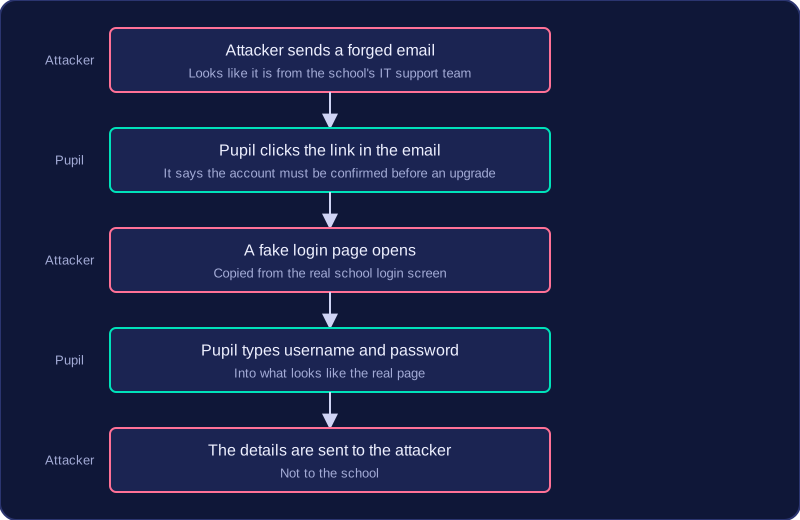
For example, an email seems to come from your school's IT support team, saying your account must be confirmed before a system upgrade. The link opens a page that looks just like the school login, and typing your username and password there sends them to whoever sent the email.
Spear phishing and vishing
| Technique | What it means | Why it works |
|---|---|---|
| Spear phishing | Phishing aimed at one particular person or organisation | It uses personal details about the target, so the sender seems to know them and the message looks genuine |
| Vishing | Phishing carried out by voice, using a telephone call or voice message | A voice can answer your questions on the spot and pressure you into acting quickly, which a written message cannot |
A spear phishing message might name your form tutor and a trip you have really booked, asking you to check a payment page — the personal details make it much harder to doubt. A vishing call might claim to be from the shop where you ordered a games console, saying the payment failed, and press you to read your card details out over the phone.
The two can overlap: a call aimed at one person, using details about them, is both vishing and spear phishing.
Baiting and quid pro quo are two social engineering techniques that work by offering you something you want, so that you let your guard down and hand over what the attacker is really after.
Baiting
In baiting, the attacker dangles something attractive in front of you: a prize, a free gift, a free download, or a file you are curious about. The offer exists only to make you act before you think. Taking the bait might mean typing your login details into a fake claim form, or downloading a file that installs malware on your device.
For example, a USB stick is left on a bench outside a leisure centre with "Party photos – please return" written on it. Whoever plugs it in out of curiosity runs a hidden program from the stick that gives the attacker a way into the device. Nobody forced their way in — the victim plugged the attack in personally.
Quid pro quo
Quid pro quo means "something for something". The attacker pretends to offer help or a service — speeding up a slow computer, resetting a password, giving technical support — and asks for your information or access to your system in return. The offer sounds helpful, which is exactly why it slips past your suspicions: you believe someone is doing you a good turn.
For example, a player in an online game is messaged by someone offering to level up their account overnight for free — hours of play done for them while they sleep. There is just one condition: send over the username and password so the "helper" can log in. The favour is the trade; the account is the prize.
Comparing the two
| Feature | Baiting | Quid pro quo |
|---|---|---|
| What is offered | A prize, gift, download or file | Help or a service |
| What the attacker wants | Details typed in, or malware installed | Information or access to the system |
| Why it works | Curiosity and the pull of a freebie | Trust in someone who seems to be helping |
Scareware is a social engineering technique that uses a fake warning to frighten you into doing what the attacker wants. The warning often claims your device is infected, your files are about to be deleted or your protection has expired.
The message is designed to look like it comes from security software you can trust. It may show a red warning triangle, an official-looking logo, a list of invented viruses or a countdown timer. These details make the danger feel real and urgent, so you act before you stop to ask whether the warning is genuine.
The attacker wants one of three things: for you to follow a link, to pay for a repair or clean-up that does nothing, or to install malware by clicking a button that seems to remove the threat. The fake warning is the lure; the fear it creates is what makes the trick work.
For example, a window labelled "System Scanner" opens on a laptop while a student is revising. A progress bar fills up, then a list of 47 problems appears next to a button marked "Activate full protection". After entering card details, the family is charged £40 and nothing is fixed. Not every version asks for money: some offer a button that says it will remove the threat, but it installs malware instead.
Scareware works because fear and urgency push people to act quickly. A warning that seems to come from a trusted security tool is hard to ignore, and the short time limit stops you from closing the window and checking whether the warning is real.
Pretexting and blagging are social engineering techniques that rely on a believable reason rather than a technical flaw. The attacker does not break into a system; they give you a reason to hand information over.
Pretexting
Pretexting is an attack where the attacker invents a believable situation that gives a reason for asking for information. They might pretend to be a technician, a competition organiser or a new member of staff. For example, a message claims to be from the organisers of a coding competition your class has entered. Your entry, it says, has a file error and will be wiped unless you send your school username and password so it can be resubmitted before the deadline. The invented problem is the pretext. It makes the request sound urgent and normal, so you may reply before checking who is really behind the message.
Blagging
Blagging is a confidence trick in which the attacker gains your trust and then persuades you to reveal information. The trust can be built in minutes or over several conversations. For example, someone joins your online game lobby, plays a few friendly rounds, then asks for your login so they can finish a tough co-op level for you while you are offline. The friendly history makes the request feel like a favour between teammates. Blagging works because you are more likely to help someone you believe you know and like.
Comparing the two
| Pretexting | Blagging | |
|---|---|---|
| What the attacker builds | A believable situation or role | Your trust and friendship |
| When the request comes | Straight away, inside the story | After trust has been gained |
| Why you comply | The reason fits and feels urgent | You feel you know the person |
| Example | Fake competition organiser resubmitting your entry | Friendly teammate asking a favour |
Both tricks work because the request arrives with a reason attached. In pretexting the reason is a made-up situation; in blagging it is a relationship the attacker has built. An attacker can use both together: invent a role, then spend time being friendly before making the request.
Social engineering tricks people into giving away information or access, so technical defences alone cannot remove the risk: a firewall can block a connection, but no software can decide whether you should trust a message asking you to confirm a password. The risk is reduced in two ways: training users to be suspicious of unexpected requests, and checking any request through an official, known contact.
Training users to be suspicious
Teach users that an unexpected request for information is a warning sign. It may arrive by email, text message, phone call or face to face. If you did not start the contact and the person wants a username, password, payment details or permission to access a device, do not give it straight away. A simple habit helps: stop, treat the request as suspicious and check it before acting. Attackers depend on a quick reply, so a moment's pause is a real defence.
Checking with an official, known contact
A request might still be genuine, so confirm it using a contact detail you already hold, never one given in the request. For example, a message claims to be from your local library and asks you to confirm your account password for a system upgrade. Do not reply to it. Instead, phone the library on the number printed on your library card and ask whether the request is real. In the same way, staff can be told to ring the IT helpdesk using the internal phone list before acting on an email that asks them to reset a password.
Why both steps matter
The check has to use a separate, official route because the attacker controls the email address or phone number shown in the original request. Regular training with realistic examples of unexpected requests, plus a safe way to confirm them, makes it much harder for an attacker to persuade someone to hand over information.