Malware
Malware Detection and Response

Anti-malware software decides whether a file is dangerous in two main ways: it compares the file with malware it already knows, or it judges how the file behaves. Once something is caught, the software has to deal with it safely.
Matching known malware
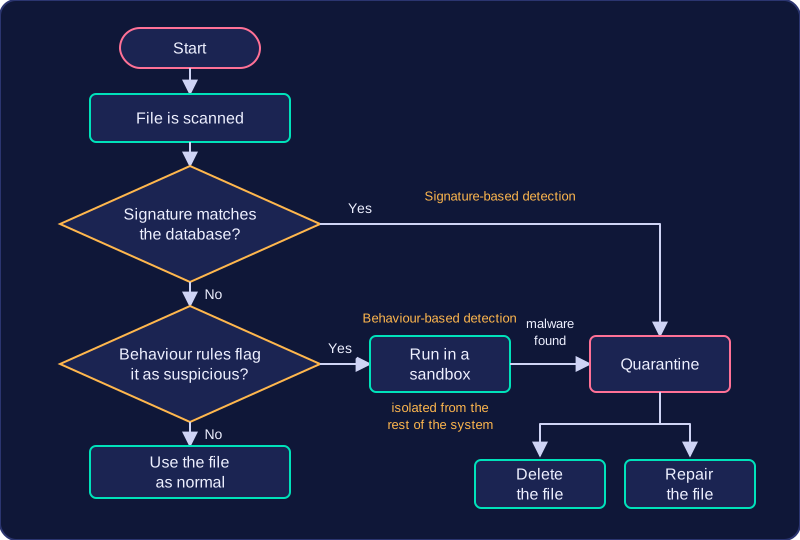
Signature-based detection compares files against a database of code patterns called signatures, taken from known malware. A signature might be a short run of bytes found inside a particular piece of ransomware, for example. The scanner checks each file against thousands of these patterns, which makes detection very accurate for threats that have already been identified.
The weakness is that a signature can only exist after the malware has been found in the wild, so brand-new malware matches nothing. That is why the signature database must be updated regularly: each update adds patterns for newly released malware, and a scanner left out of date simply will not recognise it.
Watching for suspicious behaviour
Behaviour-based detection uses heuristics: rules describing what suspicious software tends to do, rather than what its code looks like. A rule might flag a program that suddenly starts rewriting every document in a folder, or one that tries to switch off the anti-malware itself. Because it does not need a matching signature, it can catch malware that is too new to be in the database, but the rules are only a judgement, so a harmless program can occasionally be flagged by mistake.
A file that looks suspicious can be run in a sandbox, an isolated environment cut off from the rest of the system, so its behaviour can be watched in safety. Whatever it tries to do, the real files and settings are untouched.
Dealing with a find
If malware is found, the file is quarantined: it is moved to an isolated location where its code is not allowed to run. From there it can be deleted, or repaired by removing the malicious code so the file can be used again. If the scan finds nothing, it simply ends and you carry on using the file as normal.
Practise this
Edexcel GCSE Computer Science · Malware