Algorithms
Search Algorithms

Contents
A search algorithm is a method for finding out whether a target value is present in a collection of data and, if needed, where it is located. The collection could be the scores in a game, the booking references in a cinema system or the track titles in a playlist, and the target is the single value you are looking for.
Searching is a very common operation in programs. A quiz game might need to check whether a player's name is already on a leaderboard, a cinema app might need to find which screen a booking is for, or a school system might need to confirm that a pupil code is on a trip list. In each case the program needs a reliable, repeatable method rather than guessing, and it must also cope with the target not being there at all. A search that only works when the value exists is not finished: the program still has to give a correct answer when nothing matches.
For example, imagine a playlist stored as a list of track titles and you want to know whether Midnight Run is included. A search algorithm gives the program a set of steps to follow so that it can answer yes or no, and report the track's position when it is found.
The two standard search algorithms are linear search and binary search. They take different approaches and suit different situations, so a programmer chooses between them based on the data and what the program needs to do.
A linear search finds a target value in a collection by checking the items one at a time, from the first item onwards. It does not need the data to be sorted: the same method works on a jumbled list of values or on one held in alphabetical or numerical order, because it simply takes the items in the order they appear.
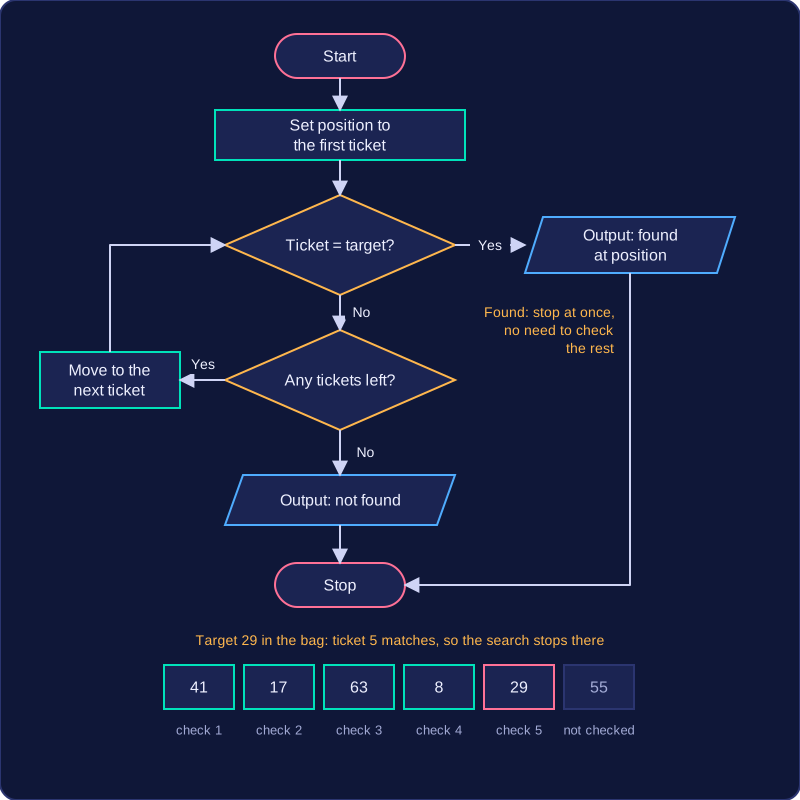
The search always begins at the first item and compares it with the target:
- If the two match, the search stops and reports success.
- If they do not match, the search moves to the next item and compares again.
- If the search reaches the end of the collection without a match, it reports that the target is not present.
Stopping as soon as a match is found matters: there is no reason to keep checking items once the target has been located, and reporting the position of the match is often just as useful as knowing it exists.
A worked example
Suppose a bag holds six raffle tickets, and you want to know whether ticket 29 has been drawn. The tickets are in the order 41, 17, 63, 8, 29 and 55.
| Check | Ticket number | Same as 29? |
|---|---|---|
| 1 | 41 | No |
| 2 | 17 | No |
| 3 | 63 | No |
| 4 | 8 | No |
| 5 | 29 | Yes, so stop |
The search stops at the fifth ticket and can report that ticket 29 was found at position 5. If the target had been 12, every ticket would be checked and the search would report that 12 is not in the bag. Positions can also be counted from 0, as Python does, so the matching ticket has index 4.
Linear search in Python
def linear_search(tickets, target):
    position = 0
    for ticket in tickets:
        if ticket == target:
            return position
        position = position + 1
    return -1

raffle = [41, 17, 63, 8, 29, 55]
print(linear_search(raffle, 29))
print(linear_search(raffle, 12))
Output:
4
-1
The loop checks each ticket in turn and keeps count of how many it has passed. As soon as the ticket being compared equals the target, the subprogram returns that position and the search ends. If the loop runs out of tickets, the subprogram returns -1, showing that the target was not found.
A linear search checks items one at a time from the start until it finds the target or runs out of items. How many comparisons it makes depends on where the target sits in the collection, or whether it is there at all.
Best case
The best case is the target sitting in the first position: the search compares it, they match, and it stops. That is one comparison, and no search that compares items can do better.
Searching the playlist ['Echoes', 'Mist', 'Orbit', 'Pulse', 'Drift'] for Echoes needs one comparison. Searching for Mist needs two, because Echoes is checked and rejected first, so position matters, not list size.
Worst case
The worst case happens in two situations:
- The target is the last item, so every other item is compared and rejected first.
- The target is absent, so every item is checked before the search can report that it is not there.
Either way the search makes as many comparisons as there are items. Saying “linear search always checks every item” is therefore wrong: it only does so in the worst case.
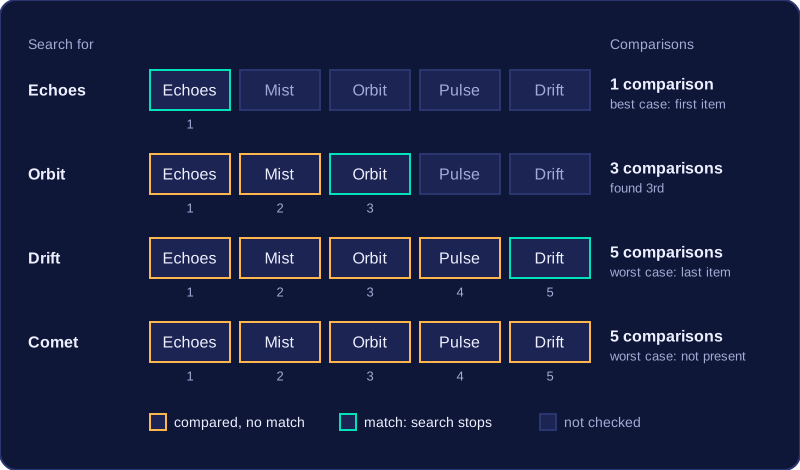
The comparisons needed for that playlist:
| Target | Position | Comparisons |
|---|---|---|
| Echoes | 1st | 1 |
| Orbit | 3rd | 3 |
| Drift | 5th (last) | 5 |
| Comet | not present | 5 |
Stopping early in sorted data
If the collection is sorted, the search can stop before the end. In ascending order, once the current item is greater than the target, the target cannot appear later, so there is no need to keep looking. In descending order the rule flips: stop once the current item is less than the target.
Searching the sorted list [4, 9, 15, 22, 30, 41] for 18 compares 4, 9, 15 and then 22. Because 22 is bigger than 18 in an ascending list, you stop after four comparisons instead of six and report that 18 is not present. That early stop is not a match: it means the target's possible position has been passed.
A flag is a Boolean variable that records whether something has happened. In a linear search, a flag called found lets the loop stop the moment the target appears, instead of checking every remaining item.
Ending the loop when the target is found
Set found to False before the loop. On each pass, compare the current item with the target and set found = True if they match. The loop condition while not found and index < len(items) then ends the search immediately. The flag is needed because the loop must know a match has happened before it decides whether to continue, and it also records the result after the loop so the not-found case can be handled.
Ending early in sorted data
If the list is sorted in ascending order, an item greater than the target means the target cannot appear later. A second flag, too_far, records that the search has moved beyond the position where the target would sit, and ends the loop early. In a descending list the test is reversed: the search stops when an item is smaller than the target, because the target cannot appear after that point.
Looking up product code 237 in this sorted stock list: at index 3 the code 241 is greater than 237, so too_far becomes True and the loop ends after four passes through the loop — code 237 is not stocked.
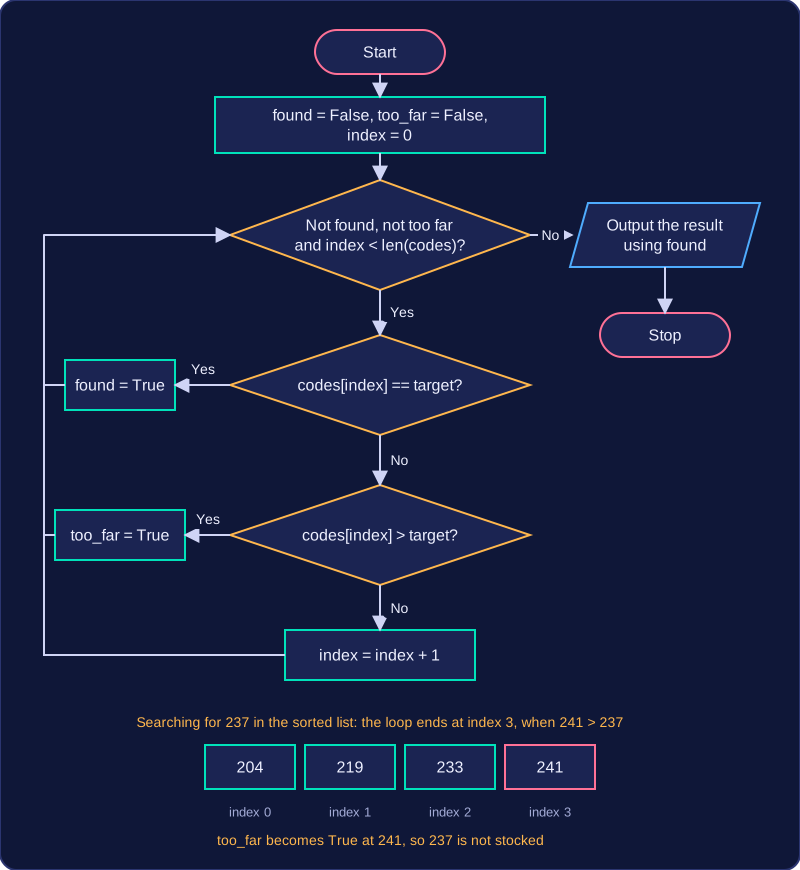
| Index | Code | Test | found | too_far |
|---|---|---|---|---|
| 0 | 204 | 204 == 237? No; 204 > 237? No | False | False |
| 1 | 219 | 219 == 237? No; 219 > 237? No | False | False |
| 2 | 233 | 233 == 237? No; 233 > 237? No | False | False |
| 3 | 241 | 241 == 237? No; 241 > 237? Yes | False | True |
codes = [204, 219, 233, 241, 258, 266, 281]
target = int(input("Product code: "))
found = False
too_far = False
index = 0
while not found and not too_far and index < len(codes):
    if codes[index] == target:
        found = True
    elif codes[index] > target:
        too_far = True
    else:
        index = index + 1
if found:
    print("Code " + str(target) + " in stock")
else:
    print("Code " + str(target) + " not stocked")
Output when the user types 237:
Product code: 237
Code 237 not stocked
A for loop can be written with a flag that skips the rest of the work once a match is found, but it still passes through the remaining items; a while loop with flags can stop at the right moment, so choose it when efficiency matters.
Binary search is a search algorithm that finds a target in a sorted collection by repeatedly checking the middle item and throwing away about half of what is left. Because each comparison discards about half of the remaining items, it is called a divide-and-conquer algorithm. If the collection is not sorted, binary search cannot be used: the discarding only works because items before the middle are smaller than it and items after it are larger.
How each comparison works
The search keeps a start index and an end index that mark the current search area. Find the midpoint by adding start and end and dividing by two; rounding down or up is fine as long as you do the same every time. Compare the middle item with the target:
- If they are equal, the search ends successfully.
- If the target is before the middle item, discard the middle item and everything after it, then move the end index to just before the old midpoint.
- If the target is after the middle item, discard the middle item and everything before it, then move the start index to just after the old midpoint.
The middle item itself is never kept in the remaining sublist: the updated start or end index leaves it out.
After every discard, recalculate the midpoint from the new start and end. Keep going until the target is found or the search area is empty. The area is empty when the start index has passed the end index, which means the target is not in the collection.
Worked example
Locker numbers stored in order: 4, 9, 15, 22, 30, 38, 41, 57, 63, 88. Indexes run from 0 to 9. Search for 57.
| Start | End | Midpoint | Middle value | Action |
|---|---|---|---|---|
| 0 | 9 | (0 + 9) ÷ 2 = 4.5, round down to 4 | 30 | 57 is after 30, so discard 30 and every item before it; start becomes 5 |
| 5 | 9 | (5 + 9) ÷ 2 = 7 | 57 | Equal, so found |
The first comparison threw away five of the ten items, which is why binary search is fast on large sorted collections.
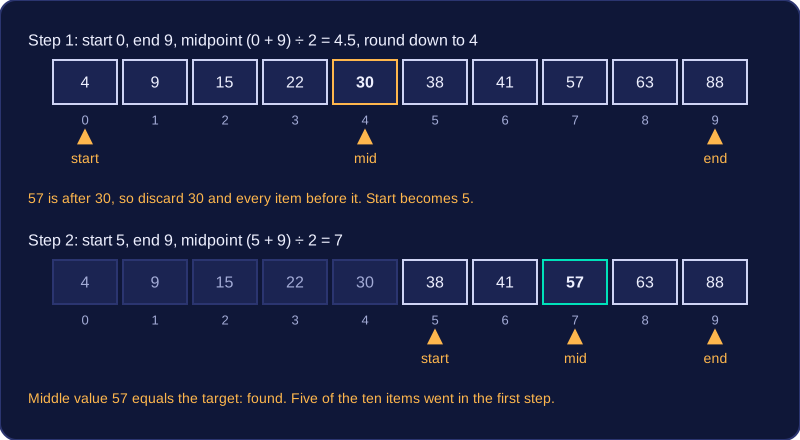
A binary search in Python keeps two indexes, start and end, marking the part of a sorted list that is still worth checking. Each pass looks at the item in the middle of that area and throws away half of what is left.
Setting up the search area
Begin with start = 0 and end = len(items) - 1, so the whole list is in the area. The midpoint is calculated with mid = (start + end) // 2. Integer division keeps mid as a whole-number index: with start 0 and end 8, mid is 4.
Narrowing the area
Compare the item at mid with the target you want:
- equal — you have found it, so report mid and stop;
- target is larger — every item up to mid is too small, so set
start = mid + 1; - target is smaller — every item from mid onwards is too big, so set
end = mid - 1.
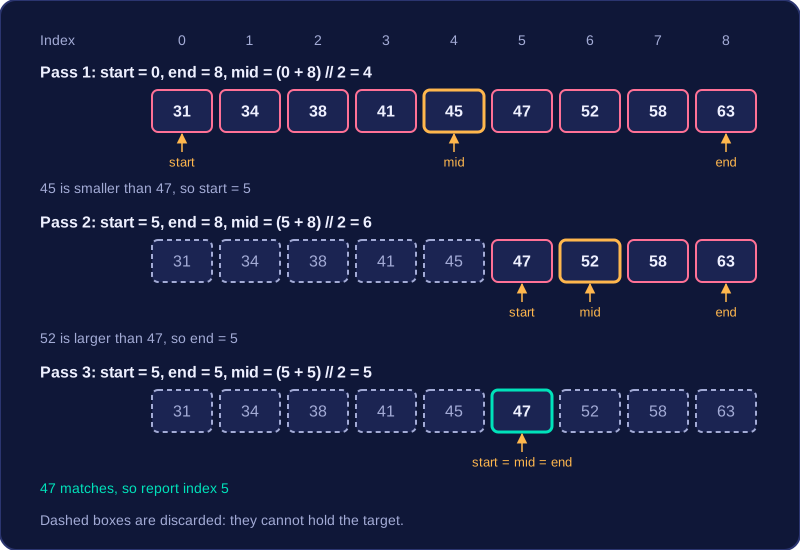
The item at mid is dropped because it has already been compared, and keeping it could leave the area the same size, so the loop would never end. The loop runs while start is less than or equal to end, and each new pass recalculates mid from the new indexes. Here is a search for 47 in a sorted list of race times in minutes: 31, 34, 38, 41, 45, 47, 52, 58, 63.
| start | end | mid | item at mid | action |
|---|---|---|---|---|
| 0 | 8 | 4 | 45 | 45 is smaller than 47, so start = 5 |
| 5 | 8 | 6 | 52 | 52 is larger than 47, so end = 5 |
| 5 | 5 | 5 | 47 | match, so report index 5 |
When start moves past end, the area is empty: the list has been halved down to nothing and the target is not present, so the program should report that instead of a position. The program below returns -1 in that case, which cannot be a real index.
def binary_search(items, target):
    start = 0
    end = len(items) - 1
    # keep halving the area until it closes
    while start <= end:
        mid = (start + end) // 2
        if items[mid] == target:
            return mid
        if items[mid] < target:
            start = mid + 1
        else:
            end = mid - 1
    return -1

race_times = [31, 34, 38, 41, 45, 47, 52, 58, 63]
print(binary_search(race_times, 47))
print(binary_search(race_times, 50))
Output:
5
-1Linear search and binary search both find whether a target value is in a collection, but each one suits different situations. Binary search is usually better for large, sorted collections; linear search is simpler and works on data in any order.
How the amount of work grows
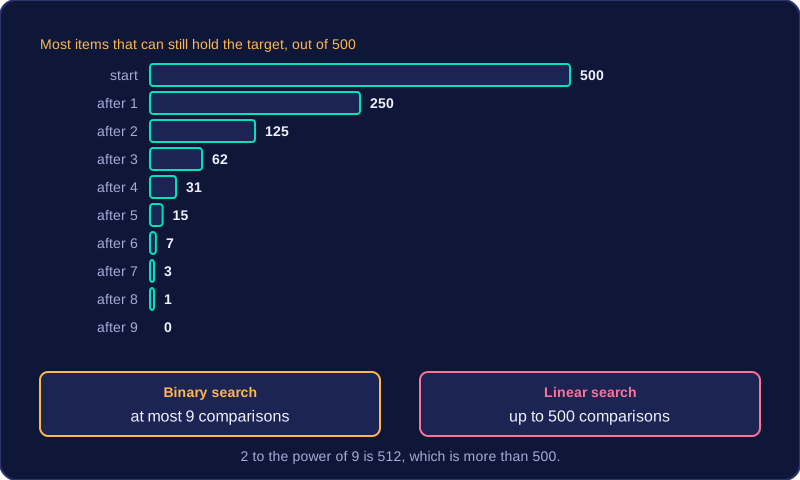
A linear search may make one comparison for each item, so a collection of 500 items could take up to 500 comparisons. If the target is the first item it takes just one, but in the worst case every item is checked.
A binary search needs the data to be sorted. It checks the middle item, then discards about half of the remaining items. Each comparison roughly halves the search area, so 500 items need at most 9 comparisons, since 2 to the power of 9 is 512, which is more than 500. That is far fewer comparisons than a linear search would make.
Choosing between them
Linear search is often more suitable for small collections, unsorted collections, or when sorting the data would cost more time and memory than simply searching it. Binary search has more complex logic and depends on sorted data, so sorting first is part of its overall cost.
| Feature | Linear search | Binary search |
|---|---|---|
| Data order | Works on any order | Must be sorted |
| Comparisons for 500 items | Up to 500 | At most 9 |
| Passes through the loop | Up to one per item | About one per halving |
| Extra memory | An index and possibly a flag | Start, end and midpoint indexes |
| Logic | Simple | More complex |
Efficiency is not only about speed. You can compare algorithms by the number of comparisons made, the number of passes through a loop, and the amount of memory used. For large sorted collections, binary search usually wins on comparisons; for small or unsorted collections, linear search is often the practical choice.
Testing a search means running it on targets you have chosen on purpose, not on one lucky value. Good test data shows whether the search finds targets in different places, copes when the target is missing, and how much work each search takes.
Test data to choose
Pick targets at the start, middle and end of the collection, plus a target that is not present. Each one takes the algorithm down a different path. A linear search needs one comparison to find the first item, several to reach a middle item, and every item to reach the last one or to prove a target is absent, so the same algorithm can look fast or slow depending on where the target sits.
Use both sorted and unsorted versions of a collection. A linear search should work on either, while a binary search only gives correct results when the data is sorted. Running binary search on an unsorted list is a useful test because it shows the algorithm giving wrong results — the data is not in the order it needs. If you plan to sort the data first, test that route too.
Reasoning about fitness for purpose
Being fit for purpose means doing the job well enough for the situation, so you judge a search by logical reasoning from the facts. Ask how big the collection is, whether it is already sorted, where the target is likely to sit, and what sorting would cost. Sorting takes many comparisons and several passes through the list, and some sorting algorithms need extra memory, so it is only worth doing if the collection will be searched again and again.
| Situation | Fitter choice | Reason |
|---|---|---|
| 12 club members, unsorted, one lookup | Linear search | Few comparisons, and sorting would cost more than the search |
| 60,000 customer records, unsorted, searched all day | Sort once, then binary search | The sorting cost is paid once, then each search discards half of the remaining records |
| Collection that cannot be rearranged | Linear search | Binary search relies on the items being in order |
Counting comparisons turns "it feels fast" into evidence. This program runs one linear search for each of four test targets and shows the result, the index and the number of comparisons made:
def linear_search(items, target):
    compares = 0
    for i in range(len(items)):
        compares = compares + 1
        if items[i] == target:
            print("Found at index:")
            print(i)
            print("Comparisons made:")
            print(compares)
            return
    print("Not found")
    print("Comparisons made:")
    print(compares)

lockers = [210, 214, 218, 222, 226, 230, 234]
for t in [210, 222, 234, 250]:
    linear_search(lockers, t)
Output:
Found at index:
0
Comparisons made:
1
Found at index:
3
Comparisons made:
4
Found at index:
6
Comparisons made:
7
Not found
Comparisons made:
7