Search Algorithms
Binary Search in Python

A binary search in Python keeps two indexes, start and end, marking the part of a sorted list that is still worth checking. Each pass looks at the item in the middle of that area and throws away half of what is left.
Setting up the search area
Begin with start = 0 and end = len(items) - 1, so the whole list is in the area. The midpoint is calculated with mid = (start + end) // 2. Integer division keeps mid as a whole-number index: with start 0 and end 8, mid is 4.
Narrowing the area
Compare the item at mid with the target you want:
- equal — you have found it, so report mid and stop;
- target is larger — every item up to mid is too small, so set
start = mid + 1; - target is smaller — every item from mid onwards is too big, so set
end = mid - 1.
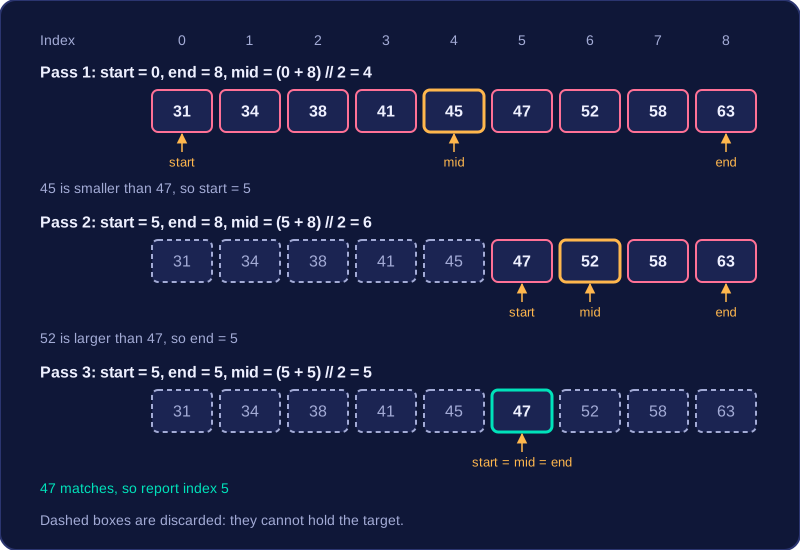
The item at mid is dropped because it has already been compared, and keeping it could leave the area the same size, so the loop would never end. The loop runs while start is less than or equal to end, and each new pass recalculates mid from the new indexes. Here is a search for 47 in a sorted list of race times in minutes: 31, 34, 38, 41, 45, 47, 52, 58, 63.
| start | end | mid | item at mid | action |
|---|---|---|---|---|
| 0 | 8 | 4 | 45 | 45 is smaller than 47, so start = 5 |
| 5 | 8 | 6 | 52 | 52 is larger than 47, so end = 5 |
| 5 | 5 | 5 | 47 | match, so report index 5 |
When start moves past end, the area is empty: the list has been halved down to nothing and the target is not present, so the program should report that instead of a position. The program below returns -1 in that case, which cannot be a real index.
def binary_search(items, target):
    start = 0
    end = len(items) - 1
    # keep halving the area until it closes
    while start <= end:
        mid = (start + end) // 2
        if items[mid] == target:
            return mid
        if items[mid] < target:
            start = mid + 1
        else:
            end = mid - 1
    return -1

race_times = [31, 34, 38, 41, 45, 47, 52, 58, 63]
print(binary_search(race_times, 47))
print(binary_search(race_times, 50))
Output:
5
-1
Practise this
Edexcel GCSE Computer Science · Search Algorithms