Search Algorithms
Comparing Linear and Binary Search

Linear search and binary search both find whether a target value is in a collection, but each one suits different situations. Binary search is usually better for large, sorted collections; linear search is simpler and works on data in any order.
How the amount of work grows
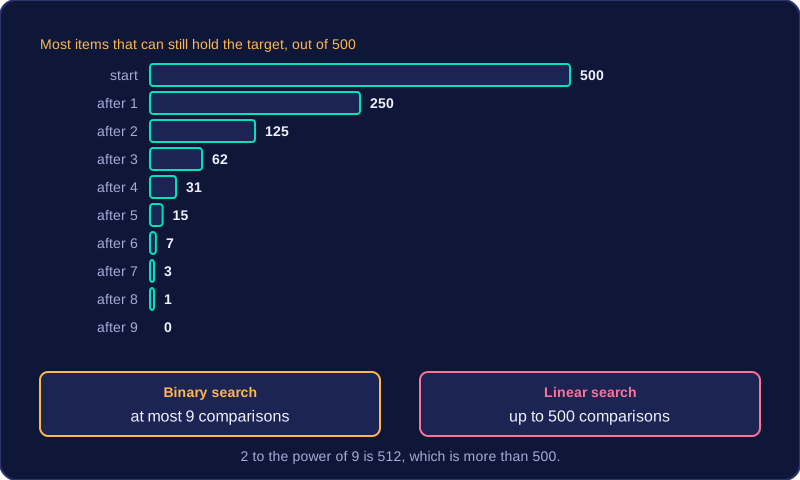
A linear search may make one comparison for each item, so a collection of 500 items could take up to 500 comparisons. If the target is the first item it takes just one, but in the worst case every item is checked.
A binary search needs the data to be sorted. It checks the middle item, then discards about half of the remaining items. Each comparison roughly halves the search area, so 500 items need at most 9 comparisons, since 2 to the power of 9 is 512, which is more than 500. That is far fewer comparisons than a linear search would make.
Choosing between them
Linear search is often more suitable for small collections, unsorted collections, or when sorting the data would cost more time and memory than simply searching it. Binary search has more complex logic and depends on sorted data, so sorting first is part of its overall cost.
| Feature | Linear search | Binary search |
|---|---|---|
| Data order | Works on any order | Must be sorted |
| Comparisons for 500 items | Up to 500 | At most 9 |
| Passes through the loop | Up to one per item | About one per halving |
| Extra memory | An index and possibly a flag | Start, end and midpoint indexes |
| Logic | Simple | More complex |
Efficiency is not only about speed. You can compare algorithms by the number of comparisons made, the number of passes through a loop, and the amount of memory used. For large sorted collections, binary search usually wins on comparisons; for small or unsorted collections, linear search is often the practical choice.
Practise this
Edexcel GCSE Computer Science · Search Algorithms