Algorithms
Sorting Algorithms

Contents
Sorting means arranging data into a chosen order: numbers from smallest to largest, names from A to Z, or scores from highest to lowest. The order is not fixed, because you pick the order that suits what you need to do with the data.
There are two main reasons to sort data.
- To use or present it. A quiz leaderboard is much easier to read with the highest score at the top, and a board of train departure times is only useful when it is in time order.
- To search it quickly. This is the bigger reason in computing, because searching a large data set can take a long time.
How sorting helps a search
To find a value in an unsorted list you may have to check every item, one at a time. That is a linear search, and on a long list it takes a large number of comparisons.
If the list is sorted, a binary search can be used instead. It checks the middle item, then discards the half of the list that cannot contain the value, so each comparison removes roughly half of the remaining items. Far fewer comparisons are needed, so the search finishes much sooner.
For example, imagine your class's cross-country finishing times, in minutes, are stored as 14.2, 12.8, 15.6, 11.9 and 13.4. To check whether 13.4 is in the list, a linear search would compare it with every value, because it sits at the end. Sorted, the list is 11.9, 12.8, 13.4, 14.2, 15.6, so 13.4 is the middle item and a binary search finds it with one comparison.
Sorting is therefore often done once so that many searches afterwards are cheap. The sort itself takes time, but that cost is paid back whenever the data is searched repeatedly.
Bubble sort is a sorting algorithm that compares items next to each other in a list. If they are in the wrong order for the sort you want, it swaps them.
How a pass works
A pass moves along the list from left to right. It compares each neighbouring pair in turn: the first and second items, then the second and third, and so on. When a pair is in the wrong order, the two items are swapped. In an ascending sort, each swap pushes a larger item one place to the right, so one item travels step by step towards its final position.
After one complete pass of an ascending sort, the largest item is in its final position at the end of the list. The next pass can ignore that item and work only on the remaining unsorted section. The section gets smaller after every pass, so later passes make fewer comparisons.
Worked example
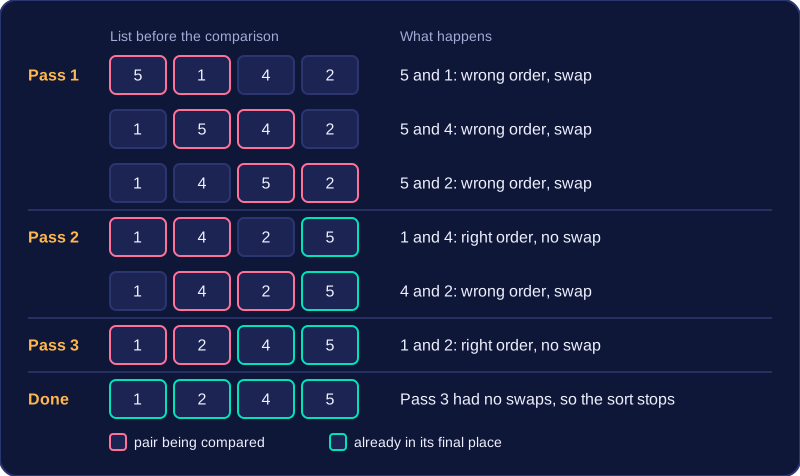
Here is an ascending bubble sort of the list 5, 1, 4, 2. Each row after the start is one comparison. A swap happens only when the pair is out of order.
| Pass | Comparison | Swap? | List after the step |
|---|---|---|---|
| Start | - | - | 5, 1, 4, 2 |
| 1 | 5 and 1 | Yes | 1, 5, 4, 2 |
| 1 | 5 and 4 | Yes | 1, 4, 5, 2 |
| 1 | 5 and 2 | Yes | 1, 4, 2, 5 |
| 2 | 1 and 4 | No | 1, 4, 2, 5 |
| 2 | 4 and 2 | Yes | 1, 2, 4, 5 |
| 3 | 1 and 2 | No | 1, 2, 4, 5 |
Pass 1 puts 5 at the end. Pass 2 puts 4 in place. Pass 3 makes no swaps, which tells the algorithm the list is in order, so it stops.
Memory and method
Bubble sort is an in-situ (in-place) algorithm. It rearranges the original list and needs only a small amount of temporary storage to hold an item during a swap. It is not a divide-and-conquer algorithm: it does not split the list into smaller sub-lists. Instead, it repeats passes over the list, comparing adjacent items until no swaps are needed.
This program bubble sorts a list of scores into ascending order.
scores = [42, 17, 93, 8, 55]
n = len(scores)
swapped = True
pass_number = 0
while swapped and pass_number < n - 1:
    swapped = False
    for i in range(n - 1 - pass_number):
        if scores[i] > scores[i + 1]:
            temp = scores[i]
            del scores[i]
            scores.insert(i + 1, temp)
            swapped = True
    pass_number = pass_number + 1
print(scores)
Output:
[8, 17, 42, 55, 93]Bubble sort has a best case and a worst case, depending on the order of the list before sorting starts. The case tells you how many passes, swaps and comparisons the algorithm needs.
Best case: already in order
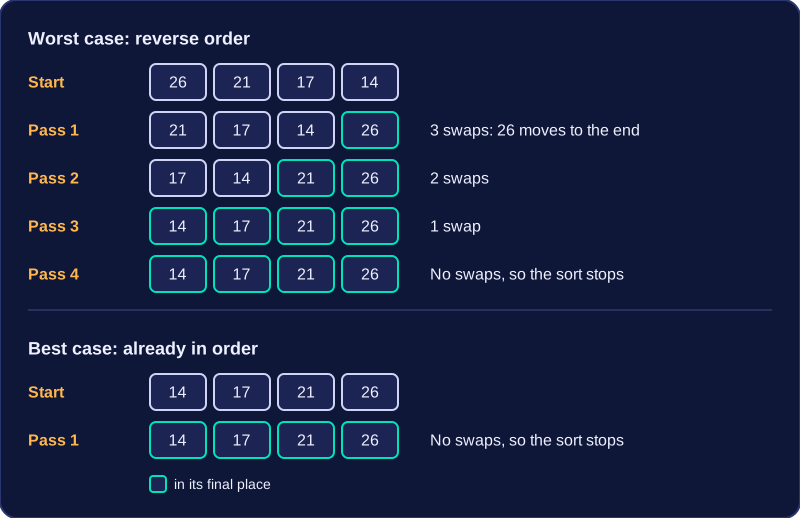
If the list is already sorted, the first pass compares neighbouring items and finds every pair in the right order, so it makes no swaps. A bubble sort that checks whether any swaps happened can then stop after that one pass. This is the best case because it needs the fewest comparisons.
For example, quiz scores 14, 17, 21, 26 are already in ascending order. One pass compares 14 with 17, then 17 with 21, then 21 with 26. Nothing is out of order, so no swaps occur and the sort ends.
Worst case: reverse order
If the list is in reverse order, almost every comparison finds a pair the wrong way round, so every pass makes swaps. Because a swap happens on every pass, the check for swaps can never stop the sort early, so it needs the most passes, the most swaps and the most comparisons. This makes it the slowest case.
For example, 26, 21, 17, 14 needs several passes. The first pass swaps 26 with 21, then 26 with 17, then 26 with 14, so 26 reaches the end straight away, but only one item is placed in its final position each pass. More passes are still needed before the list is sorted.
| Case | Starting list | Passes | Swaps | Comparisons |
|---|---|---|---|---|
| Best | Already in order | One | None | Fewest |
| Worst | Reverse order | Most | Most | Most |
Merge sort is a divide-and-conquer algorithm. It keeps splitting a list into smaller sub-lists until every sub-list holds just one item. A sub-list with one item is already sorted, so this gives you a set of tiny sorted lists to work with.
Merge sort then merges sorted sub-lists back together in pairs. To merge two sorted lists, compare the next item in each list and write the smaller one to the output list. Move forward in the list that supplied that item, then compare the next pair. Keep going until every item from both lists has been written to the output list. The result is one sorted list.
Those merged lists are paired up again, and the merging continues until a single fully sorted list remains.
Worked example
Start with the scores [7, 2, 9, 4]. Splitting gives [7], [2], [9] and [4].
Merge [7] with [2]: compare 7 and 2, write 2, then write 7, giving [2, 7]. Merge [9] with [4]: compare 9 and 4, write 4, then write 9, giving [4, 9].
Now merge [2, 7] with [4, 9]:
| Step | Compare | Write | Output |
|---|---|---|---|
| 1 | 2 and 4 | 2 | [2] |
| 2 | 7 and 4 | 4 | [2, 4] |
| 3 | 7 and 9 | 7 | [2, 4, 7] |
| 4 | 9 is left | 9 | [2, 4, 7, 9] |
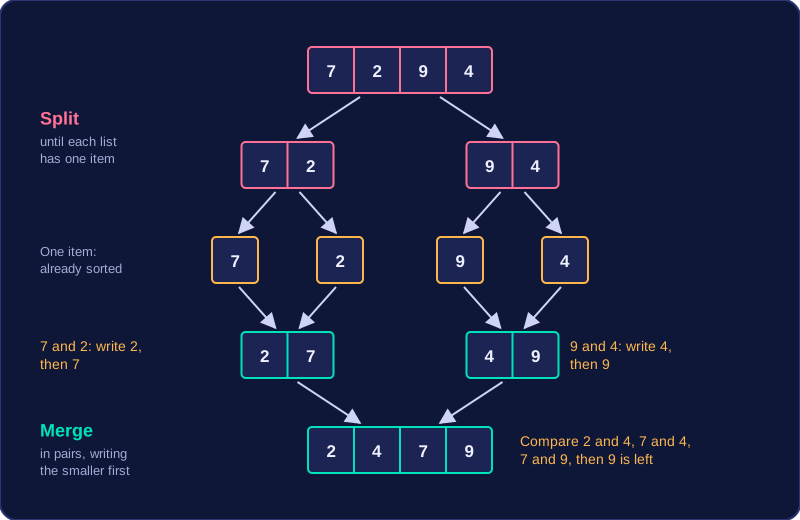
The final sorted list is [2, 4, 7, 9].
Bubble sort and merge sort can both put the same list into order, but they do different amounts of work and they use memory in different ways. Merge sort is usually the faster of the two, especially once a list gets long.
Dividing the work
Merge sort is divide-and-conquer: it keeps splitting the list into smaller parts down to single items, then merges them back. Each merge only compares the next item of two sorted lists, so the total number of comparisons stays low. Bubble sort is not divide-and-conquer: it repeatedly compares neighbouring pairs across the list, so its comparisons pile up as the list grows. For a list of 10 items, bubble sort can need up to 45 comparisons, while merge sort needs at most 25. Double the list to 20 items and bubble sort can need 190 comparisons against about 69 for merge sort, so the gap grows quickly.
Memory
Merge sort is out-of-place: splitting and merging build extra sub-lists, so it has a higher memory overhead. Bubble sort is in-situ: it swaps items inside the original list, so its storage stays constant however long the list is. Being faster does not make merge sort cheaper on memory.
Judging efficiency and fitness for purpose
You can evaluate a sorting algorithm on three measures: the number of comparisons, the number of passes or loop iterations, and the amount of memory used. More comparisons mean more work, so the program takes longer to run; fewer comparisons mean it finishes sooner.
| Measure | Bubble sort | Merge sort |
|---|---|---|
| Comparisons for 10 items (worst case) | Up to 45 | At most 25 |
| Extra lists created | None | Several sub-lists |
| Memory overhead | Low and constant | Higher |
| Best choice when | Lists are small, or memory is tight | Lists are large and speed matters |
So the best choice depends on the situation: speed first means merge sort, memory first means bubble sort. The program below counts its own passes and comparisons as it uses a bubble sort on four lap times in seconds.
lap_times = [58, 43, 61, 37]
comparisons = 0
passes = 0
for pass_number in range(1, len(lap_times)):
    passes = passes + 1
    for i in range(len(lap_times) - pass_number):
        comparisons = comparisons + 1
        if lap_times[i] > lap_times[i + 1]:
            temp = lap_times[i]
            lap_times[i] = lap_times[i + 1]
            lap_times[i + 1] = temp
print("passes: " + str(passes))
print("comparisons: " + str(comparisons))
print(lap_times)
Output:
passes: 3
comparisons: 6
[37, 43, 58, 61]