System Modelling
Reading and describing data flow diagrams

To read a data flow diagram, find every external entity (a person or system outside the system that sends or receives data), every process (an action that changes data), every data store (where data is held) and every labelled data flow (an arrow showing data moving). Work through the arrows one at a time: start at the component the arrow leaves, note the label and follow the arrowhead to the component it enters. That tells you what data is supplied, changed, saved or returned.
Turning a scenario into a full description
For a school coding club, the description could be: the external entity Student sends a sign-up request to process Check places. The process reads the current member count from the Club register data store. It compares the count with the club limit and, if a place is free, writes the updated record to the Club register and sends a place confirmation to the Student. If the club is full, it sends a club full message instead, with no store update.
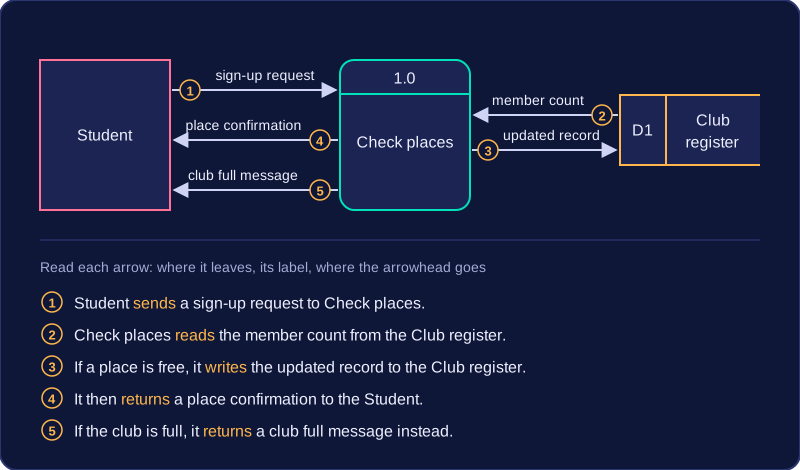
Include every input, process, store and output in the scenario, and state the direction of each flow with words such as sends, reads, writes and returns. Name the components exactly as they appear; a missing flow or an arrow described the wrong way leaves the reader unable to trace the data.
Practise this
Pearson BTEC Digital Information Technology · Data flow diagrams