System Software
Utility software

Utility software is system software that carries out housekeeping tasks on a computer: it maintains, manages, configures and protects the system. It is not application software, so you would not use it to write a story or play a game. Instead it works quietly in the background so the computer keeps running smoothly and efficiently.
Why a computer needs utility software
An operating system looks after memory, files and hardware, but it does not do everything. Utilities exist to carry out the extra tasks the operating system does not handle on its own, such as spotting problems and putting them right. A well-maintained machine runs smoothly and is less likely to fail in the middle of your work.
Utility software is also not the same thing as the operating system. The operating system is the main system software that runs the computer; utilities are separate tools that keep it in good order. Housekeeping is the whole point of a utility: it keeps the system tidy, working and free of problems, rather than helping you do a particular job on the computer.
Where utility software comes from
Computers often come with utility software already supplied as part of the operating system. Extra utilities can be installed separately when you need a job that the built-in tools do not cover.
The three utilities
The utilities that do this housekeeping include:
- Encryption software — scrambles data so that it cannot be understood without the correct key.
- Defragmentation software — reorganises the fragmented files on a magnetic hard disk so that the pieces of each file are stored together consecutively.
- Data compression software — reduces the size of files so that they take up less storage space.
Encryption software is a utility that scrambles data so that nobody can understand it without the correct key. The scrambled version is what gets stored or sent, so anyone who comes across it sees only a meaningless jumble.
How encryption software works
The software follows an algorithm — a fixed set of steps — and uses a key, a value that controls exactly how the scrambling happens. Together they turn readable data into scrambled data; to get the original back, the scrambled data must be decrypted, which only works with the correct key.
For example, a quiz club stores the answers to a competition that is still running. Encrypted, the answer list becomes a jumble of odd characters. A member who has the key decrypts it and reads the answers; anyone else who opens the file sees the jumble and learns nothing.
Why it is needed
Computers store and send data that must be kept away from unauthorised people, and the answer list is one example. If the data is intercepted on its way across a network, or the device holding it is lost or stolen, encryption means it is useless to whoever has it: without the key the contents cannot be understood or used.
| What encryption does | What it does not do |
|---|---|
| Scrambles the contents using an algorithm and a key | Stop data being intercepted, copied or stolen — the data can still be taken |
| Makes the data meaningless or unusable to anyone without the key | Merely block access to a file — the contents themselves are scrambled |
| Lets the rightful owner decrypt it back with the correct key | Guarantee safety if the key itself is given away |
So encryption protects data by making it worthless to anyone without the key, rather than by hiding it or preventing it from being taken.
Defragmentation software is a utility that tidies up how files are stored on a magnetic hard disk. It finds fragmented files — files whose pieces are scattered in different places on the disk — and moves those pieces so that each file is stored together.
A magnetic hard disk keeps data on spinning platters, and a read/write head moves across the surface to read or write it. The head has to travel to wherever the data is, so the further apart the pieces of a file are, the longer it takes to fetch them.
How fragmentation builds up
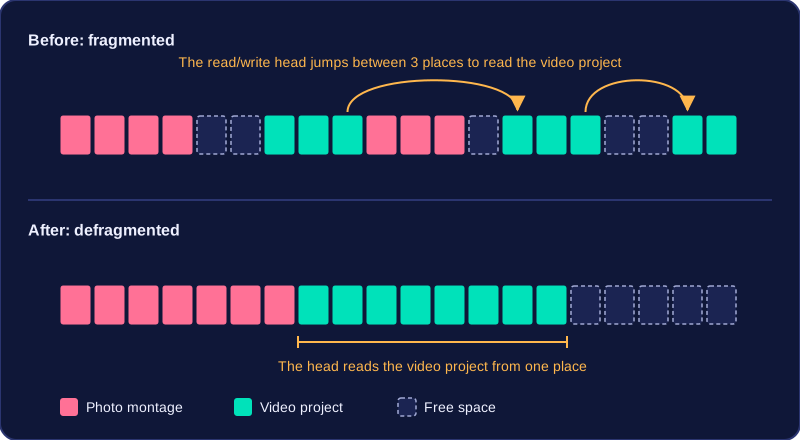
Fragmentation happens naturally as you save and delete files. Deleting something leaves a gap. When you next save a file that is bigger than the gap, part of it goes into the gap and the rest carries on somewhere else, so one file ends up split into pieces. Save a school photo montage, delete an old game, then save a video project and the video may be written into three separate spaces.
This builds up over weeks of normal use, so the disk gradually slows down. Reading a fragmented file takes longer because the read/write head has to move to several locations instead of one.
What defragmentation does
Defragmentation rearranges the pieces of every fragmented file so they are stored consecutively — one after another — and it gathers the free space together into one large area. The purpose is to improve access speed: the read/write head moves less, so your files open and save faster.
It only rearranges data that is already there. It does not create more storage space, and it does not delete any files — a disk that is nearly full stays nearly full after defragmenting. Defragmentation is only useful on a magnetic hard disk, because the delay comes from the read/write head having to travel across the platters.
Data compression software is a utility that makes a file, or a set of files, smaller. It works by storing the same information in fewer bits.
Less storage space used
Because each file is built from fewer bits, it occupies less storage space, leaving room for more files on the same device. For example, a folder of design work taking 120 MB might shrink to about 60 MB once compressed, freeing 60 MB of space for other work. That extra room means you may not need to buy a bigger drive as soon.
Faster to send and download
Compression is needed because moving data takes time. Bandwidth is the amount of data a connection can carry each second, and every bit you send uses some of it. Fewer bits means the file arrives sooner and the connection is left free for other traffic. A file that takes ten minutes to upload from home might take five once compressed to half its size, and a class of 30 pupils downloading the same resource pulls far less data through the school network.
It must be decompressed first
A compressed file is stored in a packed format, so most programs cannot open it as it stands. It has to be decompressed (often called extracting) before it can be used normally. Decompression unpacks the file back into a form the software can use, so it opens, plays or edits normally again. Compression only changes size: it does not improve quality, and it does not keep a file private, which is what encryption software is for.