Utility software
Disk Defragmenter

Defragmentation software is a utility that tidies up how files are stored on a magnetic hard disk. It finds fragmented files — files whose pieces are scattered in different places on the disk — and moves those pieces so that each file is stored together.
A magnetic hard disk keeps data on spinning platters, and a read/write head moves across the surface to read or write it. The head has to travel to wherever the data is, so the further apart the pieces of a file are, the longer it takes to fetch them.
How fragmentation builds up
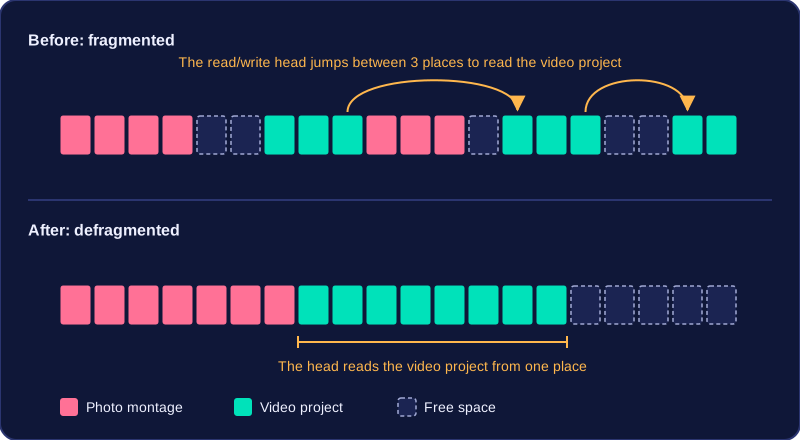
Fragmentation happens naturally as you save and delete files. Deleting something leaves a gap. When you next save a file that is bigger than the gap, part of it goes into the gap and the rest carries on somewhere else, so one file ends up split into pieces. Save a school photo montage, delete an old game, then save a video project and the video may be written into three separate spaces.
This builds up over weeks of normal use, so the disk gradually slows down. Reading a fragmented file takes longer because the read/write head has to move to several locations instead of one.
What defragmentation does
Defragmentation rearranges the pieces of every fragmented file so they are stored consecutively — one after another — and it gathers the free space together into one large area. The purpose is to improve access speed: the read/write head moves less, so your files open and save faster.
It only rearranges data that is already there. It does not create more storage space, and it does not delete any files — a disk that is nearly full stays nearly full after defragmenting. Defragmentation is only useful on a magnetic hard disk, because the delay comes from the read/write head having to travel across the platters.
Practise this
OCR GCSE Computer Science · Utility software