System Architecture
Embedded Systems
Contents
An embedded system is a computer system built into a larger device to carry out a dedicated function: one particular job, or a small set of related jobs. Its purpose is to control or perform that function as part of the device, not to run many different programs. The controller inside an electronic keyboard, for example, turns key presses into sounds and runs no other software.
A general-purpose computer is different: it can carry out many tasks, and you change what it does by running or installing different software.
How they compare
| Feature | Embedded system | General-purpose computer |
|---|---|---|
| Main job | One function, or a few related tasks | Many different tasks |
| Software | Fixed program; you cannot normally install new software | You install and run different programs |
| Size, power and cost | Typically smaller, lower power, cheaper | Typically larger, uses more power, costs more |
| Processing and memory | Limited to what the task needs | Much more processing power and memory |
| Complexity and reliability | Simple, so reliable in its dedicated role | Complex, so less suitable for one control task |
Why use an embedded system?
A device may use an embedded system rather than a general-purpose computer to keep the product smaller, cheaper, lower power and more reliable. Smaller means it fits inside the product; cheaper means the whole product costs less; lower power means it can run from a battery; simpler hardware and a fixed program mean fewer things can go wrong.
The keyboard's controller shows this. It is built into the keyboard, has a processor and limited memory, and uses dedicated hardware such as its keys as input. Its fixed program is hard for you to change and is usually held in ROM. A general-purpose computer could also generate sound, but it would bring a full operating system the instrument does not need, and its extra cost, size and complexity would make it a poorer fit for one control task; the keyboard's small fixed controller gives a fast, consistent response to every key press.
Embedded systems are built into all sorts of products, not just into what you would normally call a computer. Each one is a small computer system built in to carry out a dedicated function — one particular job inside a larger device. The examples below show how varied those products can be.
| Category | Example | What the embedded system does |
|---|---|---|
| Household appliances | Coffee machine | Heats water to the right temperature and runs the pump for the chosen drink. |
| Vehicles | Electric scooter | Checks the battery temperature and cuts the power if it gets too hot. |
| Personal devices | Wireless games controller | Reads button presses and sends the signals to the console. |
| Medical devices | Insulin pump | Delivers insulin in controlled amounts through a small tube. |
| Industrial equipment | Wind turbine | Adjusts the angle of the blades to suit the wind speed and checks the generator temperature. |
In every row the system is tucked inside the product and is only there to do that one job, which is why the categories cover so many different industries.
A device can contain several embedded systems
A larger device can hold more than one embedded system, with each one dedicated to a different function. A gym treadmill, for example, might have one system that controls the speed and incline of the running belt, another that reads pulse sensors in the handrails and adjusts the workout, and a third that checks a safety key and stops the belt if it is pulled off. These are separate systems inside the same treadmill because moving the belt, reading a pulse and stopping for safety are three different jobs.
So you cannot tell how many embedded systems a device contains just by looking at it: one product can hold several computer systems, each busy with its own task.
An embedded system has its own small set of hardware built into the larger device it belongs to: a processor and some memory. This hardware is dedicated to the device's one job, and the processor runs the program held in that memory to decide what to do with each input it receives.
The processor needs something to work on, so the device supplies inputs. Often these are sensors that measure something physical: temperature, light level, how full a tank is. Inputs can also come from a button you press or a dial you turn, perhaps to set the value the device should keep to.
Having read the input, the processor follows its program and drives an output. Outputs change something in the real world: a motor turns, a heater warms, a valve opens or closes, a light switches on, or a display shows a reading.
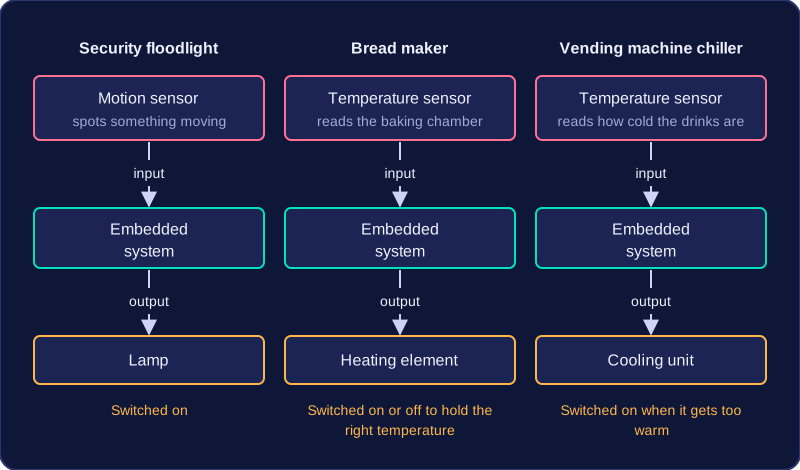
Input, processing and output in one device
Imagine a greenhouse that opens its own roof vent. A temperature sensor measures how warm the air is, and the processor compares that reading with the target temperature held in memory. If the air is too warm, the processor signals a motor to open the vent; when the sensor reports that the air has cooled, the motor runs the other way to close it. Nobody has to keep watch.
| Hardware part | Job in the greenhouse controller |
|---|---|
| Processor | Follows the program and decides when to move the motor |
| Memory | Holds the program and the target temperature |
| Input: temperature sensor | Measures the air temperature |
| Output: motor | Opens or closes the roof vent |
Why the loop matters
Notice what happens next: the output changes the temperature, the sensor reads the new temperature, and the processor acts again. This feedback loop is why embedded systems are so often used as control systems that work automatically. The system checks its inputs over and over and reacts through its outputs each time, holding a value within a range without a person making every decision.
The program an embedded system runs is fixed: it is written to do one dedicated job and is not meant to be swapped for something else. That program is typically held in ROM (read-only memory), a type of memory that keeps its contents when the power is switched off and is not normally written to while the device is running. So every time the device is switched on, the same program is there, ready to check its inputs and drive its outputs.
Why you cannot change it
An embedded system has no app store or installer, and its memory is far too small to hold extra software. The user cannot normally edit the program or add new programs, because the instructions sit in ROM rather than in storage the user can write to. The manufacturer may sometimes release a new version of the program, which is installed during a service, but that is the maker's job rather than the owner's. Adding a new card code to a door lock is only changing data, not changing the program itself.
A worked example
Think of the electronic lock on a hotel bedroom door. Its ROM holds a fixed program: read the key card, compare the code with the list of valid codes, and if it matches, run the motor that pulls the latch back for a few seconds. Hotel staff can add or remove card codes, but they cannot make the lock do anything new, such as show messages or play a greeting, because the program cannot be rewritten. If the maker finds a fault, it releases an update for the lock's program.
What this means for suitability
Because the program is fixed and memory and processing power are limited, the system can only do the task it was built for. A small youth theatre that needs one machine to sell tickets, control stage lights and play interval music, and wants to install new software when the season changes, needs a machine that runs many different programs. An embedded system is not suitable for that job, since its fixed program and limited memory cover only one task and the theatre staff cannot install the extra programs themselves.
An embedded system is built with just enough of everything to do its own dedicated job well. The characteristics below are typical rather than strict rules: they explain why an embedded system is a good fit for the device it is built into.
| Characteristic | What it means | Why it suits the device |
|---|---|---|
| Limited processing power and memory | A modest processor and small memory, matched to the one task. | It needs only enough speed and storage for its job, so extra capacity would add cost and power use. |
| Small size | A small processor and little memory take up little space. | It fits inside the larger device, even a compact or handheld one. |
| Low power use | It draws little electricity and runs cool. | It can often run from batteries and costs little to run. |
| Low cost | Simpler, smaller parts are cheap to make in large numbers. | The manufacturer keeps the price of the whole product down. |
| High reliability | Fewer parts, and simple software tested for one task, so less can go wrong. | It is less likely to fail over years of use, which matters if it controls something important. |
| Continuous running | Designed to keep working for long periods without attention. | You never need to restart it or supervise it. |
| Simple or absent interface | Often only minimal controls, or none at all. | You only start it or make a simple choice, so extra controls would add cost and complexity. |
Matching characteristics to the device
Imagine a bike computer that shows your speed and distance. It only has to count wheel turns and do simple sums, so a small processor and little memory are enough, and it is small enough to clip to the handlebars. It runs from a coin battery because it uses little power, it is cheap enough to add to a bike, and it keeps working for hours on a ride without attention. A couple of buttons are all you need to switch between speed and distance, so the interface stays simple. Each characteristic matches a need of the device, which is why the embedded system suits it.