System Architecture
Parts of the CPU
Contents
The Central Processing Unit (CPU) is the part of a computer that processes data and instructions. It is also called the processor. Its purpose is to carry out the instructions of the programs held in memory, which is how a computer runs software.
The CPU does this by repeatedly carrying out the fetch-execute cycle, once for each instruction. After it has dealt with one instruction, it moves on to the next one in the program. For example, a program for a school bell might contain an instruction to read the clock and another to switch on the bell: the CPU deals with the first instruction, then the second, and so on until the program ends.
Inside the CPU are the components that make all this happen: the Control Unit, the Arithmetic Logic Unit (ALU), registers and cache. Each one has its own job to do while the CPU works through a program. They are all built into the processor itself rather than sitting out in RAM, so the CPU can reach the values it needs without the delay of a fetch from memory.
A program is a sequence of instructions that the CPU carries out one after another. The data are the values those instructions work on.
Imagine a program that plays a ringtone. Its instructions say things like "take the next note from the tune and sound it for the length given". The notes and their lengths are the data. On their own, the instructions have nothing to play; on their own, the data are just a list of notes and numbers. You need both.
Where the program lives
A computer that uses Von Neumann architecture keeps the program in memory instead of building it into the hardware. The instructions sit in memory alongside the data, and the CPU fetches them from there, one at a time, as it works through the program.
This is what makes a computer general purpose. The hardware only ever does the same small set of jobs, so it doesn't need to know in advance whether it is helping you write an essay or play a game. Load a different program into memory and the same machine does a completely different job.
Same hardware, different job
Suppose you open a photo editor on a laptop. Its instructions are loaded into memory and the CPU begins carrying them out. Later you open a spreadsheet instead: a new set of instructions is loaded into memory in its place, and the CPU carries those out. Nothing inside the laptop has been rebuilt or rewired.
| Program built into the hardware | Program held in memory | |
|---|---|---|
| Where the program is | Built into the circuits | Held in memory with the data |
| To run a different program | A new circuit is needed | Load the new program into memory |
The CPU works through the instructions by repeating the fetch-decode-execute cycle, and the same cycle works for every program you load.
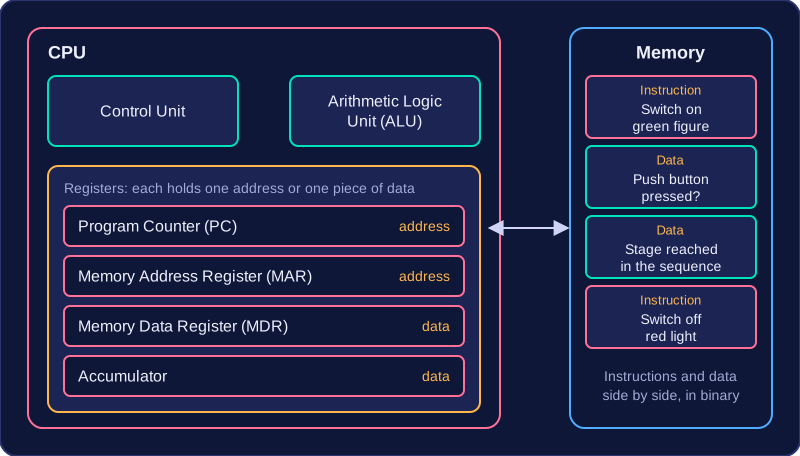
Von Neumann architecture is the design used by most modern computers. Its key feature is that a program's instructions and its data are stored together in the same memory, in binary, with no separate memory set aside for instructions.
That shared memory matters because the CPU treats instructions and data in exactly the same way: it fetches both from memory as and when they are needed, rather than reading one from one place and the other from somewhere else. A single program's instructions sit alongside the values it works on.
An example
Imagine a program that works the lights at a pedestrian crossing. Memory holds the binary for each instruction — such as switch on the green figure, or switch off the red light — and also the binary for the data the program is working on: whether the push button has been pressed, and which stage of the sequence the crossing has reached. Both sit in the same memory, side by side. When the CPU reaches the instruction that switches on the green figure, it fetches that instruction, then fetches the button data it needs from the same memory.
The Von Neumann registers
Four registers inside the CPU are named as part of Von Neumann architecture: the Program Counter, the Memory Address Register, the Memory Data Register and the Accumulator. Each of these holds just one item — either a memory address, which says where something is stored, or a piece of data, which is what is actually stored there.
An address and the value stored at that address are not the same thing, so it matters which of the two a register holds; swapping them makes the registers impossible to tell apart.
Registers are tiny, very fast storage locations built into the CPU. They are not locations in RAM: they sit inside the processor itself, holding the particular instruction or data value that the CPU is handling at that instant.
A register holds just one item at a time: it may be an instruction, a data value or an address in memory. Because a register is built into the CPU and holds a single item, registers are the fastest storage in a computer. There are only a few of them, though, so the total amount they can store is tiny, smaller than the cache.
What the named registers hold
| Register | What it stores |
|---|---|
| Program Counter (PC) | The address of the next instruction |
| Memory Address Register (MAR) | The address in memory that the CPU will access next for a read or a write operation |
| Memory Data Register (MDR) | Data or an instruction that has just been read, or data waiting to be written |
| Accumulator | Data, including results from calculations |
An address tells the CPU where something is; data is the value itself. For example, if the next instruction is at address 5120, the Program Counter holds 5120. Once that instruction is fetched, the instruction itself is held in the Memory Data Register.
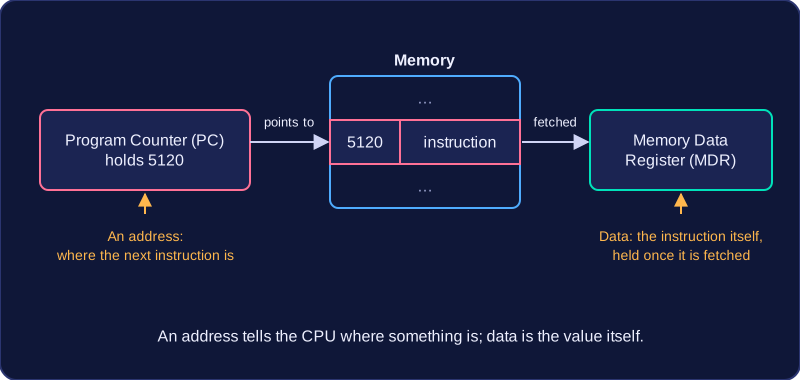
Describe a register by what it stores rather than by an action it performs: the Program Counter stores the address of the next instruction, so it does not fetch the instruction, and it does not count how many programs have run.
The Control Unit (CU) is one of the main components inside the CPU. It carries out a job rather than storing anything, so it is a component and not a register. Its role is to direct the rest of the CPU: it works out what each instruction means, then makes the other components carry that instruction out at the right moment.
Decoding and controlling
Decoding is how the CU makes sense of an instruction. Instructions arrive as patterns of binary, and the CU recognises what each pattern means and which action is needed next.
Once it knows what is needed, the CU sends control signals along control lines. A signal might tell memory to read or to write, tell the ALU which operation to carry out, or move data from one place to another. Saying only that the CU "sends control signals" tells you very little on its own; what matters is what each signal causes a component to do. The CU also controls the flow of data inside the CPU and along the paths linking the CPU to memory and to input and output devices, so values arrive in the right place at the right time.
Managing the cycle
The CU manages the fetch-decode-execute cycle, keeping fetch, decode and execute in that order for every instruction and starting the next fetch once the current instruction has been carried out. Decode, the middle stage, happens here rather than in the ALU.
What it does not do
The CU performs no calculations, because the ALU does those, and it stores nothing, because registers hold the data and instructions being worked on. Picture a conductor in front of an orchestra: the conductor makes no sound but decides who plays and when.
The Arithmetic Logic Unit (ALU) is the part of the CPU that carries out calculations and tests on values. It is a CPU component, not a register: it works on values rather than storing them.
The ALU handles three kinds of operation:
- Arithmetic operations work with numbers: addition, subtraction, multiplication and division are all carried out here.
- Logical operations work on binary values, combining them with AND and OR or inverting them with NOT.
- Comparisons test two values and produce a true or false answer, such as whether a score equals the target or is greater than it. Decisions and loops in a program rely on these tests: an
ifstatement only chooses a branch once the ALU has compared the values.
For example, a school trip is booking minibuses. Each minibus seats 15 students and 4 minibuses have been reserved, so the ALU multiplies 15 by 4 to get 60, which is stored in the Accumulator. The ALU then compares 60 with the 57 students who returned their permission slips and gives true, because there is room for everyone. The Accumulator holds the answer to a calculation, not the calculation itself.
The ALU does not fetch or decode instructions, and it does not control the flow of data around the CPU; the Control Unit does that. The ALU receives values, performs the operation it has been given and sends the result to the Accumulator.
The Program Counter (PC) is a register inside the CPU. It holds the memory address of the next instruction to be fetched. It holds an address only — not the instruction itself, and not the data that the instruction works on.
Memory is a long list of numbered locations. Each address holds either an instruction or a piece of data, so holding one of those addresses tells the CPU exactly where to look.
The table shows a short program in memory. The instructions are written in English so you can follow them; in memory they are stored as binary codes.
| Memory address | Instruction stored there |
|---|---|
| 60 | get the player's answer |
| 61 | check whether the answer is correct |
| 62 | increase the score by one |
| 63 | show the score |
During the fetch stage
In the fetch stage the CPU uses the number in the Program Counter to work out where to look. If the Program Counter holds 60, the CPU collects the instruction at address 60, which is "get the player's answer".
Then it is incremented
As soon as the instruction has been collected, the Program Counter is incremented: 1 is added to it, so it now reads 61, where the following instruction is stored. Instructions normally sit one after another in memory, so adding 1 moves to the next one. The next fetch uses 61, then 62, then 63.
The Program Counter is not counting instructions, and it is not counting programs. Adding 1 simply moves it along to the next address, like moving to the next line when reading a list.
A jump changes the address
Programs do not always run straight down the list. If the instruction that has just been executed is a jump, the CPU replaces the value in the Program Counter with a different address during the execute stage. The next instruction is then fetched from there instead. A loop or an if statement relies on jumps to go back to an earlier instruction, or to skip forward past instructions it does not need.
The Memory Address Register (MAR) is a register inside the CPU that holds an address: the number of the memory location the CPU is about to read from or write to. It always holds an address, never the instruction or data itself.
Where, not what
An address is the number that labels one memory location. The data is whatever is held inside that location: an instruction, or a value the program is working on. Every location in memory is the same apart from its address, so the CPU cannot fetch anything until it has put the right location number into the MAR.
For example, if a program's instructions start at location 500, the MAR holds 500 to fetch the first one and 501 to fetch the next. If the program then saves a high score, the MAR holds the address of the location where that score will be written.
Instructions or data
The location named by the MAR might contain an instruction, as it does during the fetch stage of the fetch-decode-execute cycle, or it might contain data the program is working on. The MAR does the same job either way: it stores the location, and nothing else.
MAR or MDR?
These two registers are easy to swap over. The Memory Data Register (MDR) holds the instruction or data that has just been read from memory, or the value waiting to be written to memory. So check what the value is: if it is a location number, it belongs in the MAR; if it is the contents of that location, it belongs in the MDR.
The Memory Data Register (MDR) is a register inside the CPU. It stores whatever has just arrived from memory — a piece of data or an instruction — and it also holds on to data that is waiting to be sent out to memory. It always holds the value itself, never the address of the place the value came from: addresses are held in the Memory Address Register (MAR) instead.
During the fetch stage
Every instruction starts by being fetched from memory. When that read happens the instruction arrives in the MDR, and it stays there while the Control Unit decodes it and the CPU carries it out. Once the fetch has finished, then, the MDR is holding an instruction rather than a piece of data.
Data on the move
Anything travelling between the CPU and RAM passes through the MDR. When the CPU reads from memory, the value stored at that location is copied into the MDR. When the CPU writes to memory, the value is put into the MDR first and then sent on to memory. Nothing gets in or out without passing through this register.
For example, a vending machine's control program needs the price of a snack before it can work out change. The address of that price in memory is placed in the MAR, while the price itself — 85 pence, stored in binary — sits in the MDR as it is copied in from memory. The MDR carries the price; it does not carry the address that says where the price is kept.
The Accumulator is a register inside the CPU that holds the result of the most recent operation carried out by the Arithmetic Logic Unit (ALU). Along with the Program Counter, Memory Address Register and Memory Data Register, it is one of the four registers of Von Neumann architecture.
What it holds
The Accumulator holds data: a value or the answer to a calculation. It never holds an address. An address says where something is stored, while the Accumulator holds the value itself. A common mix-up is thinking it stores the location of a result; it stores the result.
During the execute stage
In the execute stage the ALU carries out the arithmetic or logical work for the current instruction, using the data it has been given, and whatever it produces is placed in the Accumulator. For example, a photo editing app might brighten a picture by adding 20 to the red value of every pixel; the ALU works out each new red value and the Accumulator holds it until the CPU writes it back to memory.
The Accumulator does not do the calculation. The ALU does the work, and the Accumulator is only where the answer is kept. Keeping it in a register means the next instruction can use it straight away rather than waiting for a slower read from RAM. The Accumulator also does not decode instructions or control the flow of data; those are jobs for other CPU components.
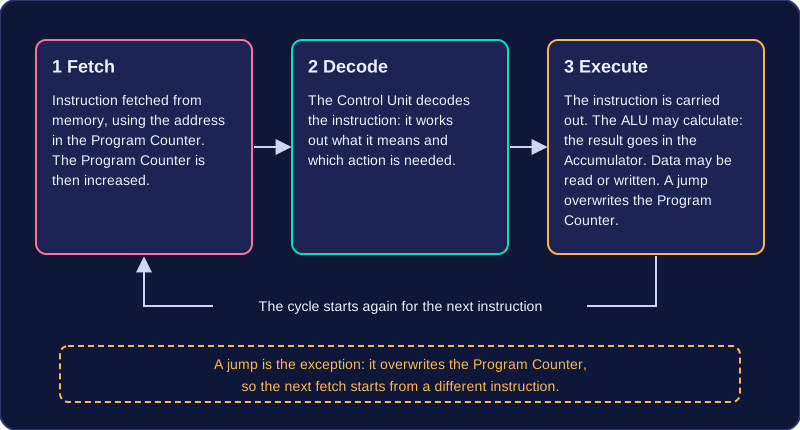
The fetch-decode-execute cycle is the set of steps the Central Processing Unit (CPU) works through to run each instruction of a program. The three stages always happen in the same order: fetch, then decode, then execute. The CPU finishes one instruction and then starts again for the next.
What happens at each stage
| Stage | What happens |
|---|---|
| Fetch | The CPU fetches the next instruction from memory, using the address stored in the Program Counter. The Program Counter is then increased, so it points at the instruction that comes after it. |
| Decode | The Control Unit decodes the instruction: it works out what the instruction means and which action is needed. |
| Execute | The instruction is carried out. The Arithmetic Logic Unit (ALU) may carry out a calculation, and its result is placed in the Accumulator; data may be read from or written to memory; or a jump may overwrite the Program Counter. |
Why the order matters
The CPU cannot execute an instruction it has not fetched, and it cannot act on an instruction until the Control Unit has decoded it. Running the stages as fetch, execute, decode would mean trying to carry out something the CPU has not yet understood, so that order is always wrong.
When execute finishes, the cycle begins again and the next instruction is fetched. Because the Program Counter was increased after the fetch, the CPU moves on one instruction at a time. A jump is the exception: it changes the Program Counter, which is how programs repeat or skip sections of code.
Following one instruction
Picture a program that makes a warning light flash in a factory. One instruction is a jump back to an earlier address, so the flashing repeats. Before fetch, the Program Counter holds the address of that jump instruction. In fetch, the CPU copies the instruction from memory and the Program Counter moves on. In decode, the Control Unit works out that it is a jump and finds the address to go to. In execute, that address is placed into the Program Counter, so the next fetch starts from the earlier instruction and the light keeps flashing.