Programming Languages & IDEs
Languages
Contents
Programming languages are grouped into two levels: high-level and low-level. The level depends on how close the language is to people or to the processor. A language close to English and maths is high-level; a language close to the instructions a processor carries out is low-level.
Closeness, not quality
A high-level language uses readable words and familiar maths, so you can look at a line and roughly follow what it does. A low-level language uses instructions that match the hardware, so it is much harder to read. Machine code is the form the processor executes directly.
The word low-level does not mean poor, simple or old, and high-level does not mean better. These words only describe distance from the processor. A low-level language is nearer the hardware, which is exactly what a programmer sometimes wants.
Seeing the difference
In a high-level language, one statement can do a lot of work. Adding up every score in a list can be one short statement, and you never think about where those values sit in memory.
In a low-level language, the same job is broken into small steps: fetch one value, fetch the next, combine them, store the result. In machine code, each step is one instruction the processor can carry out directly. That is why low-level code is longer and harder to follow, but gives exact control over what the machine does.
Machine code is closest to the processor. Assembly language sits just above it, and high-level languages are furthest away, at the human end.
| Question to ask | High-level | Low-level |
|---|---|---|
| Closer to what? | People: English words and maths | The processor: its own instructions |
| How much work is one line? | Often many machine instructions | Usually one machine instruction |
| How easy to read and write? | Easier | Harder, needs knowledge of the hardware |
To classify a language or a statement about one, ask only one thing: is this aimed at people, or at the processor?
Machine code and assembly language are the two low-level languages. Both work at the level of the processor itself, so every instruction in them matches something the hardware can really do.
Machine code: the processor's own language
Machine code is written as binary patterns — strings of 0s and 1s. Each pattern stands for exactly one instruction in that processor's instruction set, which is the fixed list of operations the processor was built to carry out. One pattern, for example, might mean “load the number stored in memory location 6”. Machine code is the only form a processor can execute directly, with no translation at all.
Assembly language: the same instructions, named
Reading binary patterns is slow and easy to get wrong, so assembly language replaces each pattern with a short word called a mnemonic. The instruction above could be written as LOAD 6. There is one mnemonic for every machine code instruction, so the two languages have a one-to-one correspondence: a single line of assembly becomes a single machine code instruction, never several.
A processor cannot run assembly language, because it only understands binary patterns. Every assembly program therefore needs converting into machine code first, and that conversion is a straight swap of each mnemonic for its pattern. Assembly is therefore just a more human-readable way of writing the same instructions, not a different set of instructions.
Tied to one type of processor
Instruction sets differ from one processor design to the next, so a program written in a low-level language works on only one kind of processor. Move it to a different processor and it will not run, because the same patterns mean different things there, or nothing at all — the program has to be rewritten for the new processor. High-level languages are not tied to one processor like this, which is why they are portable.
Low-level languages – assembly language and machine code – work at the level of the instructions the processor actually carries out. That closeness brings real advantages, but it asks a great deal of the programmer.
Benefits of low-level languages
- Direct control over the hardware. You choose exactly which memory locations and registers hold each value, rather than leaving those decisions to something else.
- Speed and size. Because you pick every instruction yourself, you can optimise a program to run as fast as possible or to use as little memory as possible, whichever matters more.
- No translation for machine code. Machine code is already in the form the processor executes, so it runs straight away without being converted first.
For example, the routine that redraws a game screen sixty times a second might be written at a low level, so that each frame is finished before the next one is due. A low-level program can also be trimmed byte by byte to squeeze into a tiny memory limit, where a translated high-level version would not fit.
Drawbacks of low-level languages
- Slow and fiddly to produce. Writing code, working out what an existing program does and tracking down mistakes all take much longer than with a high-level language: each instruction does one tiny job, so even a simple task becomes a long list of them, and there are no readable statements to skim when you are hunting for a bug.
- You need detailed knowledge of the processor. You must understand its registers, its instruction set and how memory is laid out before you can write anything useful.
- Not portable. Each type of processor understands its own set of instructions, so code built for one chip will not run on another and must be rewritten for the new chip.
That is why low-level languages are used only when their benefits are essential: where memory is very limited, or where part of a program must run as fast as possible. For most other work, the ease of a high-level language is worth more than the control you give up.
High-level languages are programming languages written to be close to English and to maths. You write them as statements built from readable keywords such as for, def and return, so the code looks like a set of instructions a person can follow.
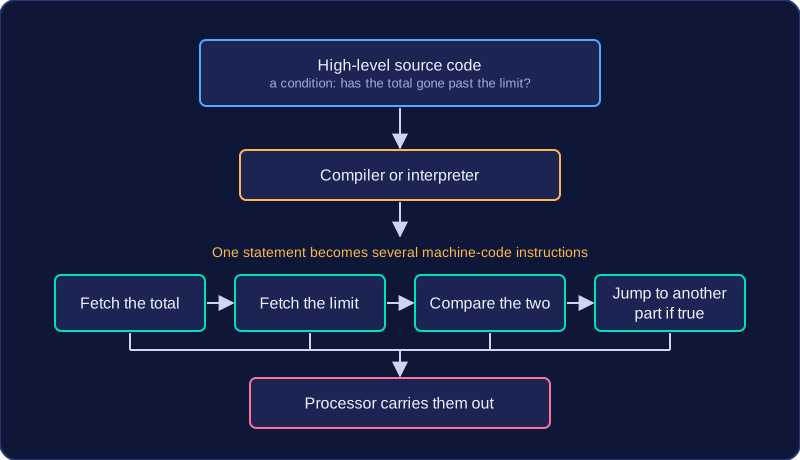
Each statement does a lot of work. When it is translated, one statement usually turns into many machine code instructions. For example, one statement that works out the average of the values in a list has to load each value in turn, add it to a running total, count how many values there are, divide the total by the count and store the answer — many machine code instructions from the single line you wrote.
Benefits
- Programs are quicker to write and simpler to read, follow and fix when something goes wrong, because the statements mean something to a person.
- Fewer lines of code are needed to get a job done.
- You do not need to know how the processor works — there are no registers or memory addresses to manage.
- The language already provides built-in features such as lists for storing data and named functions you can call, so many common tasks are solved for you.
- High-level languages are portable: the code you write is not tied to one type of processor, so one set of instructions can be translated for a completely different make of computer and still work.
Drawbacks
- You have less direct control over the hardware, so you cannot fine-tune exactly which memory locations or registers are used.
- A finished program built this way can be slower, and may need more memory, than a carefully written low-level program.
- Any program written in a high-level language must be translated into machine code before it will run, because a processor only executes machine code.
Despite these drawbacks, high-level languages are used for most general-purpose programming because they are much easier to work with.
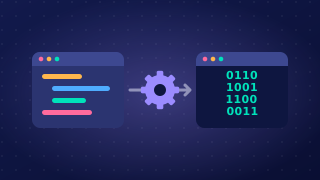
A translator is a program that converts code written by a programmer into machine code, so that it can be executed. Without one, the instructions a programmer types would just sit in a file and never run.
Why a translator is needed
A processor can only execute machine code — the binary patterns that make up its own instruction set. It cannot act on a readable statement such as score = score + 5, because that is not one of its instructions. So every program written in a high-level language, and every one written in assembly language, has to be turned into machine code before it can run — and that is the translator's job.
Think of two people who speak different languages: the programmer writes in something a person can read, the processor only understands machine code, and the translator sits in between turning one into the other.
| Code the programmer writes | Can the processor execute it directly? | Does it need translating? |
|---|---|---|
| Machine code | Yes | No — it is already in the right form |
| Assembly language | No | Yes |
| High-level language | No | Yes |
Source code
The code written by the programmer is called the source code. It is the version a person can read, edit and store. The translator takes that source code as its input and turns it into machine code the processor can carry out. The two are versions of the same program: one written for a person to read and change, and one written for the processor to carry out.
Two types of translator
For high-level languages there are two types of translator: the compiler and the interpreter. Both turn high-level source code into machine code the processor can carry out, but they go about the job in different ways.
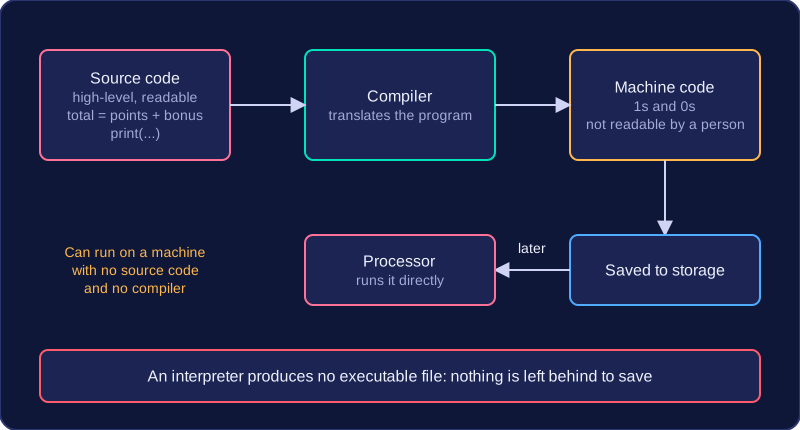
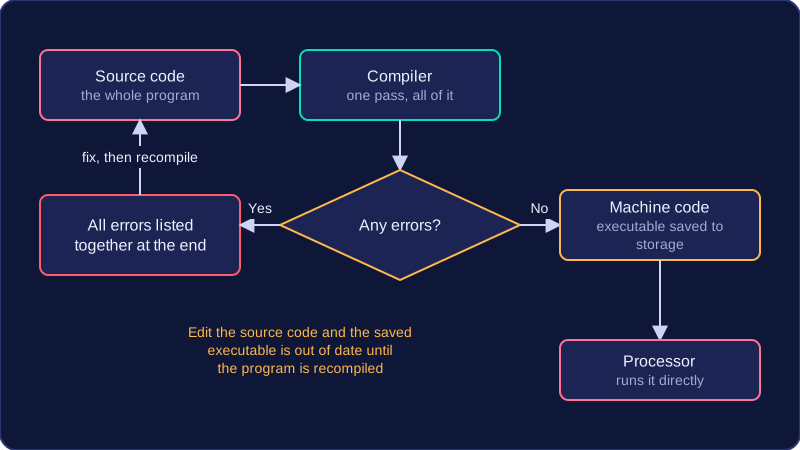
A compiler is a type of translator. It takes the complete source code and converts it all to machine code before the program is executed. The result is an executable file. Once it has been compiled, the executable can be started as many times as you like; it does not need to be translated again, and neither the source code nor the compiler has to be there.
What the executable gives you
If you compile a quiz game on one Windows laptop, you can copy the executable to another Windows laptop and play it there without installing the compiler or handing over your code.
Benefits
- A compiled program is fast to start and run, since the translation work was completed earlier. The program only has to be translated once.
- You can give the executable to users without the source code, so your code stays private and cannot easily be copied or modified, and users do not need the translator.
- A compiler can also optimise the code while it translates, for example by removing instructions that have no effect or choosing a faster machine instruction, so the executable may run faster or use less memory.
Drawbacks
- Compiling a large program can take a long time, and after every change you must compile the program again before you can test the new version.
- A compiler attempts to translate the whole program and then reports all errors together. The program cannot run until every syntax error is fixed, and because the errors are all reported at the end, they can be harder to locate.
- An executable is produced for one type of computer or platform only. For example, an executable made for a Windows laptop will not run on an Apple Mac; the source code must be compiled for that platform instead.
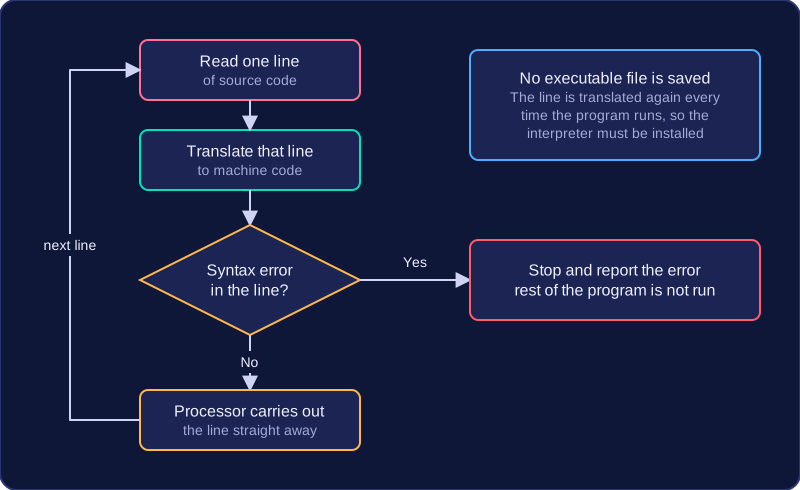
An interpreter is a translator that converts source code into machine code one line or statement at a time. Each line is executed immediately, then the interpreter moves on to the next one. It does not create an executable file, so the program is translated again every time it is run.
Errors and debugging
If an error occurs in a line, either while the line is being translated or while it runs, the interpreter stops at that line and displays an error message. You can see exactly where the problem is, which helps you find and fix it. Earlier lines have already been executed, so the program may have produced some output before it stops.
total = 8 + 4
print(total)
average = total / 0
print(average)
Output:
12
ZeroDivisionError: division by zero (line 3)
Benefits of an interpreter
- It helps during development and debugging, because you can test a change immediately without compiling the whole program again.
- Errors are reported as they are reached, pointing to the line that caused the problem, so faults are quick to track down.
- You can run a program even if some parts are unfinished, so you can test one section at a time.
Drawbacks of an interpreter
- Execution is slower, as each line is translated again on every run. Lines inside a loop are translated again on each pass.
- Anyone running the program needs the interpreter installed as well as the source code itself. The user therefore has a copy of the source code, so it cannot be kept private.
Interpreters are most useful during development; compilers suit finished programs that are given to users.
Choosing between a compiler and an interpreter depends on two things: how far through development the program is, and who will end up running it. Both turn high-level code into machine code, so the choice is about what suits the job, not about what they do.
Finished and being handed out: choose a compiler
A compiler translates the whole program in one go and produces an executable file. That makes it the sensible choice when a finished program will be installed and run by lots of people, because:
- the executable runs quickly, as translation is already done;
- users need no translator on their own computer;
- you hand over only the executable, so your source code stays private and is hard to copy or change.
Still being built and tested: choose an interpreter
An interpreter translates and runs the code one line at a time, so it halts as soon as a line goes wrong and tells you which line the problem is on. You fix that line and run again straight away, with no compiling step in the way, and you can run a program that is only half finished.
For example, a school installs a finished revision quiz on the computers in its study centre. A compiler suits this: the quiz is translated once, the executable is copied onto every machine, and nobody can open it up and rewrite the questions.
| Situation | Choose | Why |
|---|---|---|
| A finished program being sold or given to many users | Compiler | The executable runs quickly, users need no translator and the source code stays private |
| Testing a section of code you have just written | Interpreter | It stops on the faulty line and a fix can be tried out at once |
| Users must not be able to alter the code | Compiler | Users get only the executable, so the source code is never handed over |
So ask who is running the program: someone still fixing it wants an interpreter, while someone who just needs it to work wants a compiler.