Programming Fundamentals
Sub Programs

Contents
A sub program is a named section of code that performs a single job. You write it once, then call it whenever that job needs doing, so its instructions exist in one place only.
How control moves
When a program reaches a call, it does not carry on down the page. Control jumps to the sub program, runs its lines in order, then returns to the line immediately after the call. The body of a sub program is stepped over where it is defined and only runs when it is called, so the order the lines run in is not the order they appear in the file.
Imagine a program that prints a joining letter for each of three after-school clubs: chess, art and coding. The letter-writing steps sit inside one sub program. The main program calls it three times, once for each club. Each time, control jumps in, prints that club's letter, and comes back ready for the next call. Reading the code from top to bottom shows you where the sub program lives, not the order things happen when it runs.
Two kinds
Procedures and functions are the two kinds of sub program, and the general name for a named block of code you call is a subroutine. A procedure carries out a task, while a function sends a value back to the code that called it. Either way, the block is written once and only runs when it is called.
A sub program is a named block of code that you write once and then run whenever you need it. Writing it is called defining it; asking it to run is called calling it.
Defining with def
A definition starts with the keyword def, then the sub program's name, then a pair of brackets, then a colon. The code that does the work goes on the lines underneath and must be indented, usually by four spaces.
Those indented lines are the body of the sub program. Python has no end keyword, so the body finishes at the first line that is no longer indented, which belongs to the main program again. Defining a sub program does not run it — the body only runs when a call is made.
Calling a sub program
To run the sub program, write its name followed by brackets. Those brackets still have to be written when the sub program takes nothing in, so you write showBanner() and never showBanner. Without brackets, Python treats the name as an ordinary variable rather than a call, so the body never runs.
# a definition: def, name, brackets, colon, indented body
def showBanner():
    print("*** School Quiz Night ***")
    print("Friday, 7pm, Main Hall")

# main program: each call is the name plus brackets
showBanner()
print("Teams of four - bring a pencil")
showBanner()
Output:
*** School Quiz Night ***
Friday, 7pm, Main Hall
Teams of four - bring a pencil
*** School Quiz Night ***
Friday, 7pm, Main Hall
Python is case-sensitive, so the name in the call must match the definition exactly, capitals included. ShowBanner() is a different name from showBanner(), so Python cannot find that definition and reports a NameError.
Python reads the file from top to bottom, so the definition must be reached before the call runs. That is why definitions are usually placed above the main program, with the calls below them.
A procedure is a sub program that carries out a task and does not return a value to the calling code. You define it once, then call it whenever that task is needed, but nothing comes back from the call — no number, no text, not even True or False.
Because a procedure sends no value back, a call does not produce a result you can use in a calculation or store for later use. Procedure calls are written as statements on their own line. If the calling code needs a value returned, a function is used instead.
def showLap(lapNumber, seconds):
    print("Lap " + str(lapNumber) + " took " + str(seconds) + " seconds")

showLap(1, 63)
showLap(2, 58)
Output:
Lap 1 took 63 seconds
Lap 2 took 58 seconds
Here showLap takes two parameters, so the same procedure can report a different lap each time it runs, yet it still returns nothing — it simply prints. The parameters supply the data the task works on, which is what makes one procedure reusable for every lap instead of a separate block of code for each.
A function is a sub program that returns a value to the code that called it. That value is called the return value, and the keyword that sends it back is return.
When Python reaches a return statement, the function stops straight away, so code later in that call is not run. If the return is inside an if branch, reaching it ends the function early; if that branch is not taken, the rest of the function can still run.
Using what comes back
The call itself produces the returned value, so you can use it just like a value you typed yourself. For example, a call that returns 4 can be stored in a variable, used in a calculation, printed as part of output, or joined to text with str().
If you call a function and do nothing with the result, the value is lost as soon as the line finishes. Nothing is displayed automatically, so a call on its own produces no output and leaves you nothing to use later.
True or false functions in conditions
A function can return True or False as well as a number. Since the call is already that Boolean value, you can put it straight into an if condition without comparing it to anything. Comparing the call with True as well works, but the comparison is unnecessary because the call already gives the condition.
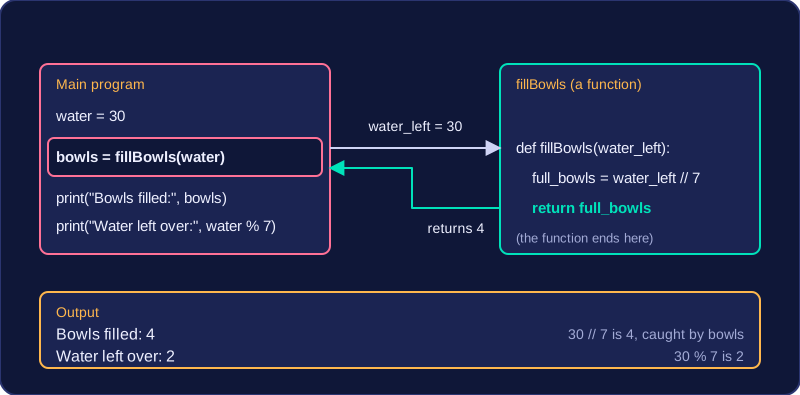
def fillBowls(water_left):
    full_bowls = water_left // 7
    return full_bowls

water = 30
bowls = fillBowls(water)
print("Bowls filled:", bowls)
print("Water left over:", water % 7)
Output:
Bowls filled: 4
Water left over: 2
Here the value from return is caught by bowls and printed. You could put the call directly in the first print line instead of storing it first; the output would be the same, because the call itself is the value.
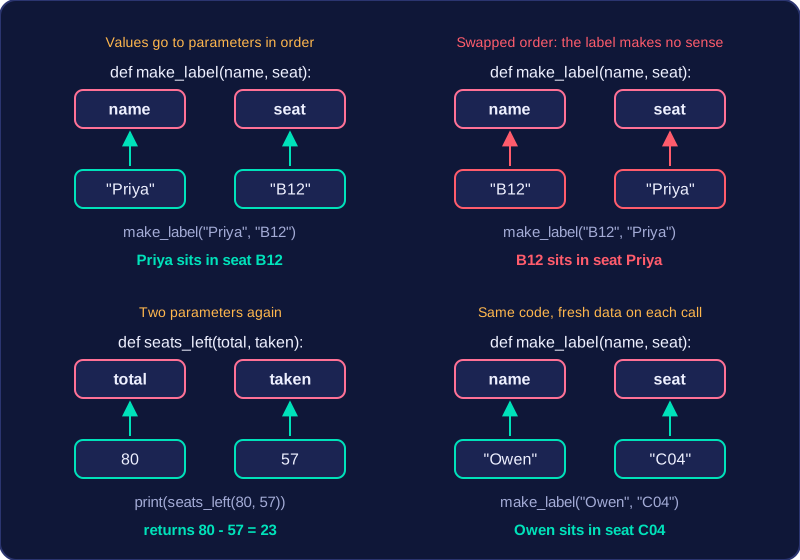
Parameters are the variables named inside a sub program's brackets when it is defined. They are placeholders for the values the sub program will receive when it is called. When you call it, the values inside the call brackets are passed to the parameters in order: first value to first parameter, second to second, and so on.
A sub program can take no parameters, one parameter or several. Its definition shows how many it expects, so a call must supply a value for each one in the right order. The values supplied in a call may also be called arguments; the distinction between the two terms is not needed here.
Parameters are useful because one sub program can handle fresh values on every call. Without them, a sub program cannot be handed new data each time it is called, so it is less flexible. Both procedures and functions can take parameters, so a procedure is not limited to empty brackets.
A function should receive the data it needs through its parameters. It should not use input() inside the function and overwrite a parameter with the user's answer, because then the value passed in is lost and the function is tied to one way of getting data.
def make_label(name, seat):
    print(name + " sits in seat " + seat)

def seats_left(total, taken):
    return total - taken

make_label("Priya", "B12")
make_label("Owen", "C04")
print(seats_left(80, 57))
Output:
Priya sits in seat B12
Owen sits in seat C04
23
Here, make_label and seats_left each have two parameters. The calls pass values in order, and each call can use different data while the code inside the sub program stays the same. The order matters: swapping Priya and B12 would put the seat into name and the name into seat, so the label would make no sense.
An array (a list in Python) can be passed to a function or procedure as a parameter, just like a single number or a piece of text. The sub program uses the parameter name to reach the whole array and work through its elements, so the same code can process any set of data you hand to it. Nothing needs to be copied by hand — you pass the array's name, and the parameter inside the sub program refers to that array.
Working with an array of any length
Inside the sub program you usually do not know how many elements will arrive, because a different call may pass a longer or shorter array. Rather than writing a fixed number, call len() on the array parameter and use the result to control a loop. The loop then runs once per element, so one sub program copes with two elements or two hundred without any changes.
def showBadges(badges):
    # loop once for each element, whatever the length
    for index in range(len(badges)):
        print(str(index + 1) + ". " + badges[index])

swimBadges = ["Star", "Dolphin", "Gold"]
showBadges(swimBadges)
showBadges(["Bronze", "Silver"])
Output:
1. Star
2. Dolphin
3. Gold
1. Bronze
2. Silver
The call showBadges(swimBadges) passes a three-element array, so the loop runs three times; the second call passes a two-element array and the same loop runs twice. The parameter badges always refers to whichever array was passed, and len(badges) gives the right count each time.
Returning an array
Arrays are returned in exactly the same way as any other value: a function builds a result and sends it back with return. The calling code stores the returned array in a variable, and can then index it, loop over it, or pass it into another sub program. It is good practice for the function to build a new array rather than changing the one it was given, so the original data is still usable afterwards.
def lowStock(counts):
    # build a new array of counts that need restocking
    restock = []
    for index in range(len(counts)):
        if counts[index] < 5:
            restock.append(counts[index])
    return restock

shelf = [9, 2, 7, 4]
toOrder = lowStock(shelf)
print(toOrder)
print(shelf)
Output:
[2, 4]
[9, 2, 7, 4]
Here lowStock makes an empty list, appends each count that is below 5 and returns the finished list. toOrder therefore holds only the items that need restocking, and because shelf itself was never changed it can still be used later in the program.
Choosing between a function and a procedure depends on whether the code that calls it needs a value back. A function is the right choice when the calling code needs a result to use, such as a calculation, a true/false check, or a value to store in a variable. A procedure is the right choice when the task only needs to do something, such as displaying output, and no value needs to be returned.
A function must send its result back with return. Printing the result inside the function is not the same: the caller has no returned value to store or use. If a function works out the area of a board, it should return the area so the main program can store it or compare it. If a procedure shows a menu on screen, printing is the whole job, so there is nothing to return.
def board_area(length, width):
    return length * width

def show_menu():
    print("Start game")
    print("Quit game")

area = board_area(5, 3)
print(area)
show_menu()
Output:
15
Start game
Quit game| What the caller needs | Choose | Reason |
|---|---|---|
| A number for another calculation | Function | The caller needs the result |
True or False for an if condition | Function | The returned Boolean is the check |
| A value to store in a variable | Function | The returned value can be assigned |
| A menu shown on screen | Procedure | Displaying is the whole task |
| The basket total display updated after an item is scanned | Procedure | No result is needed back |
In Python, practical uses include a calculation function, a conversion function, a grading function, a procedure that displays instructions, and a quiz app decomposed into sub programs, with a procedure that shows the current question and a function that checks whether the chosen answer is correct.
A sub program is a named section of code that performs a single job. Writing a task as a sub program and then calling it gives your program several real advantages.
Less repeated code
If the same job is needed in three places, you write it once as a sub program and call it three times. The program is shorter, so there is less to read and less that can go wrong. A bug in the task only has to be fixed once, and every call picks up the fix straight away, because they all run the same code.
def show_heading(round_number):
    print("=== Round " + str(round_number) + " ===")

# written once, called three times
show_heading(1)
show_heading(2)
show_heading(3)
Output:
=== Round 1 ===
=== Round 2 ===
=== Round 3 ===
Breaking a big problem into tasks
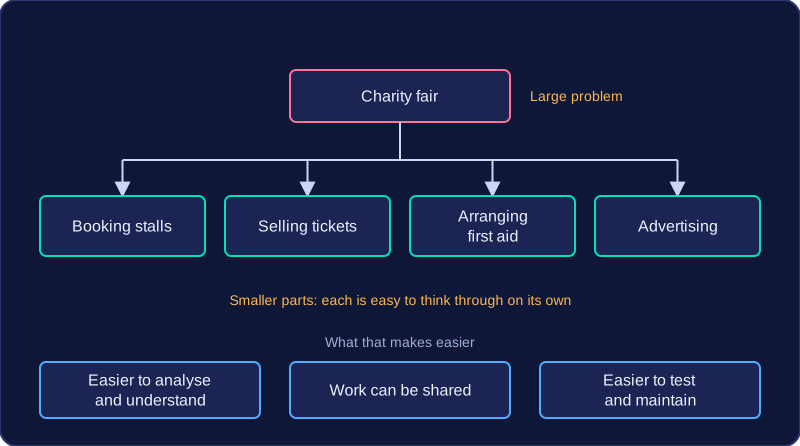
A large problem is hard to hold in your head all at once, so it is split into smaller tasks, which is called decomposition. Each task becomes its own sub program: a quiz program, for example, might use one sub program to pick a question, one to check the answer and one to update the score. Each piece is small enough to write and understand on its own.
Easier testing, reading, reuse and teamwork
You can run tests on one sub program by itself, using a few chosen values, before joining it to the rest of the program; testing and debugging are then easier because mistakes are found in a short piece of code rather than a long one. A well-chosen name such as check_answer tells you what happens without reading the body, which makes the whole program easier to follow and maintain.
- Reuse: the same sub program can be dropped into another program, or shared in a library, without being rewritten.
- Teamwork: in a team, separate sub programs can be built in parallel by different people, provided everyone agrees on the names and the parameters each one takes.
A sub program is not only for code that repeats. It is also worth writing one for a task that happens once, simply because naming it makes the program clearer.