Sub Programs
Benefits of sub programs

A sub program is a named section of code that performs a single job. Writing a task as a sub program and then calling it gives your program several real advantages.
Less repeated code
If the same job is needed in three places, you write it once as a sub program and call it three times. The program is shorter, so there is less to read and less that can go wrong. A bug in the task only has to be fixed once, and every call picks up the fix straight away, because they all run the same code.
def show_heading(round_number):
    print("=== Round " + str(round_number) + " ===")

# written once, called three times
show_heading(1)
show_heading(2)
show_heading(3)
Output:
=== Round 1 ===
=== Round 2 ===
=== Round 3 ===
Breaking a big problem into tasks
A large problem is hard to hold in your head all at once, so it is split into smaller tasks, which is called decomposition. Each task becomes its own sub program: a quiz program, for example, might use one sub program to pick a question, one to check the answer and one to update the score. Each piece is small enough to write and understand on its own.
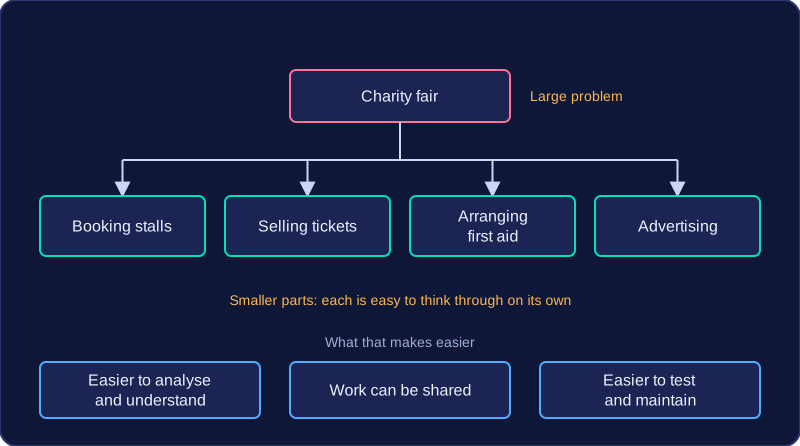
Easier testing, reading, reuse and teamwork
You can run tests on one sub program by itself, using a few chosen values, before joining it to the rest of the program; testing and debugging are then easier because mistakes are found in a short piece of code rather than a long one. A well-chosen name such as check_answer tells you what happens without reading the body, which makes the whole program easier to follow and maintain.
- Reuse: the same sub program can be dropped into another program, or shared in a library, without being rewritten.
- Teamwork: in a team, separate sub programs can be built in parallel by different people, provided everyone agrees on the names and the parameters each one takes.
A sub program is not only for code that repeats. It is also worth writing one for a task that happens once, simply because naming it makes the program clearer.