Protocols
HTTP and HTTPS

HTTP (HyperText Transfer Protocol) is the set of rules a web browser and a web server use to exchange web pages. Your browser acts as a client: it sends an HTTP request asking for a page, and the web server sends that page back in an HTTP response.
HTTP does not encrypt the data. If someone intercepts the request or response, they can read the page, the web address and anything typed into the page.
| Feature | HTTP | HTTPS |
|---|---|---|
| Job | Requests and sends web pages | Does the same job as HTTP |
| Encryption | None | Data is encrypted |
| If intercepted | Can be read | Cannot be understood |
| Best for | Pages with nothing private | Sensitive or personal data |
HTTPS adds encryption
HTTPS (HyperText Transfer Protocol Secure) performs the same web-page transfer as HTTP, but it encrypts the data before it travels. Encryption scrambles the data so it looks meaningless. Only the browser and the web server can turn it back into the original page, so intercepted data cannot be understood.
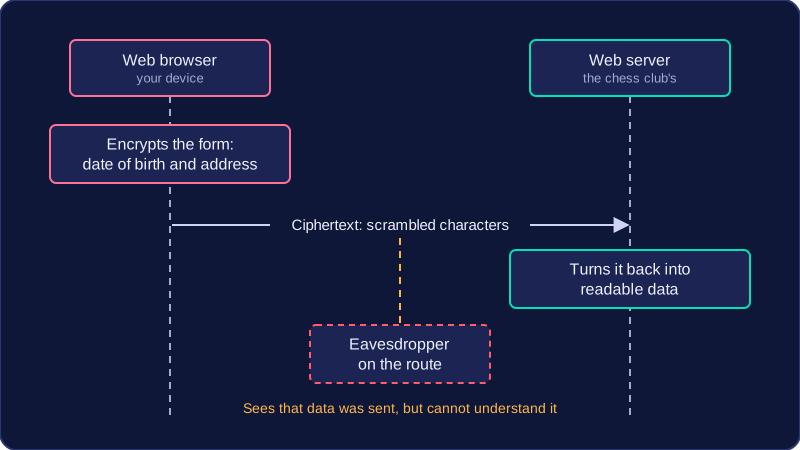
Choosing HTTPS
Choose HTTPS whenever web data needs to be encrypted, especially when sensitive data is being sent. For example, a pupil sending a private message to a teacher through a school's online contact form should use HTTPS, so anyone intercepting the traffic cannot read the message. A public page such as a school lunch menu could be sent with HTTP because nothing on it is private.
The function of HTTPS is to encrypt the data. Seeing https at the start of a web address only tells you that HTTPS is switched on, not what it does. Encryption protects data only while it is travelling, and it does not check who owns a website — a scam site can set up HTTPS just as easily as a genuine one, so always check the domain name carefully before entering personal details.
Practise this
OCR GCSE Computer Science · Protocols