Memory
Virtual Memory

Virtual memory is a reserved area of secondary storage that the computer uses as extra RAM when RAM is full. It is only used then: if everything running fits in RAM, virtual memory is never touched. A computer with no secondary storage cannot use it at all, because virtual memory has to be set aside on secondary storage.
How virtual memory works
RAM fills up when you have lots of programs open or are working with large files. Without virtual memory, the computer would have to refuse to open anything else, and programs already running could stop working or crash. Instead, the operating system moves data you are not using just now out of RAM and into virtual memory, freeing space in RAM.
When you go back to that data, it is copied back into RAM while other unused data is moved out to make room. This swapping happens constantly. The CPU can only process data that is in RAM, so anything in virtual memory has to be copied back first.
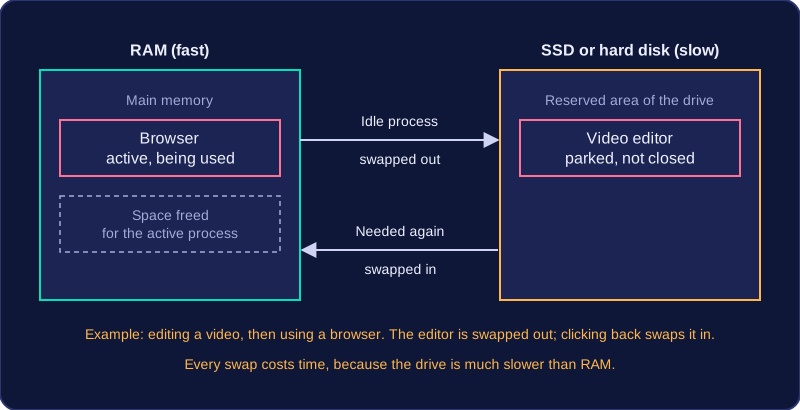
For example, a music studio mixing a multi-track recording has RAM full. The tracks that are currently muted are not needed, so the operating system moves some of that audio data into virtual memory. Switching a muted track back on brings a brief pause while its data is copied into RAM so the CPU can process it.
Advantages and disadvantages
- More programs can stay open and bigger files can be used than RAM alone allows, so the computer carries on instead of crashing.
- It uses secondary storage the computer already has, so no extra hardware is needed.
- Secondary storage is far slower than RAM, so every swap costs time and the machine feels slower; the heavier the swapping, the worse the slowdown.
- It takes up storage space that could otherwise hold your files.
Adding more RAM
Extra RAM reduces the need for virtual memory, because more of the running software fits in RAM. It only speeds up a computer that was already filling RAM and swapping data out. If RAM was never full, adding memory makes little visible difference.
Practise this
OCR GCSE Computer Science · Memory